EasyManua.ls Logo

JVC TK-1280E - Page 39

JVC TK-1280E
82 pages
Print Icon
To Next Page IconTo Next Page
To Previous Page IconTo Previous Page
Loading...
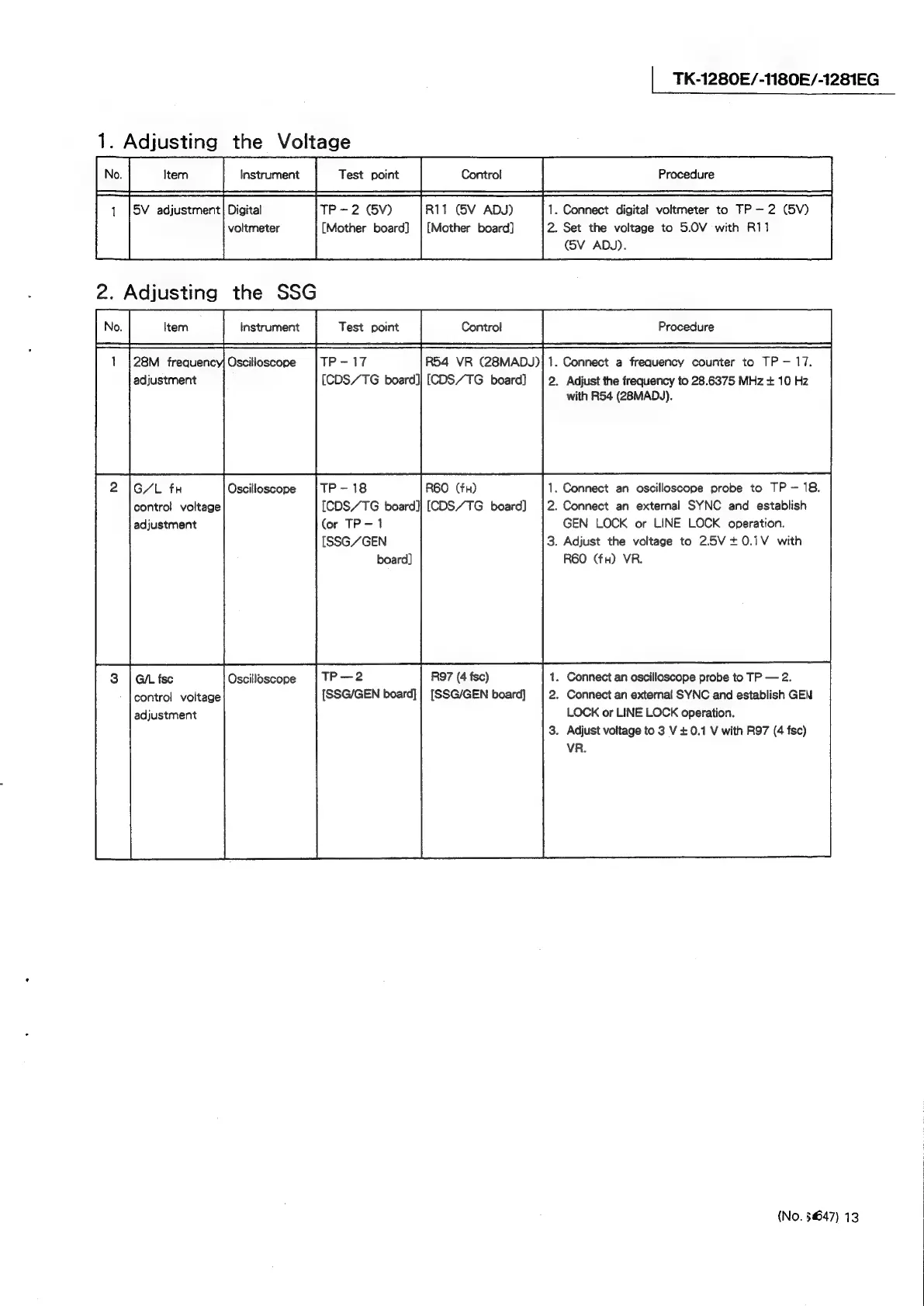
TK-1280E/-1180E/-1281EG
1.
Adjusting
the
Voltage
TP-2
(V)
R11
(5V
ADJ)
1.
Connect
digital
voltmeter
to
TP
2
(SV)
(Mother
board]
|
[Mother
board]
2.
Set
the
voltage
to
5.0V
with
R11
(5V
ADJ).
28M
frequenc
aesieusee.
||
R54
VR
(28MADJ)
VR
(28MADJ)}1.
Connect
a
frequency
counter
to
TP
17.
adjustment
(CDS/TG
board]|
[CDS/TG
board]
.
Adjust
the
frequency
to
28.6375
MHz
+
10
Hz
with
R54
(28MAD\).
G/L
fx
Oscilloscope
TP
-
18
.
Connect
an
oscilloscope
probe
to
TP
—-
18.
contro!
voltage
[CDS/TG
board]}
[CDS/TG
board]
.
Connect
an
external
SYNC
and
establish
adjustment
(or
TP-1
GEN
LOCK
or
LINE
LOCK
operation.
[SSG/GEN
.
Adjust
the
voltage
to
25V+0.1V
with
board]
R60
(fx)
VR.
G/L
fse
Oscilloscope
_
R97
(4
fsc)
.
Connect
an
oscilloscope
probe
to
TP
2.
contro!
voltage
[SSG/GEN
board]
|
[SSG/GEN
board}
.
Connect
an
external
SYNC
and
establish
GEN
adjustment
LOCK
or
LINE
LOCK
operation.
.
Adjust
voltage
to
3
V
+
0.1
V
with
R97
(4
fsc)
VR.
(No.
§647)
13