EasyManua.ls Logo

JVC TK-1280E - Page 40

JVC TK-1280E
82 pages
Print Icon
To Next Page IconTo Next Page
To Previous Page IconTo Previous Page
Loading...
TK-1280E/-N180E/-1281EG
|
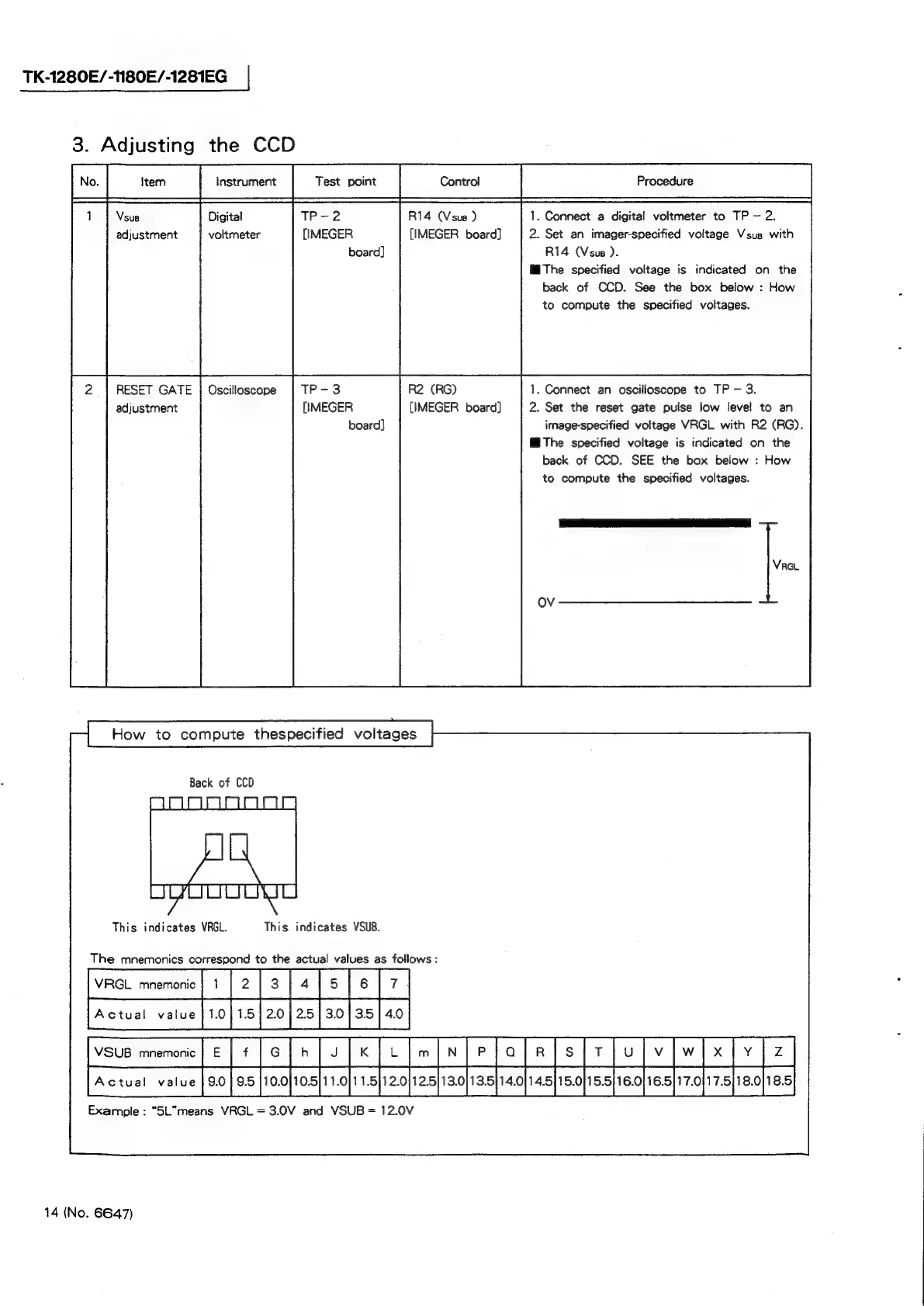
3.
Adjusting
the
CCD
Vsus
Digital
TP-2
R14
(Vsus
)
1.
Connect
a
digital
voltmeter
to
TP
2.
adjustment
voltmeter
[IMEGER
[IMEGER
board]
2.
Set
an
imager-specified
voltage
Vsus
with
board]
R14
(Vsus
).
M@The
specified
voltage
is
indicated
on
the
back
of
CCD.
See
the
box
below
:
How
to
compute
the
specified
voltages.
RESET
GATE
|
Oscilloscope
TP-3
R2
(RG)
1.
Connect
an
oscilloscope
to
TP
3.
adjustment
[IMEGER
{IMEGER
board]
2.
Set
the
reset
gate
pulse
low
level
to
an
board]
image-specified
voltage
VRGL
with
R2
(RG).
M@The
specified
voltage
is
indicated
on
the
back
of
CCD.
SEE
the
box
below
:
How
to
compute
the
specified
voltages.
How
to
compute
thespecified
voltages
Back
of
CCD
This
indicates
VRGL.
This
indicates
VSUB.
The
mnemonics
correspond
to
the
actual
values
as
follows
:
vac
mrorne]
[2
[3
[«[s
fe
[7
jvsus
mamone|
|
¢{o[n
|v
[x
[ulm{nfelalals|riulv[w]
x]
| z
|
PAcwat
vate]
0fashoofoahah
afzoj
asad
aspaohasf
sobs
eoheslnaf-spaolea
Example
:
“SL”means
VRGL
=
3.0V
and
VSUB
=
12.0V
14
(No.
6647)