EasyManua.ls Logo

JVC TK-1280E - Page 43

JVC TK-1280E
82 pages
Print Icon
To Next Page IconTo Next Page
To Previous Page IconTo Previous Page
Loading...
TK-1280E/-180E/-1281EG
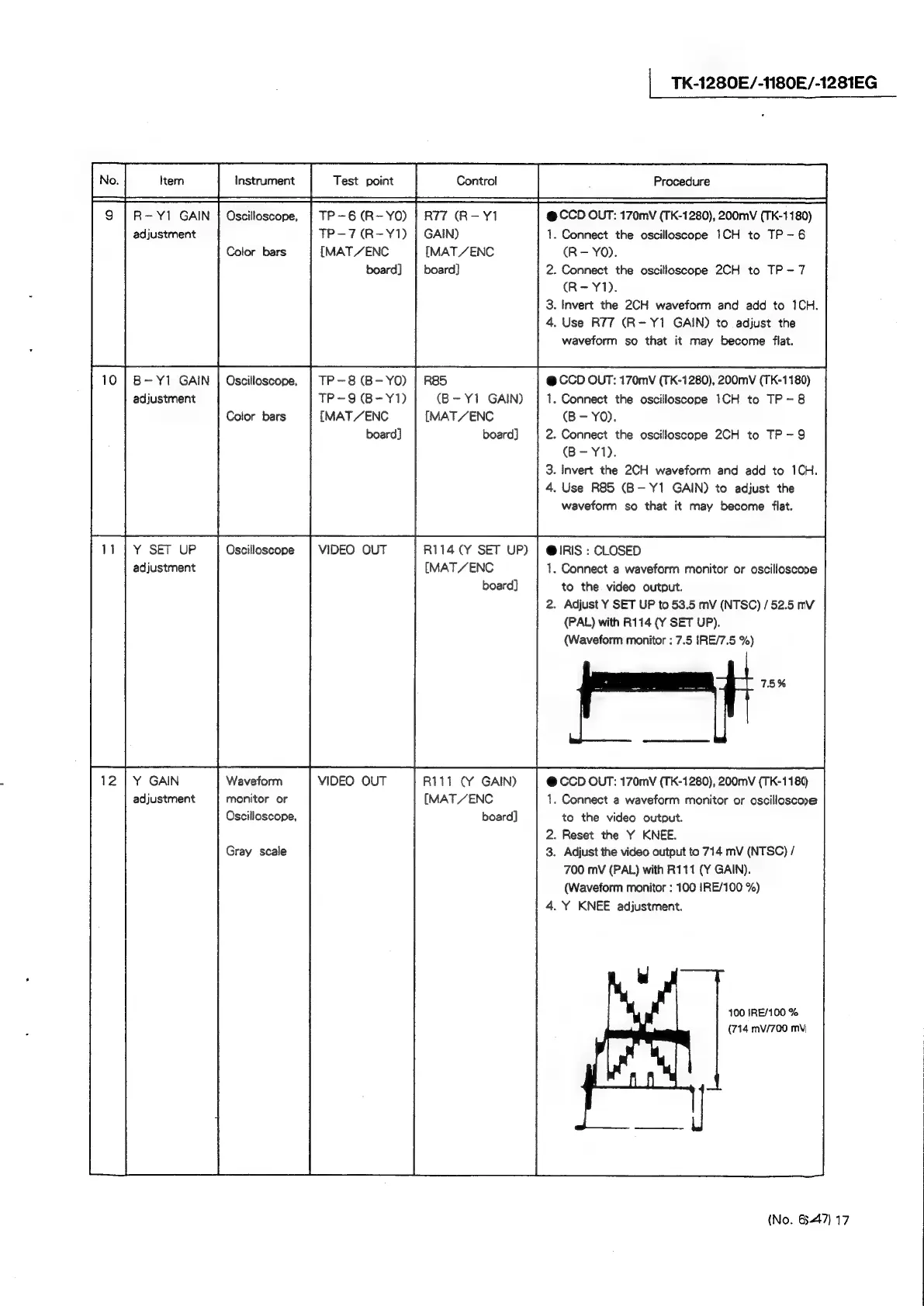
TP-6(R-YO)
|
R77
(R-Y1
@
CCD
OUT:
170mV
(TK-1280),
200mV
(TK-1180)
adjustment
TP-7(R-Y1)
|
GAIN)
.
Connect
the
oscilloscope
1CH
to
TP-6
[MAT
/ENC
[MAT
/ENC
(R—-
YO).
board]
|
board]
.
Connect
the
oscilloscope
2CH
to
TP-7
(R-Y1).
.
Invert
the
2CH
waveform
and
add
to
1CH.
.
Use
R77
(R-Y1
GAIN)
to
adjust
the
waveform
so
that
it
may
become
flat.
B-Y1
GAIN
|
Oscilloscope,
|
TP-8
(B-YO)
|
R85
@
CCD
OUT:
170mvV
(TK-1280),
200mV
(TK-1180)
adjustment
TP-9
(B-Y1)
(B-Y1
GAIN)
1.
Connect
the
oscilloscope
1CH
to
TP
-8
Color
bars
[MAT/ENC
[MAT
/ENC
(B-
YO).
board]
board}
.
Connect
the
oscilloscope
2CH
to
TP
-9Q
(B-Y1).
.
Invert
the
2CH
waveform
and
add
to
1CH.
.
Use
R85
(B-Y1
GAIN)
to
adjust
the
waveform
so
that
it
may
become
flat.
Y
SET
UP
Oscilloscope
|
VIDEO
OUT
R114
(Y
SET
UP)
|
@IRIS:
CLOSED
adjustment
[MAT
/ENC
1.
Connect
a
waveform
monitor
or
oscilloscope
board]
to
the
video
output.
2.
Adjust
Y
SET
UP
to
53.5
mV
(NTSC)
/52.5
mV
(PAL)
with
R114
(Y
SET
UP).
(Waveform
monitor
:
7.5
IRE/7.5
%)
Waveform
VIDEO
OUT
R111
(Y
GAIN)
@
CCD
OUT:
170mV
(TK-1280),
200mvV
(TK-1180
adjustment
monitor
or
[MAT
/ZENC
.
Connect
a
waveform
monitor
or
oscilloscoe
Oscilloscope,
board]
to
the
video
output.
.
Reset
the
Y
KNEE.
Gray
scale
.
Adjust
the
video
output
to
714
mV
(NTSC)
/
700
mV
(PAL)
with
R111
(Y
GAIN).
(Waveform
monitor
:
100
IRE/100
%)
4.
Y
KNEE
adjustment.
100
IRE/100
%
(714
mv/700
mV
_|
|
|
|
(No.
6447)
17