EasyManua.ls Logo

JVC TK-1280E - Page 44

JVC TK-1280E
82 pages
Print Icon
To Next Page IconTo Next Page
To Previous Page IconTo Previous Page
Loading...
TK-1280E/-N80E/-1281EG
No
[
tem
|
trate
|
ie!
fod
13
|
Y
KNEE
Wave
|
VIDEO
ouT
|
OUT
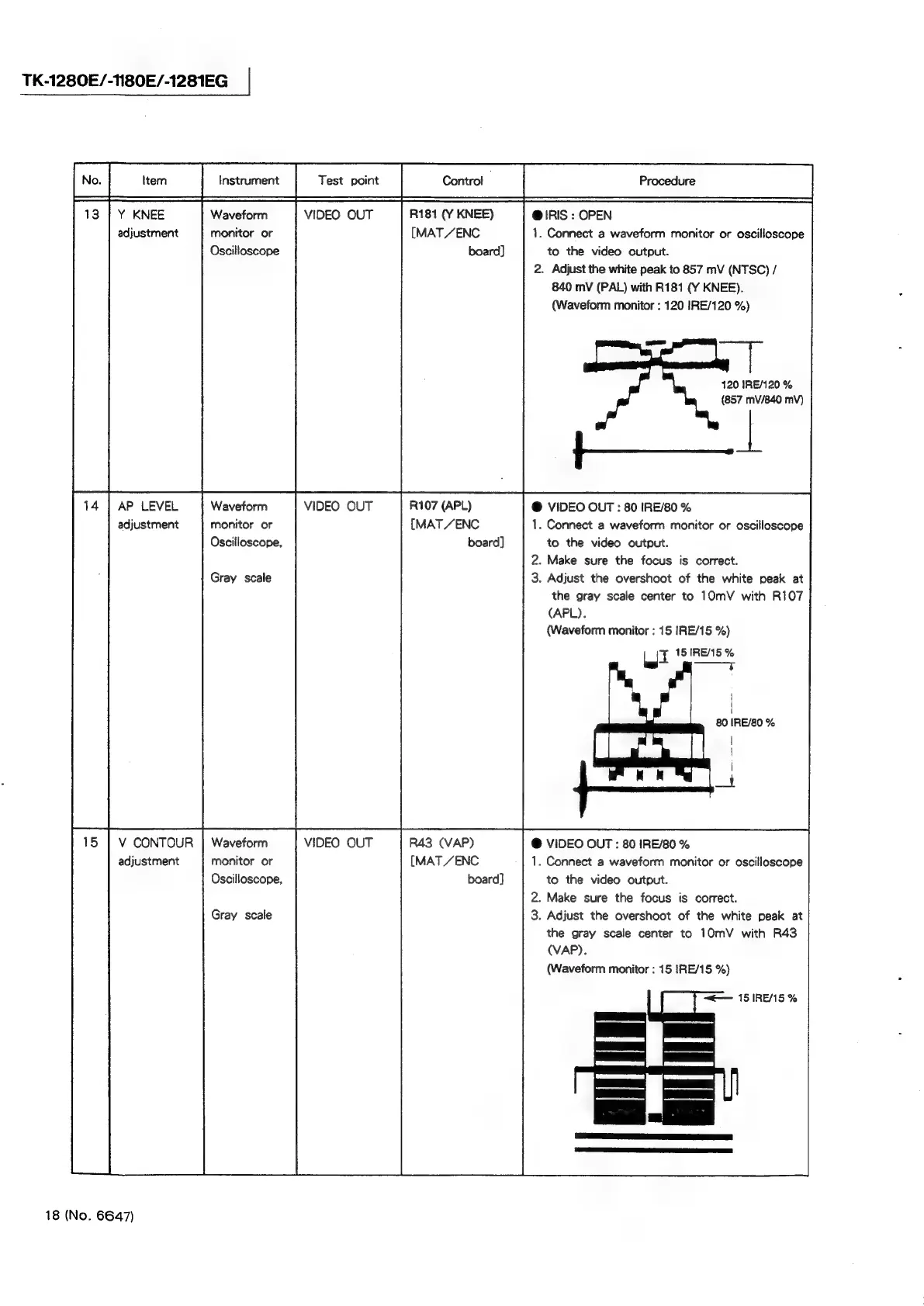
R181
(Y
KNEE)
@
IRIS
:
OPEN
adjustment
monitor
or
[MAT
/ENC
1.
Connect
a
waveform
monitor
or
oscilloscope
VIDEO
OUT
Oscilloscope
board]
to
the
video
output.
VIDEO
OUT
2.
Adjust
the
white
peak
to
857
mV
(NTSC)
/
840
mV
(PAL)
with
R181
(Y
KNEE).
(Waveform
monitor
:
120
IRE/120
%)
—
120
IRE/120
%
(857
mV/840
mV)
14
|
AP
LEVEL
Waveform
R107
(APL)
@
VIDEO
OUT
:
80
IRE/80
%
adjustment
monitor
or
[MAT
/ENC
1.
Connect
a
waveform
monitor
or
oscilloscope
Oscilloscope,
board]
to
the
video
output.
2.
Make
sure
the
focus
is
correct.
3.
Adjust
the
overshoot
of
the
white
peak
at
the
gray
scale
center
to
10mV
with
R107
(APL).
(Waveform
monitor
:
15
IRE/15
%)
bgt
15
IRE/15
%
t
Gray
scale
V
CONTOUR
|
Waveform
R43
(VAP)
@
VIDEO
OUT
:
80
IRE/80
%
adjustment
monitor
or
[MAT
ZENC
1.
Connect
a
waveform
monitor
or
oscilloscope
Oscilloscope,
board]
to
the
video
output.
2.
Make
sure
the
focus
is
correct.
3.
Adjust
the
overshoot
of
the
white
peak
at
the
gray
scale
center
to
10mV
with
R43
(VAP).
(Waveform
monitor
:
15
IRE/15
%)
~—
ISIRENMS%
Le!
ES
Gray
scale
18
(No.
6647)