EasyManua.ls Logo

JVC TK-1280E - Page 8

JVC TK-1280E
82 pages
Print Icon
To Next Page IconTo Next Page
To Previous Page IconTo Previous Page
Loading...
J
SYNC
IN
connector
@
BNC
connector
for
external
sync
reference
signal
input
such
as
composite
video
signa!
(VBS)
or
black
burst
sig-
Notes:
e
{f
the
external
sync
signal
to
be
input
is
less
than
—4dB
with
respect
to
the
reference
level,
sync
operation
is
not
RalEB).
ssible
e
Connect
to
the
connector
outputting
the
signal
to
be
po
.
used
as
a
reference
for
extemal
sync.
Reference
level
|Composite
video
signal
|
1.0
Vp-p*
e
Use
a
coaxial
cable
for
connection.
(VBS)
e@
When
the
sync
reference
signal
is
input,
the
camera
automatically
switches
from
the
internal
to
external
sync
Black
burst
signal
(BB)
j
0.45
Vp-
mode
to
parton
ger:loer
operation,
*
The
video
components
of
the
signal
do
not
matter.
Caution:
e
Before
performing
gen-lock
operation
with
the
external
sync
signal
input,
make
sure
to
set
the
sync
mode
switch
to
“VE”
position.
(See
page
12.)
e@
When
an
external
H/V
sync
signal
is
input,
the
camera
automatically
switches
to
H/V
lock
mode
when
the
sync
mode
switch
is
set
in
LL
position.
(See
page
12.)
e
Gen-lock
operation
may
become
unstable
using
a
sig-
nal
containing
severe
jitter
(vertical
or
horizontal
picture
vibrations)
such
as
a
video
recorder
playback
signal.
e
When
gen-iock
operation
is
performed,
adjustment
of
horizontal
phase
and
colour
sub-carrier
phase
are
required.
(See
page
13.)
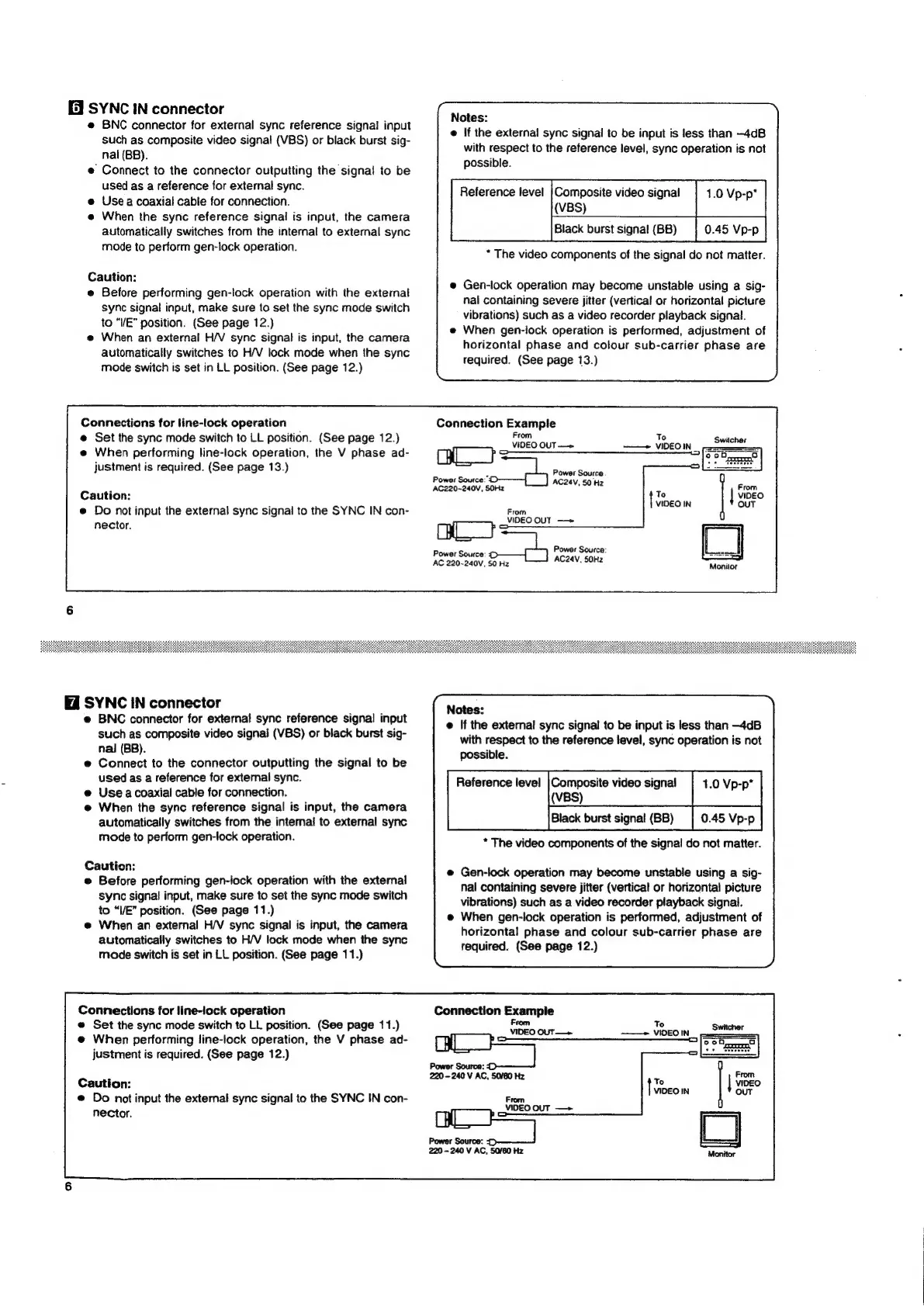
Connections
for
line-lock
operation
Connection
Example
e
Set
the
sync
mode
switch
to
LL
position.
(See
page
12.)
one
Out
os
7
Switcher
e@
When
performing
line-lock
operation,
the
V
phase
ad-
Qe
Se
;
justment
is
required.
(See
page
13.)
:
eu
‘ower
Source:
ue
Cautio
AC220-240V,
SOHz
AC24V,
50
Hz
n:
e@
Do
not
input
the
external
sync
signal
to
the
SYNC
IN
con-
ee
From
VIDEO
OUT
—»
nector.
CAL}
Power
Source:
Power
Source
was
AC24V.
50H2
AC
220-240V,
50
Hz
SYNC
IN
connector
sisages
e@
BNC
connector
for
external
sync
reference
signal
input
@
If
the
external
sync
signal
to
be
input
is
less
than
—4dB
Such
as
composite
video
signal
(VBS)
or
black
burst
sig-
with
respect
to
the
reference
tevel,
sync
operation
is
not
nal
(BB).
:
possible.
Reference
level
|Composite
video
signal
1.0
Vp-p’
(VBS)
e@
Connect
to
the
connector
outputting
the
signal
to
be
used
as
a
reference
for
external
sync.
e@
Use
a
coaxial
cable
for
connection.
@
When
the
sync
reference
signal
is
input,
the
camera
:
automatically
switches
from
the
intemal
to
external
sync
0.45
Vp-p
mode
to
perform
gen-lock
operation.
*
The
video
components
of
the
signal
do
not
matter.
Caution:
e@
Before
performing
gen-iock
operation
with
the
external
sync
signal
input,
make
sure
to
set
the
sync
mode
switch
to
“VE”
position.
(See
page
11.)
@
When
an
external
H/V
sync
signal
is
input,
the
camera
automatically
switches
to
H/V
lock
mode
when
the
sync
mode
switch
is
set
in
LL
position.
(See
page
11.)
e@
Gen-lock
operation
may
become
unstable
using
a
sig-
nal
containing
severe
jitter
(vertical
or
horizontal
picture
vibrations)
such
as
a
video
recorder
playback
signal.
@
When
gen-lock
operation
is
performed,
adjustment
of
horizontal
phase
and
colour
sub-carrier
phase
are
required.
(See
page
12.)
Connections
for
line-lock
operation
e
Set
the
sync
mode
switch
to
LL
position.
(See
page
11.)
@
When
performing
line-iock
operation,
the
V
phase
ad-
o_O
justment
is
required.
(See
page
12.)
Power
Source:
220-240
V
AC,
50/60
Hz
Caution:
t
VIDEO
@
Do
not
input
the
external
sync
signal
to
the
SYNC
IN
con-
se
From
VIDEO
OUT
—>
Power
Source:
=
220
-
240
V
AC,
50/60
Hz
ae

Related product manuals