EasyManua.ls Logo

JVC TK-1280E - Page 9

JVC TK-1280E
82 pages
Print Icon
To Next Page IconTo Next Page
To Previous Page IconTo Previous Page
Loading...
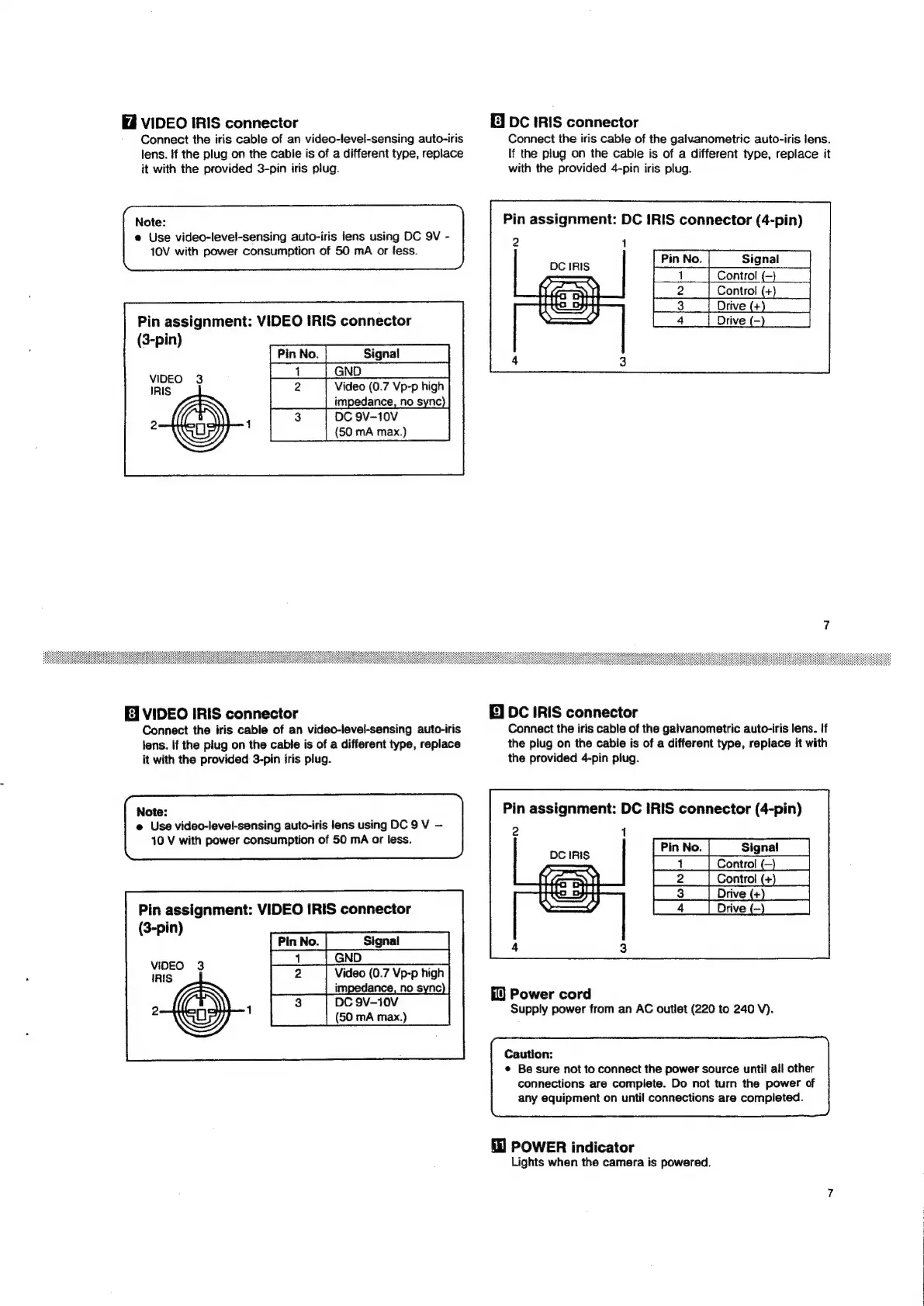
VIDEO
IRIS
connector
Connect
the
iris
cable
of
an
video-level-sensing
auto-iris
lens.
if
the
plug
on
the
cable
is
of
a
different
type,
replace
it
with
the
provided
3-pin
iris
plug.
Note:
e
Use
video-level-sensing
auto-iris
lens
using
DC
9V
-
10V
with
power
consumption
of
50
mA
or
fess.
Pin
assignment:
VIDEO
IRIS
connector
(3-pin)
[PinNo.|
__Signal__
Co
a
vi
ie
oes
feed
Video
(0.7
Vp-p
high
impedance,
no
sync
@)-
TE
EJ
VIDEO
IRIS
connector
Connect
the
iris
cable
of
an
video-level-sensing
auto-iris
lens.
If
the
plug
on
the
cable
is
of
a
different
type,
replace
it
with
the
provided
3-pin
iris
plug.
Note:
e
Use
video-level-sensing
auto-iris
lens
using
DC
9
V
10
V
with
power
consumption
of
50
mA
or
less.
Pin
assignment:
VIDEO
IRIS
connector
(3-pin)
VIDEO
3
IRIS
NY
DC
9V-10V
(50
mA
max.)
aN
be
Video
(0.7
Vp-p
high
impedance,
no
sync
E]
DC
IRIS
connector
Connect
the
iris
cable
of
the
galvanometric
auto-iris
lens.
If
the
plug
on
the
cable
is
of
a
different
type,
replace
it
with
the
provided
4-pin
iris
plug.
Pin
assignment:
DC
IRIS
connector
(4-pin)
2
1
DC
IRIS
|
1.‘
Control
-
aoc
Controt
+
|
3
|
Drive(+)
Drive
(-
E]
DC
IRIS
connector
Connect
the
iris
cable
of
the
galvanometric
auto-iris
lens.
If
the
plug
on
the
cable
is
of
a
different
type,
replace
it
with
the
provided
4-pin plug.
Pin
assignment:
DC
IRIS
connector
(4-pin)
2
1
pe
IRIS
os
ee
|
2
|
Control(+)
|
|
3
|
4
|
Power
cord
Supply
power
from
an
AC
outlet
(220
to
240
V).
Caution:
¢
Be
sure
not
to
connect
the
power
source
until
all
other
connections
are
complete.
Do
not
turn
the
power
of
any
equipment
on
until
connections
are
completed.
POWER
indicator
Lights
when
the
camera
is
powered.

Related product manuals