MODE S E L EC T
CAMERA T I TLE ED I T . .
REV ERSE MODE OFF
ALM. T I TLE S Z
E
I DOUBLE
ALARM COLOUR WHI TE
AUX TERMINAL (B&W IN)
D. ZOOM MAX x2
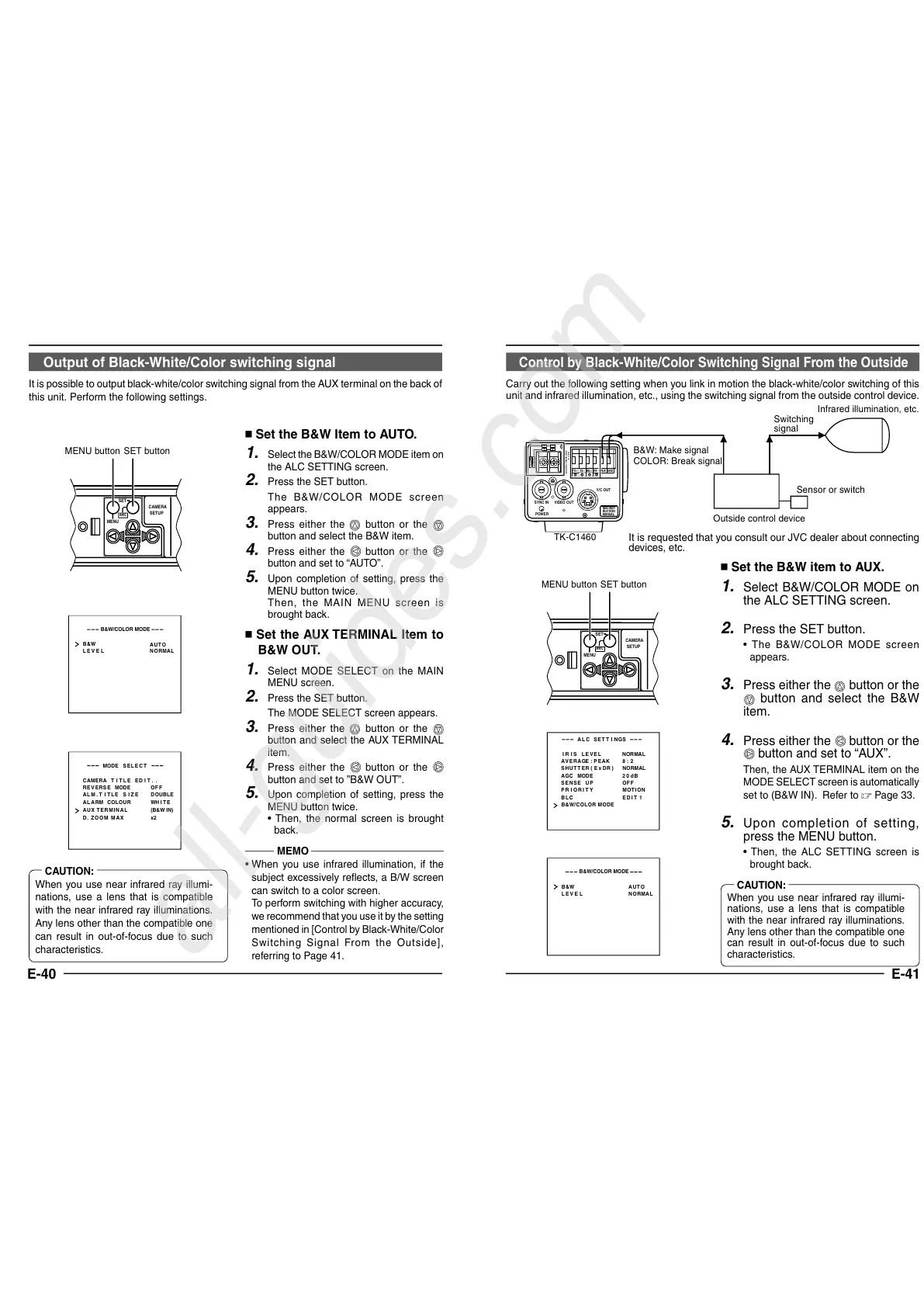
Output of Black-White/Color switching signal
It is possible to output black-white/color switching signal from the AUX terminal on the back of
this unit. Perform the following settings.
Set the B&W Item to AUTO.
1.
Select the B&W/COLOR MODE item on
the ALC SETTING screen.
2.
Press the SET button.
The B&W/COLOR MODE screen
appears.
3.
Press either the
button or the
button and select the B&W item.
4.
Press either the
button or the
button and set to “AUTO”.
5.
Upon completion of setting, press the
MENU button twice.
Then, the MAIN MENU screen is
brought back.
Set the AUX TERMINAL Item to
B&W OUT.
1.
Select MODE SELECT on the MAIN
MENU screen.
2.
Press the SET button.
The MODE SELECT screen appears.
3.
Press either the
button or the
button and select the AUX TERMINAL
item.
4.
Press either the
button or the
button and set to
”B&W OUT”.
5.
Upon completion of setting, press the
MENU button twice.
• Then, the normal screen is brought
back.
B&W
LEVE L
NORMAL
AUTO
B&W/COLOR MODE
SET buttonMENU button
MEMO
• When you use infrared illumination, if the
subject excessively reflects, a B/W screen
can switch to a color screen.
To perform switching with higher accuracy,
we recommend that you use it by the setting
mentioned in [Control by Black-White/Color
Switching Signal From the Outside],
referring to Page 41.
CAUTION:
When you use near infrared ray illumi-
nations, use a lens that is compatible
with the near infrared ray illuminations.
Any lens other than the compatible one
can result in out-of-focus due to such
characteristics.
E-41
Control by Black-White/Color Switching Signal From the Outside
Carry out the following setting when you link in motion the black-white/color switching of this
unit and infrared illumination, etc., using the switching signal from the outside control device.
Set the B&W item to AUX.
1.
Select B&W/COLOR MODE on
the ALC SETTING screen.
2.
Press the SET button.
• The B&W/COLOR MODE screen
appears.
3.
Press either the
button or the
button and select the B&W
item.
4.
Press either the
button or the
button and set to “AUX”.
Then, the AUX TERMINAL item on the
MODE SELECT screen is automatically
set to (B&W IN). Refer to Page 33.
5.
Upon completion of setting,
press the MENU button.
• Then, the ALC SETTING screen is
brought back.
LACSETTINGS
IIRSLEVEL NORMAL
AEVRAEG:PEAK 82:
ACGMODE
2dB0
SUTHTERExDR)(
NRMALO
PIORRITY
BCLED
SNSEEUP OFF
B&W/COLOR MODE
TION
T1
MO
I
B&W
LEVE L
NORMAL
AUTO
B&W/COLOR MODE
DC12V
AC24V
Y/C OUT
SYNC IN
POWER
VIDEO OUT
SEE INST-
RUCTION
MANUAL
+
-
12
CLASS 2 ONLY(U TYPE)
ISOLATED POWER ONLY
(E TYPE)
TX
+
TX
-
RX
+
RX
-
AUX
GND
A
B
CD
B&W: Make signal
COLOR: Break signal
TK-C1460
Switching
signal
Infrared illumination, etc.
Sensor or switch
Outside control device
CAUTION:
When you use near infrared ray illumi-
nations, use a lens that is compatible
with the near infrared ray illuminations.
Any lens other than the compatible one
can result in out-of-focus due to such
characteristics.
It is requested that you consult our JVC dealer about connecting
devices, etc.
All manuals and user guides at all-guides.com
all-guides.com


 To Next Page
 Loading...











