EasyManua.ls Logo

JVC TK-C600 - Page 10

JVC TK-C600
53 pages
Print Icon
To Next Page IconTo Next Page
To Previous Page IconTo Previous Page
Loading...
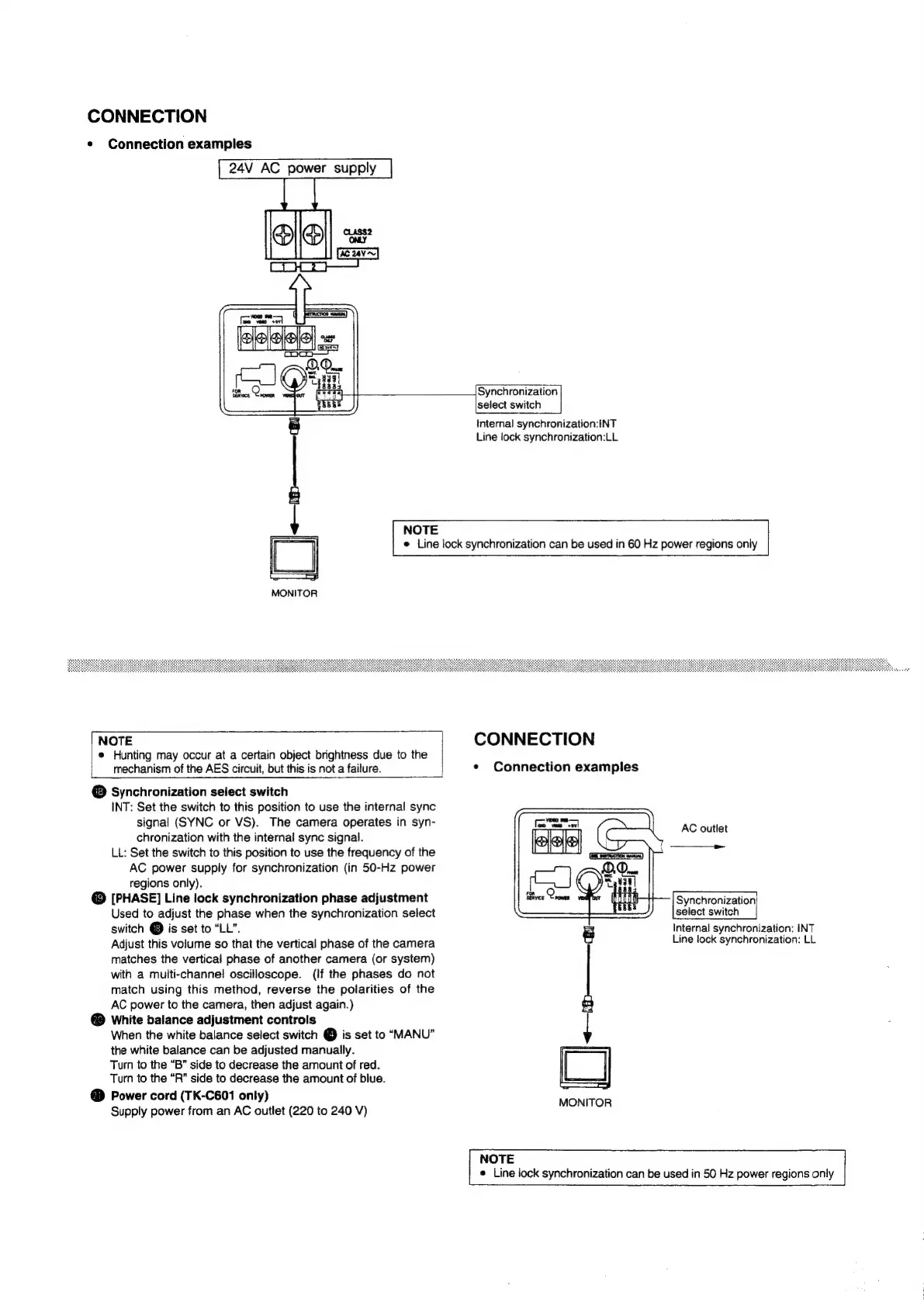
CONNECTION
*
Connection
examples
24V
AC
power
supply
pia
mii
en
ae
A
em
eleleele|
=,
MONITOR
NOTE
Hunting
may
occur
at
a
certain
object
brightness
due
to
the
mechanism
of
the
AES
circuit,
but
this
is
not
a
failure.
@
Synchronization
select
switch
INT:
Set
the
switch
to
this
position
to
use
the
internal
sync
signal
(SYNC
or
VS).
The
camera
operates
in
syn-
chronization
with
the
internal
sync
signal.
LL:
Set
the
switch
to
this
position
to
use
the
frequency
of
the
AC
power
supply
for
synchronization
(in
50-Hz
power
regions
only).
@
[PHASE]
Line
lock
synchronization
phase
adjustment
Used
to
adjust
the
phase
when
the
synchronization
select
switch
@
is
set
to
“LL”.
Adjust
this
volume
so
that
the
vertical
phase
of
the
camera
matches
the
vertical
phase
of
another
camera
(or
system)
with
a
multi-channel
oscilloscope.
(If
the
phases
do
not
match
using
this
method,
reverse
the
polarities
of
the
AC
power
to
the
camera,
then
adjust
again.)
White
balance
adjustment
controls
When
the
white
balance
select
switch
@
is
set
to
“MANU”
the
white
balance
can
be
adjusted
manually.
Turn
to
the
“B”
side
to
decrease
the
amount
of
red.
Turn
to
the “R”
side
to
decrease
the
amount
of
blue.
Power
cord
(TK-C601
only)
Supply
power
from
an
AC
outlet
(220
to
240
V)
Synchronization
select
switch
internal
synchronization:INT
Line
lock
synchronization:LL
NOTE
e
Line
lock
synchronization
can
be
used
in
60
Hz
power
regions
only
CONNECTION
¢
Connection
examples
AC
outlet
Synchronization
select
switch
Internal
synchronization:
INT
Line
lock
synchronization:
LL
NOTE
e
Line
lock
synchronization
can
be
used
in
50
Hz
power
regions
only

Related product manuals