EasyManua.ls Logo

JVC TK-C600 - Page 9

JVC TK-C600
53 pages
Print Icon
To Next Page IconTo Next Page
To Previous Page IconTo Previous Page
Loading...
=
Pah
[=F
EREEE
@
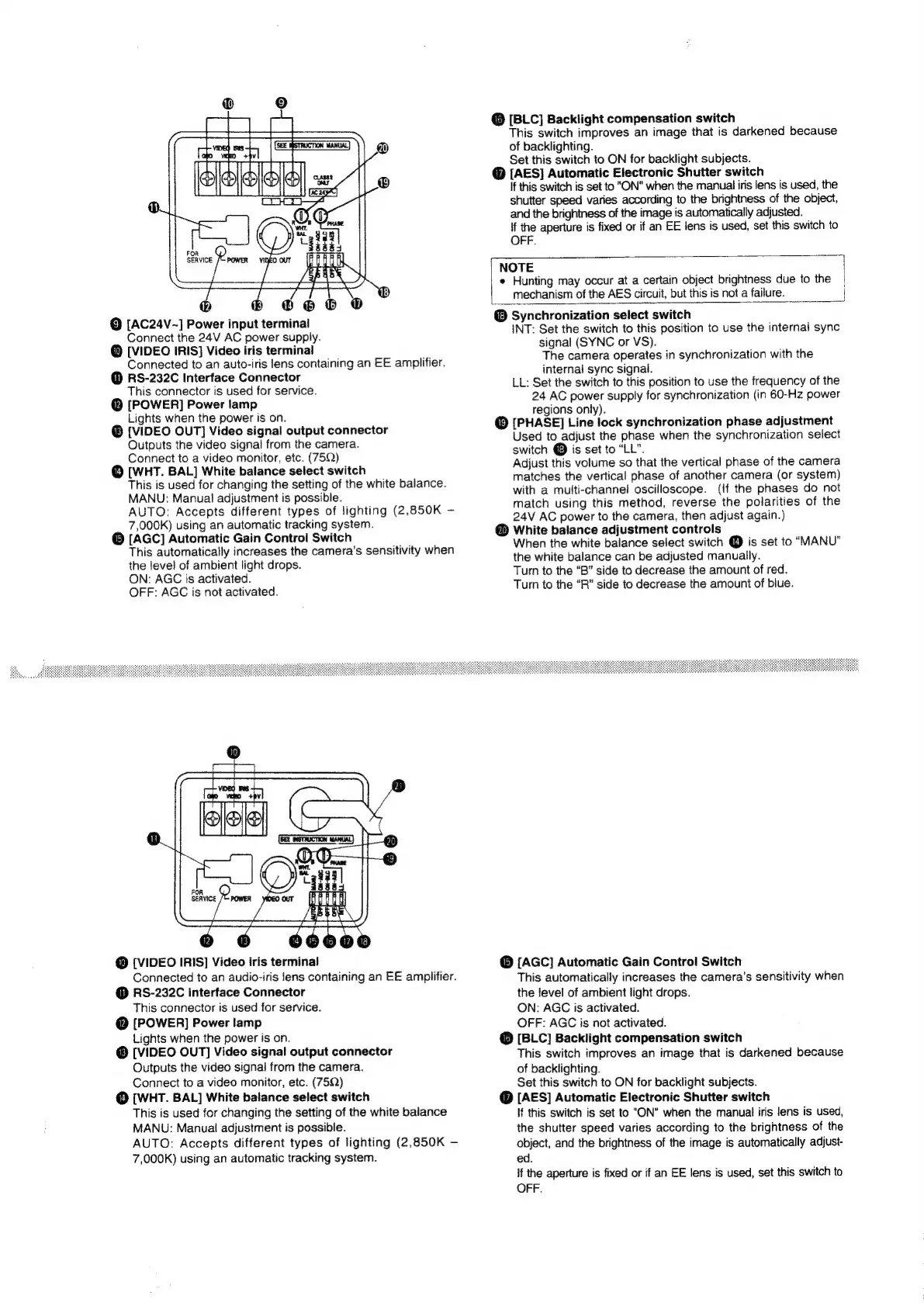
[AC24V~]
Power
input
terminal
Connect
the
24V
AC
power
supply.
@
[VIDEO
IRIS]
Video
iris
terminal
Connected
to
an
auto-iris
lens
containing
an
EE
amplifier.
@
RS-232C
Interface
Connector
This
connector
is
used
for
service.
@
[POWER]
Power
lamp
Lights
when
the
power
is
on.
[VIDEO
OUT]
Video
signal
output
connector
Outputs
the
video
signal
from
the
camera.
Connect
to
a
video
monitor,
etc.
(75Q)
©
[WHT.
BAL]
White
balance
select
switch
This
is
used
for
changing
the
setting
of
the
white
balance.
MANU:
Manual
adjustment
is
possible.
AUTO:
Accepts
different
types
of
lighting
(2,850K
7,000k)
using
an
automatic
tracking
system.
@
[AGC]
Automatic
Gain
Control
Switch
This
automatically
increases
the
camera's
sensitivity
when
the
level
of
ambient
light
drops.
ON:
AGC
is
activated.
OFF:
AGC
is
not
activated.
@
[VIDEO
IRIS]
Video
iris
terminal
Connected
to
an
audio-iris
lens
containing
an
EE
amplifier.
@
RS-232C
Interface
Connector
This
connector
is
used
for
service.
@
[POWER]
Power
lamp
Lights
when
the
power
is
on.
[VIDEO
OUT]
Video
signal
output
connector
Outputs
the
video
signal
from
the
camera.
Connect
to
a
video
monitor,
etc.
(75Q)
@
[WHT.
BAL]
White
balance
select
switch
This
is
used
for
changing
the
setting
of
the
white
balance
MANU:
Manual
adjustment
is
possible.
AUTO:
Accepts
different
types
of
lighting
(2,850K
7,000K)
using
an
automatic
tracking
system.
@
[BLC]
Backlight
compensation
switch
This
switch
improves
an
image
that
is
darkened
because
of
backlighting.
Set
this
switch
to
ON
for
backlight
subjects.
@
[AES]
Automatic
Electronic
Shutter
switch
If
this
switch
is
set
to
"ON"
when
the
manual
iris
lens
is
used,
the
shutter
speed
varies
according
to
the
brightness
of
the
object,
and
the
brightness
of
the
image
is
automatically
adjusted.
if
the
aperture
is
fixed
or
if
an
EE
lens
is
used,
set
this
switch
to
OFF.
NOTE
e
Hunting
may
occur
at
a
certain
object
brightness
due
to
the
mechanism
of
the
AES
circuit,
but
this
is
not
a
failure.
@
Synchronization
select
switch
INT:
Set
the
switch
to
this
position
to
use
the
internal
sync
signal
(SYNC
or
VS).
The
camera
operates
in
synchronization
with
the
internal
sync
signal.
LL:
Set
the
switch
to
this
position
to
use
the
frequency
of
the
24
AC
power
supply
for
synchronization
(in
60-Hz
power
regions
only).
@
[PHASE]
Line
lock
synchronization
phase
adjustment
Used
to
adjust
the
phase
when
the
synchronization
select
switch
@
is
set
to
“LL”.
Adjust
this
volume
so
that
the
vertical
phase
of
the
camera
matches
the
vertical
phase
of
another
camera
(or
system)
with
a
multi-channel!
oscilloscope.
(If
the
phases
do
not
match
using
this
method,
reverse
the
polarities
of
the
24V
AC
power
to
the
camera,
then
adjust
again.)
@
White
balance
adjustment
controls
When
the
white
balance
select
switch
@
is
set
to
“MANU”
the
white
balance
can
be
adjusted
manually.
Turn
to
the
“B”
side
to
decrease
the
amount
of
red.
Turn
to
the
“R”
side
to
decrease
the
amount
of
blue.
©
[AGC]
Automatic
Gain
Control
Switch
This
automatically
increases
the
camera’s
sensitivity
when
the
level
of
ambient
light
drops.
ON:
AGC
is
activated.
OFF:
AGC
is
not
activated.
@
[BLC}]
Backlight
compensation
switch
This
switch
improves
an
image
that
is
darkened
because
of
backlighting.
Set
this
switch
to
ON
for
backlight
subjects.
@
[AES]
Automatic
Electronic
Shutter
switch
If
this
switch
is
set
to
"ON"
when
the
manual
iris
lens
is
used,
the
shutter
speed
varies
according
to
the
brightness
of
the
object,
and
the
brightness
of
the
image
is
automatically
adjust-
ed.
if
the
aperture
is
fixed
or
if
an
EE
lens
is
used,
set
this
switch
to
OFF.

Related product manuals