EasyManua.ls Logo

JVC TK-C600 - Page 8

JVC TK-C600
53 pages
Print Icon
To Next Page IconTo Next Page
To Previous Page IconTo Previous Page
Loading...
CONTROLS,
CONNECTORS
AND
INDICATORS
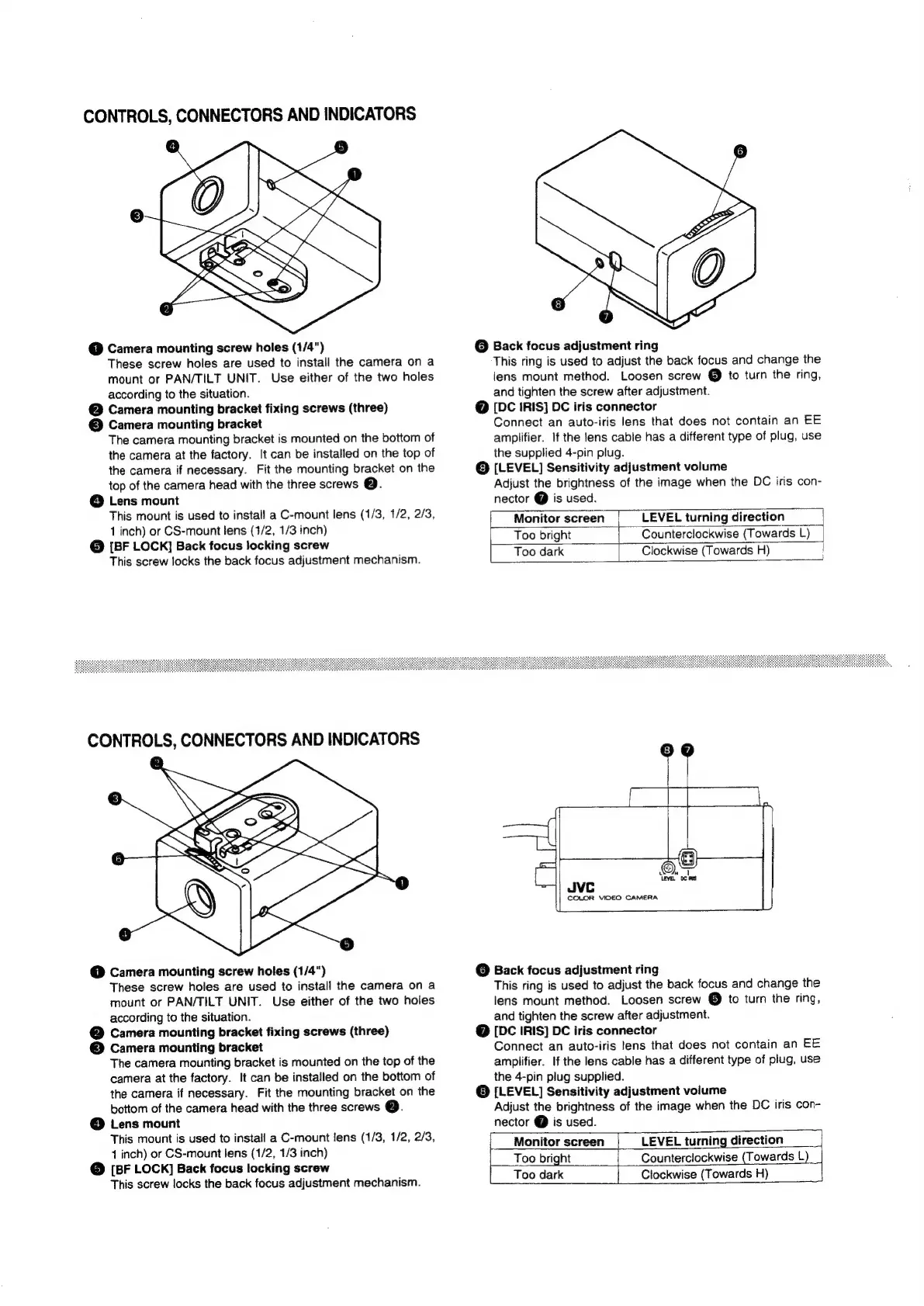
@
Camera
mounting
screw
holes
(1/4")
These
screw
holes
are
used
to
install
the
camera
on
a
mount
or
PAN/TILT
UNIT.
Use
either
of
the
two
holes
according
to
the
situation.
@
Camera
mounting
bracket
fixing
screws
(three)
©
Camera
mounting
bracket
The
camera
mounting
bracket
is
mounted
on
the
bottom
of
the
camera
at
the
factory.
It
can
be
installed
on
the
top
of
the
camera
if
necessary.
Fit
the
mounting
bracket
on
the
top
of
the
camera
head
with
the
three
screws
Qe.
©
Lens
mount
This
mount
is
used
to
install
a
C-mount
lens
(1/3,
1/2,
2/3,
1
inch)
or
CS-mount
lens
(1/2,
1/3
inch)
@
[BF
LOCK]
Back
focus
locking
screw
This
screw
locks
the
back
focus
adjustment
mechanism.
CONTROLS,
CONNECTORS
AND
INDICATORS
a)
@
Camera
mounting
screw
holes
(1/4")
These
screw
holes
are
used
to
install
the
camera
on
a
mount
or
PAN/TILT
UNIT.
Use
either
of
the
two
holes
according
to
the
situation.
@
Camera
mounting
bracket
fixing
screws
(three)
©
Camera
mounting
bracket
The
camera
mounting
bracket
is
mounted
on
the
top
of
the
camera
at
the
factory.
It
can
be
installed
on
the
bottom
of
the
camera
if
necessary.
Fit
the
mounting
bracket
on
the
bottom
of
the
camera
head
with
the
three
screws
Qe.
@
Lens
mount
This
mount
is
used
to
install
a
C-mount
lens
(1/3,
1/2,
2/3,
14
inch)
or
CS-mount
lens
(1/2,
1/3
inch)
@
[BF
LOCK]
Back
focus
locking
screw
This
screw
locks
the
back
focus
adjustment
mechanism.
@
Back
focus
adjustment
ring
This
ring
is
used
to
adjust
the
back
focus
and
change
the
lens
mount
method.
Loosen
screw
@
to
turn
the
ring,
and
tighten
the
screw
after
adjustment.
@
[DC
IRIS}
DC
iris
connector
Connect
an
auto-iris
lens
that
does
not
contain
an
EE
amplifier.
If
the
lens
cable
has
a
different
type
of
plug,
use
the
supplied
4-pin
plug.
©
[LEVEL]
Sensitivity
adjustment
volume
Adjust
the
brightness
of
the
image
when
the
DC
iris
con-
nector
@
is
used.
Monitor
screen
|
LEVEL
turning
direction
Too
bright
Counterclockwise
(Towards
L)
Too
dark
Clockwise
(Towards
H)
JVC
COLOR
VIDEO
CAMERA
@
Back
focus
adjustment
ring
This
ring
is
used
to
adjust
the
back
focus
and
change
the
lens
mount
method.
Loosen
screw
@
to
turn
the
ring,
and
tighten
the
screw
after
adjustment.
@
[DC
IRIS]
DC
iris
connector
Connect
an
auto-iris
lens
that
does
not
contain
an
EE
amplifier.
If
the
lens
cable
has
a
different
type
of
plug,
use
the
4-pin
plug
supplied.
©
[LEVEL]
Sensitivity
adjustment
volume
Adjust
the
brightness
of
the
image
when
the
DC
iris
Con-
nector
@
is
used.
Monitor
screen
|
Too
bright
Too
dark
LEVEL
turning
direction
|
Counterclockwise
(Towards
L)
Clockwise
(Towards
H)

Related product manuals