EasyManua.ls Logo

JVC TK-C600 - Page 11

JVC TK-C600
53 pages
Print Icon
To Next Page IconTo Next Page
To Previous Page IconTo Previous Page
Loading...
LENS
e
Mounting
a
lens
@)
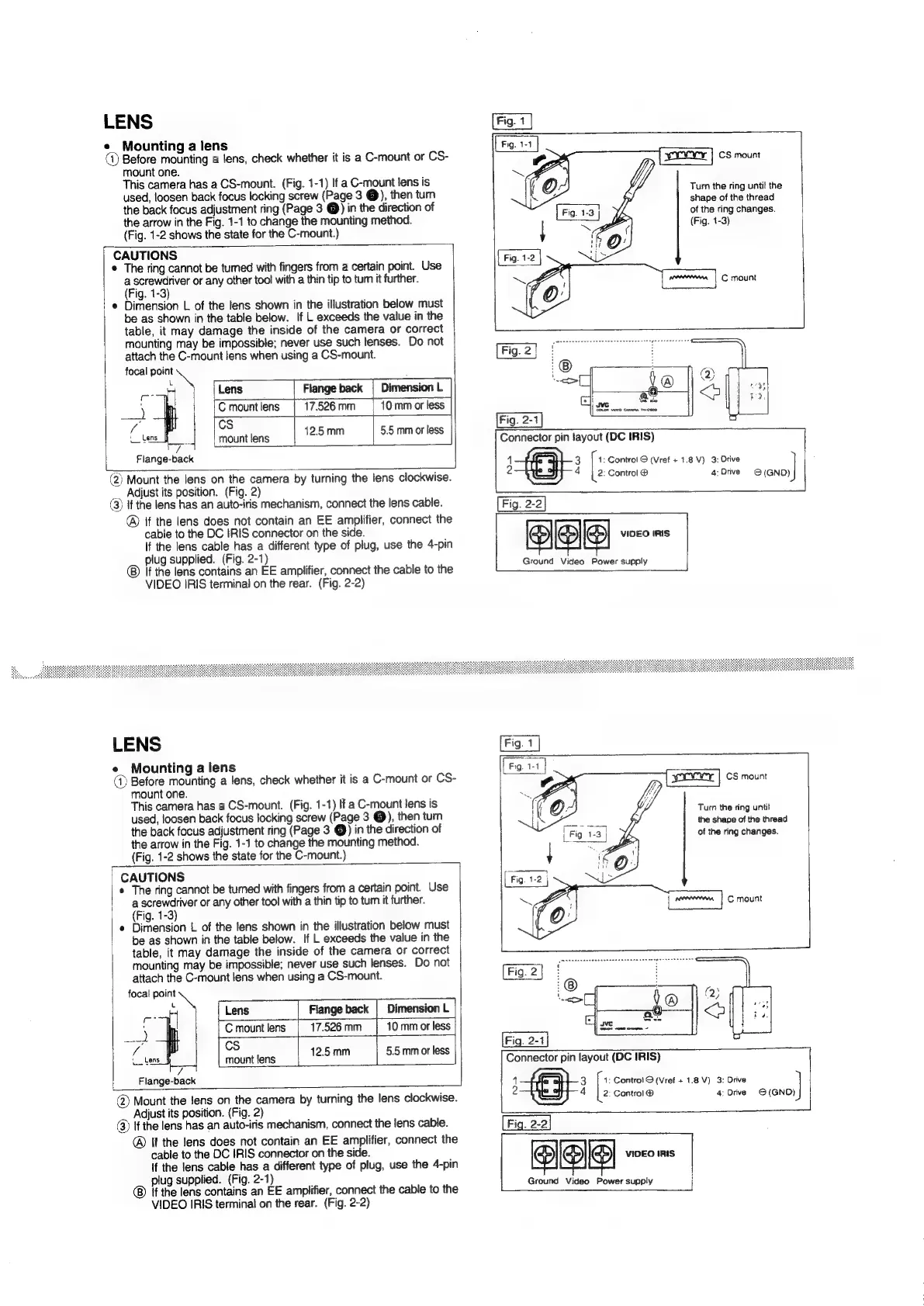
Before
mounting
a
lens,
check
whether
it
is
a
C-mount
or
CS-
mount
one.
This
camera
has
a
CS-mount.
(Fig.
1-1)
If
a
C-mount
lens
is
used,
loosen
back
focus
locking
screw
(Page
3
@),
then
turn
the
back
focus
adjustment
ring
(Page
3
@)
in
the
direction
of
the
arrow
in
the
Fig.
1-1
to
change
the
mounting
method.
(Fig.
1-2
shows
the
state
for
the
C-mount.)
CAUTIONS
The
ring
cannot
be
tumed
with
fingers
from
a
certain
point.
Use
oa
or
any
other
tool
with
a
thin
tip
to
tum
it
further.
ig.
1-3
'
e
Dimension
L
of
the
lens
shown
in
the
illustration
below
must
be
as
shown
in
the
table
below.
If
L
exceeds
the
value
in
the
table,
it
may
damage
the
inside
of
the
camera
or
correct
mounting
may
be
impossible;
never
use
such
tenses.
Do
not
attach
the
C-mount
lens
when
using
a
CS-mount.
focal
point
L
a
Ze
)
|
Lens
|
Flange
back
)
|
Cmountiens
|
17.526mm
|
10
mmorless
f
cs
{Lens
foe
mount
lens
|
12.5
mm
5.5
mm
or
less
7
Flange-back
(2)
Mount
the
lens
on
the
camera
by
turning
the
lens
clockwise.
_.
Adjust
its
position.
(Fig.
2)
(3)
if
the
lens
has
an
auto-iris
mechanism,
connect
the
lens
cable.
®
if
the
lens
does
not
contain
an
EE
amplifier,
connect
the
cable
to
the
DC
IRIS
connector
on
the
side.
if
the
lens
cable
has
a
different
type
of
plug,
use
the
4-pin
plug
supplied.
(Fig.
2-1)
If
the
lens
contains
an
EE
amplifier,
connect
the
cable
to
the
VIDEO
IRIS
terminal
on
the
rear.
(Fig.
2-2)
Turn
the
ring
until
the
shape
of
the
thread
of
the
ring
changes.
(Fig.
1-3)
Connector
pin
!ayout
(DC
IRIS)
|
1
3.
|
1:
Control
S
(Vref
+
1.8V)
3:
Drive
j
2
4
2:
Control
@
4;
Drive
O(GND)
|
Fig.
2-2
es)
VIDEO
IRIS
Ground
Video
Power
supply
LENS
Mounting
a
lens
(@
Before
mounting
a
lens,
check
whether
it
is
a
C-mount
or
CS-
mount
one.
This
camera
has
a
CS-mount.
(Fig.
1-1)
If
a
C-mount
lens
is
used,
loosen
back
focus
locking
screw
(Page
3
@),
then
turn
the
back
focus
adjustment
ring
(Page
3
@)
in
the
direction
of
the
arrow
in
the
Fig.
1-1
to
change
the
mounting
method.
(Fig.
1-2
shows
the
state
for
the
C-mount.)
CAUTIONS
*
The
ring
cannot
be
turned
with
fingers
from
a
certain
point.
Use
a
screwdriver
or
any
other
tool
with
a
thin
tip
to
tum
it
further.
(Fig.
1-3)
¢
Dimension
L
of
the
lens
shown
in
the
illustration
below
must
table,
it
may
damage
the
inside
of
the
camera
or
correct
mounting
may
be
impossible;
never
use
such
lenses.
Do
not
attach
the
C-mount
lens
when
using
a
CS-mount.
focal
point
=
Lens
Flange
back
|
Dimension
L
|
i)
C
mount
lens
17.526
mm
10
mm
or
less
ee
ca
Feng
12.5
mm
5.5
mm
or
less
;
7
i
Flange-back
be
as
shown
in
the
table
below.
If
L
exceeds
the
value
in
the
|
@)
Mount
the
fens
on
the
camera
by
turning
the
lens
clockwise.
Adjust
its
position.
(Fig.
2)
(3)
If
the
lens
has
an
auto-iris
mechanism,
connect
the
lens
cable.
If
the
lens
does
not
contain
an
EE
amplifier,
connect
the
cable
to
the
DC
IRIS
connector
on
the
side.
If
the
lens
cable
has
a
different
type
of
plug,
use
the
4-pin
plug
supplied.
(Fig.
2-1)
if
the
lens
contains
an
EE
amplifier,
connect
the
cable
to
the
VIDEO
IRIS
terminal
on
the
rear.
(Fig.
2-2)
snr
|
cs
mount
Turn
the
ring
until
the
shape
of
the
thread
of
the
ring
changes.
Fig.
2-4
Connector
pin
layout
(DC
IRIS)
4
3
1:
Control
O
(Vref
+
1.8
V)
3:
Drive
2
4
2:
Control
@
4:
Drive
G(GND)
[Fig.
2-2]
VIDEO
IRIS
Ground
Video
Power
supply

Related product manuals