Connection (Continued)
Memo
v
Do not connect DC 12 V and AC 24 V cables at the same time.
v
When using a DC 12 V power supply, ensure that the polarities of the
cable are correct.
m
AC 220 V - AC 240 V (TK-C9201EG/TK-C9301EG)
When using this camera, install it near the socket so that power disconnection
may be made immediately.
Connecting the Monitor
Connect with a 75 K coaxial cable (BNC) such as RG-59.
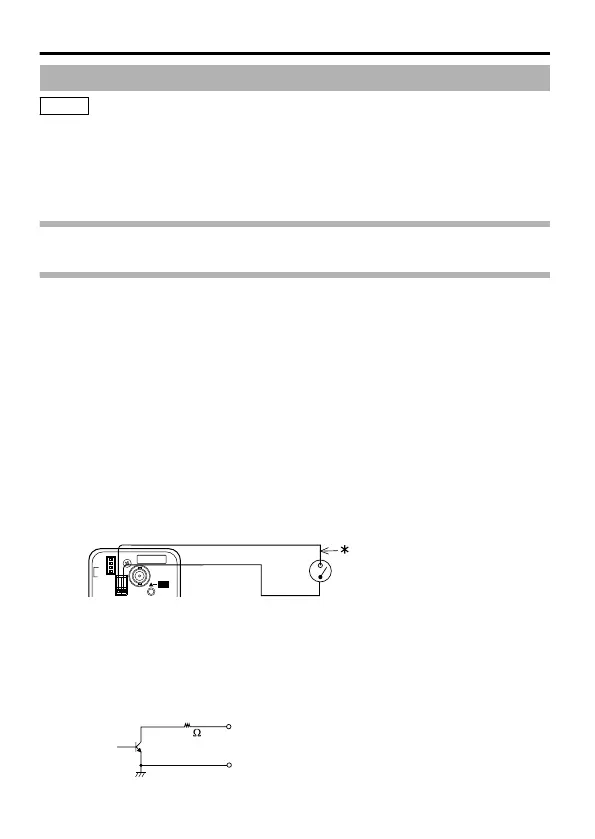
Connecting the Alarm Input/Output Terminal (TK-C9300U/TK-
C9300E/TK-C9301EG only)
Menu settings may be required depending on the connected equipment. (Refer to
[AUX FUNCTION] in the separate "MENU SETTING".)
The default setting has been set to alarm input (IN:ALARM).
m
Alarm input terminal
Connect the infrared sensor, door sensor, metal sensor, manual switch sensor
and the like.
v
To prevent noise from entering the internal circuit, supply non-voltage setting
signal to the alarm input signal.
v
Do not supply voltage.
v
Using the menu, you can select whether to set to alarm when the contact is
short (MAKE), or when the contact is open (BREAK).
v
Supply such that the alarm signal stays at a minimum of 200 ms or more.
Otherwise, the alarm signal may not be recognized.
.
AUX(IN)
Please use a shielded cable.
GND
SET
MANUAL
SEE INSTRUCTION
ONLY
(
E TYPE
)
ISOLATED POWER
(
U TYPE
)
CLASS 2 ONLY
OUT
VIDEO
ON
CRT
ON
OFF
LCD
BLC OFF
D/N AUTO
MONITOR TYPE
ADJUST
FOCUS
WIDE-D OFF
m
Alarm output terminal
Connect to alarm devices such as alarm, indicator, light or buzzer.
v
The alarm output signal is open collector output and turns ON during an alarm.
(Maximum voltage 16 V, current 30 mA)
v
This terminal has a polarity. Make sure to connect such that a higher voltage is
output from the + terminal than from the - terminal. Otherwise, it will result in
damages.
.
Connection/Installation
8



 To Next Page