25
DVD/CD 6
ON SCREEN
On-Screen Operations
Remote control
On-screen Bar Operations
INFO
Remote
ONLY
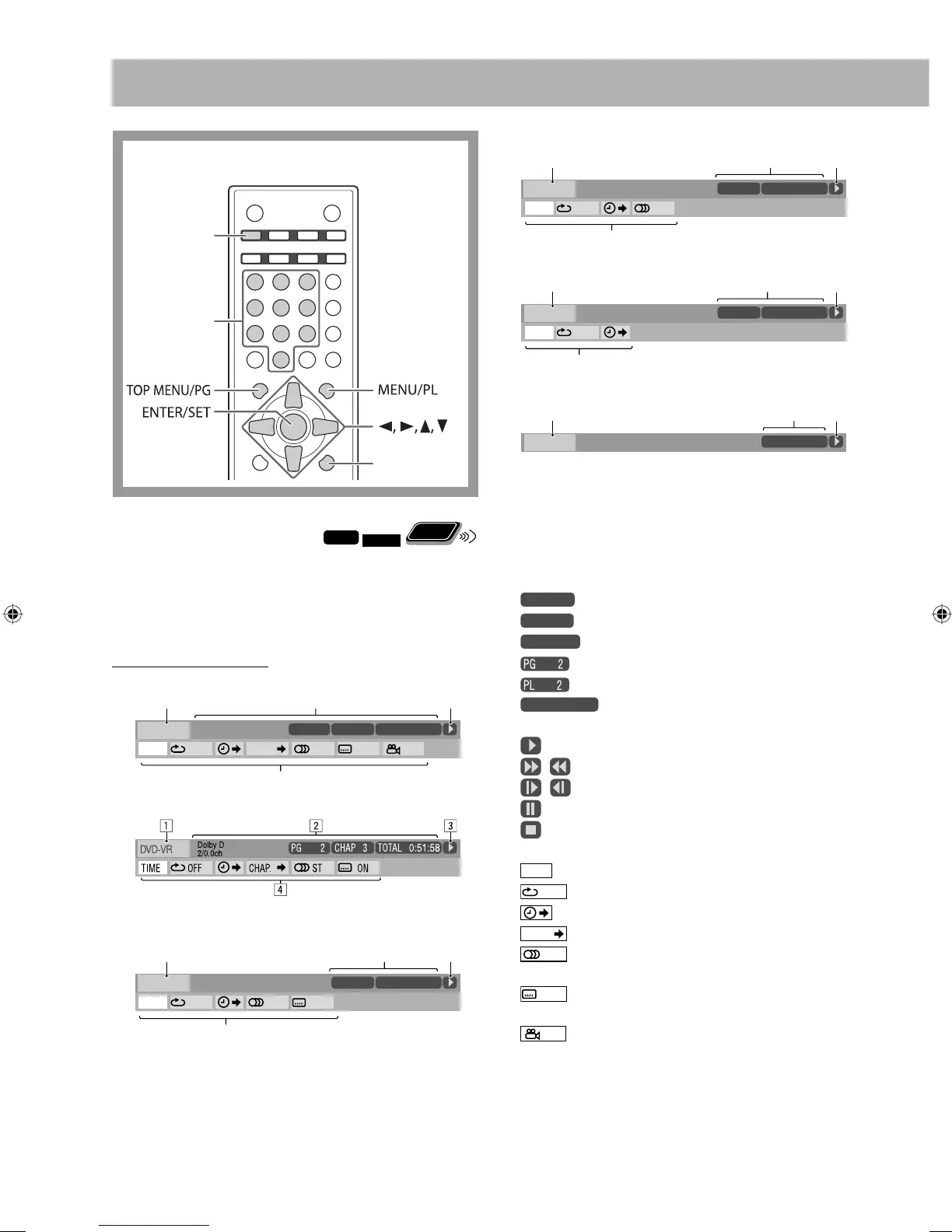
You can check the disc information and playback status by
using the on-screen bar (not applicable for MP3/WMA/
WAV/JPEG files). You can also use some functions when
playing back DVD Video/DVD-VR/SVCD/VCD/CD.
On-screen Bar Information
DVD Video
DVD-VR
SVCD
Number
buttons
2
OFF
1/3
1/3 1/3
TIME
4
TITLE
14
TOTAL
1:25:58
CHAP
23
DVD-VIDEO
TITLE 2
TIME OFF CHAP. 1/31/31/1
TIME 0:00:58
CHAP 3
Dolby D
3/2.1ch
1
3
2
OFF
1/3
1/3 1/3
TIME
4
TITLE
14
TOTAL
1:25:58
CHAP
23
SVCD
TIME OFF ST1
TRACK 3
1
3
1/3
-/4
TIME 0:00:58
PROGRAM
VCD
CD
MPEG-1/MPEG-2/DivX files on a disc
1 Disc/source
2 Playback information
Dolby D Audio format
3/2.1ch, 2/0.0 ch Channel number
PROGRAM, RANDOM Current play mode
TITLE
2
Current title
CHAP
3
Current chapter
TRACK
14
Current track
Current program
Current Play List
TIME 0:00:58
Time indication
3 Operation modes
Playback
/ Forward/Reverse search
/ Forward/Reverse slow-motion
Pause
Stop
4 Function icons (on the pull-down menu)
TIME
Select to change the time indications.
OFF
Select to repeat playback.
Select for time search.
CHAP.
Select for chapter search.
1/3
Select to change the audio language or
channel (see also page 19).
1/3
Select to change subtitle language (see also
page 20).
1/3
Select to change the view angle (see also page
10).
2
OFF
1/3
1/3 1/3
TIME
4
TITLE
14
TOTAL
1:25:58
CHAP
23
VCD
TIME OFF ST
TRACK 3
1
3
TIME 0:00:58
PROGRAM
2
OFF
1/3
1/3 1/3
TIME
4
TITLE
14
TOTAL
1:25:58
CHAP
23
CD
TIME OFF
TRACK 3
1
3
TIME 0:00:58
RANDOM
TOTAL
1:25:58
CHAP
23
FILE
Time 00:00:58
213
EN25-32_UX-GP7V[U]1.indd 25EN25-32_UX-GP7V[U]1.indd 25 6/16/08 11:22:24 AM6/16/08 11:22:24 AM



 To Next Page