EasyManua.ls Logo

JVC XV-THG31 - User Manual

JVC XV-THG31
29 pages
Print Icon
To Next Page IconTo Next Page
Loading...
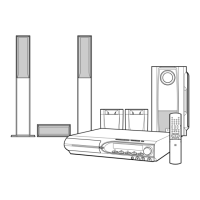
TH-G31
Consists of XV-THG31 and SP-THG51F,
SP-THG61C and SP-THG50W
DVD DIGITAL THEATER SYSTEM
INSTRUCTIONS
For Customer Use:
Enter below the Model No. and
Serial No. which are located on
the rear of cabinet. Retain this
information for future reference.
Model No.
Serial No.
LVT2051-001A
[J]
HT994SJ-A0_BUSAJJK
TUNING TUNING

Table of Contents

Questions and Answers

  • J
    Jonathan HillAug 20, 2025
    What to do if there is no picture on my JVC Home Theater System?
    • J
      Jessica LambertAug 20, 2025
      If there's no picture on your TV when using your JVC Home Theater System, ensure that the TV is set to the correct video input mode to receive the DVD signal. Also, check that the video cable is securely connected to the jacks and that the TV is powered on.
  • W
    William MarshallAug 22, 2025
    How to fix a JVC XV-THG31 remote control that isn't working?
    • H
      huntergonzalezAug 22, 2025
      If you are experiencing remote control issues with your JVC Home Theater System, make sure to point the remote control directly at the remote sensor on the DVD/CD Receiver and stay within a range of approximately 23 ft (7 m). Remove any obstacles that might be blocking the signal. If the issue persists, replace the batteries in the remote control with new ones.
  • B
    Bill SuarezAug 25, 2025
    Why is there no sound on my JVC Home Theater System?
    • A
      Amy WongAug 25, 2025
      If you're not getting any sound or only a very low-level sound from your JVC Home Theater System, verify that the connected equipment is set to receive the DVD audio signal output. Ensure the audio cables are securely connected to the jacks and the connected equipment is turned on. If the issue continues, the audio connecting cable may be damaged; try replacing it.
  • L
    Lisa AdamsAug 26, 2025
    How to stop loud humming noise from JVC Home Theater System?
    • O
      olsonleonardAug 26, 2025
      If you're experiencing a loud hum or noise with your JVC Home Theater System, clean the disc. Also, verify that the speakers and components are securely connected. If the problem persists, try moving the DVD/CD Receiver away from the TV to reduce interference.
  • M
    Michael SimmonsAug 28, 2025
    What to do if the picture quality is poor on my JVC Home Theater System?
    • H
      hensonjosephAug 28, 2025
      If the playback picture quality is poor on your JVC Home Theater System, try the following: * Clean the disc. * Ensure a playable disc is correctly inserted with the playback side down and placed within the guide. * If a menu is on the TV screen, press the SETUP button to turn it off. * If the Rating level is set, cancel the Rating function or change the rating level.
  • T
    Todd EvansAug 29, 2025
    Why can't I tune into radio stations on my JVC XV-THG31 Home Theater System?
    • C
      Carla Hunt MDAug 29, 2025
      If you are unable to tune in radio stations on your JVC Home Theater System, make sure the antenna is securely connected and positioned correctly. If the signal strength is weak, try tuning in the station manually. If no stations are preset, you may need to preset them.
  • S
    Shelly ReynoldsAug 31, 2025
    How to fix a JVC Home Theater System when nothing is displayed on the front panel?
    • H
      Heather TorresAug 31, 2025
      To address the issue of nothing being displayed on the front panel of your JVC Home Theater System, press the DIMMER button on the remote control.
  • L
    Lisa AcostaSep 2, 2025
    What to do if the JVC XV-THG31 Home Theater System DVD/CD Receiver audio CD indicator does not work?
    • M
      moralesreneeSep 2, 2025
      If the DVD/CD Receiver audio CD indicator on your JVC Home Theater System isn't working, make sure a disc is inserted.
  • S
    Seth BassSep 4, 2025
    What to do if my JVC Home Theater System has no picture?
    • A
      Alexander HuntSep 4, 2025
      If your JVC Home Theater System shows no picture, there are a few potential causes: * Ensure your TV is set to the correct video input mode to receive the DVD signal. * Check that the video cable is securely connected to both the DVD/CD Receiver and the TV. * Confirm that the connected TV is powered on.
  • I
    Isaac PetersonSep 6, 2025
    Why is my JVC XV-THG31 Home Theater System remote control not working?
    • D
      Diana DeckerSep 6, 2025
      If the remote control for your JVC Home Theater System isn't working correctly: * Make sure you're pointing the remote at the remote sensor on the DVD/CD Receiver. * Ensure you're within 23 ft (7 m) of the DVD/CD Receiver. * Remove any obstacles between the remote and the DVD/CD Receiver. * Try replacing the batteries in the remote with new ones.

Summary

Product Overview and Instructions

Customer Use and Identification

Instructions for customers to record model and serial numbers for future reference.

Safety Information - Electrical Hazards

Electrical Safety and Usage Precautions

Covers risk of electric shock, proper ventilation, and avoiding moisture or heat exposure.

Safety Information - Operational Guidelines

General Installation and Maintenance Safety

Provides 14 numbered instructions for safe installation, operation, and maintenance procedures.

System Introduction and Basic Information

Symbol Glossary and Manual Conventions

Explains symbols used on screen and in the manual for clarity and operation.

Disc Handling, Care, and Screen Saver

Guides on proper disc handling, storage, cleaning, and screen saver function.

Disc Playback and Regional Restrictions

Playable Disc Formats and Notes

Details supported disc formats like DVD, CD, MP3, WMA, JPEG, and playback considerations.

Regional Code and Copyright Protection

Explains regional code restrictions for DVDs and copyright protection technology.

Front Panel Controls and Indicators

Remote Control Operations

Remote Functions and Battery Installation

Details remote control functions, button operations, and battery installation instructions.

Installation and Connection Guide

TV and Antenna Connections

Instructions for connecting the unit to a TV via video or component cables and installing the FM antenna.

Connecting External Audio;Video Devices

Auxiliary and Digital Audio Input Ports

Guides on connecting external devices via AUX IN, OPTICAL IN, and AUDIO IN ports.

HDMI Connection and Video Output

HDMI Technology and Connection Steps

Explains HDMI technology and how to connect the unit to an HDMI-compatible TV or monitor.

Resolution Settings and TV Compatibility

Details resolution settings for HDMI and component outputs and potential TV compatibility issues.

Speaker System Installation

On-Screen Display and Initial Setup

Viewing Disc Information On-Screen

How to view on-screen playback details such as title, chapter, time, audio, and subtitle.

Initial System Setup and Language Selection

Walks through initial setup, including language selection and system configuration.

General Operation and Display Settings

Display Mode and Aspect Ratio Adjustments

Adjusts screen display settings like TV Aspect Ratio (4:3, 16:9) and Display Mode (Letterbox, Panscan).

Language Preferences for Menus and Audio

Configures menu language, disc audio, subtitle, and disc menu language preferences.

Audio Playback Features and Options

Audio Settings: DRC, Vocal, and AV Sync

Adjusts Dynamic Range Control, Vocal enhancement, and HD AV Sync for optimal audio playback.

5.1 Surround Sound Configuration

Speaker Calibration and Volume Tuning

Guides on selecting speakers, adjusting size, volume, and distance for surround sound.

5.1 Surround Sound Configuration

Speaker Testing and Verification

Tests individual speaker outputs to ensure proper connection and sound.

Parental Controls and Area Code Settings

Locking, Rating, and Password Management

Sets up parental controls, rating limits, and password protection for disc playback.

Area Code Selection for Playback

Enters the DVD disc's area code to ensure compatibility with playback restrictions.

Other System Settings

Core Operation Functions

Basic Button Operations Explained

Summarizes the functions of common buttons like OPEN/CLOSE, PAUSE, SKIP, REPEAT, MENU, SUBTITLE, SLOW.

Advanced Playback and Media Features

Time Search, Speed Playback, and Scene Memory

Enables playing at specific times, 1.5x speed, and recalls the last viewed scene.

Screen Saver and Mixed File Playback

Covers screen saver activation, last scene memory, and playback of discs with mixed file types.

Playing Audio CDs and MP3;WMA Files

ID3 Tag Display and Disc Compatibility

Shows track information and details compatibility requirements for MP3/WMA files on discs.

Programmed Playback Features

Creating, Repeating, and Erasing Playlists

Guides on creating, repeating, and erasing tracks from a programmed playback list.

JPEG File Playback and Slideshows

Navigating and Displaying JPEG Files

Instructions for viewing JPEG files, including still pictures, rotation, and moving between files.

Slideshows, Music Playback, and Help Menu

Details on setting up slideshows, playing background music, and accessing the help menu.

JPEG Disc Compatibility Considerations

Lists compatibility requirements and limitations for JPEG files on discs.

Troubleshooting Common Issues

Power, Picture, and Sound Problems

Addresses problems related to no power, no picture, or no sound and their solutions.

Playback, Noise, and Disc Issues

Helps resolve issues like poor playback quality, discs not starting, or audio hum and noise.

Troubleshooting and System Settings

Tuning, Remote, and Display Issues

Solves problems with radio tuning, remote control operation, and dim front panel display.

Timer, Muting, and Ejection Lock Features

External Audio and Surround Sound Modes

Connecting External Audio Sources

Instructions on how to enjoy audio from external sources through the unit's input options.

Selecting Surround Sound Modes

Guides on selecting different pre-set surround sound fields for an enhanced audio experience.

Reference Lists for Settings

Language Code Reference Guide

A list of language codes used for setting disc audio, subtitle, and menu languages.

Area Code Reference Guide

A list of area codes to select for DVD playback compatibility and restrictions.

Technical Specifications Overview

General, Video, and Tuner Specifications

Details power, dimensions, video systems, and tuner frequency range.

Amplifier, Speaker, and Accessory Specifications

Provides specifications for amplifier output, speaker impedance, and supplied accessories.

Product Warranty Information

Limited Warranty Terms and Conditions

Outlines the warranty period, what is covered, what is not covered, and service procedures.

Customer Record Keeping for Warranty

Instructions for the customer to record model, serial number, and purchase date for service.

Customer Support and Service Information

Contacting JVC for Assistance and Service

Provides contact information, toll-free numbers, and website for hook-up, operation, and service inquiries.

JVC XV-THG31 Specifications

General IconGeneral
TypeHome Theater System
Channels5.1
DVD PlayerYes
Remote ControlYes
Audio Formats SupportedDolby Digital, DTS
Video Formats SupportedDVD
InputsHDMI, Composite
OutputsHDMI
TunerFM
Speaker Configuration5 Satellite Speakers, 1 Subwoofer

Related product manuals