
 Need help?
Do you have a question about the JVD DH9335 and is the answer not in the manual?
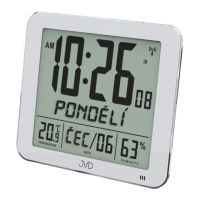
Radio Controlled Time (RC-DCF), 12/24 hour display, alarm, perpetual calendar, day of week languages.
Indoor measurable range: -10°C ~+ 50°C, °C / °F user selectable.
Indoor measurable range: 20% ~ 99%.
A1: Time Display, A2: Day of Week, A3: Temperature, A4: Radio Controlled Icon, A5: Humidity, A6: Date.
B1: MODE/SET, B2: -, B3: ✔/↑, B4: ALARM ON/OFF, B5: RESET, B6: SNOOZE, B7: Alarm mode slide switch.
C1: Wall Mount Hole, C2: Stand, C3: Battery Compartment.
Instructions for opening the battery compartment and inserting AA batteries with correct polarity.
Automatic DCF signal scanning, icon status indication, and manual scan initiation.
Entering Clock/Calendar setting mode via MODE button and adjusting time parameters.
How to view, set, and confirm alarm times using the MODE and directional buttons.
Activating/deactivating alarms, selecting alarm days, and snooze operation.
Display of LL.L or HH.H when temperature exceeds measurable limits.
Display of 20% or 99% when humidity is below minimum or above maximum.
Time information is lost when the battery is removed.
Avoid direct sunlight, heavy heat, cold, high humidity, or wet areas.
Do not use abrasive or corrosive materials for cleaning to prevent damage.

 To Next Page
 General