Digital Photo Frame V10M10_IM_EN_08172007
www.jWIN.com
- 12 -
GETTING STARTED
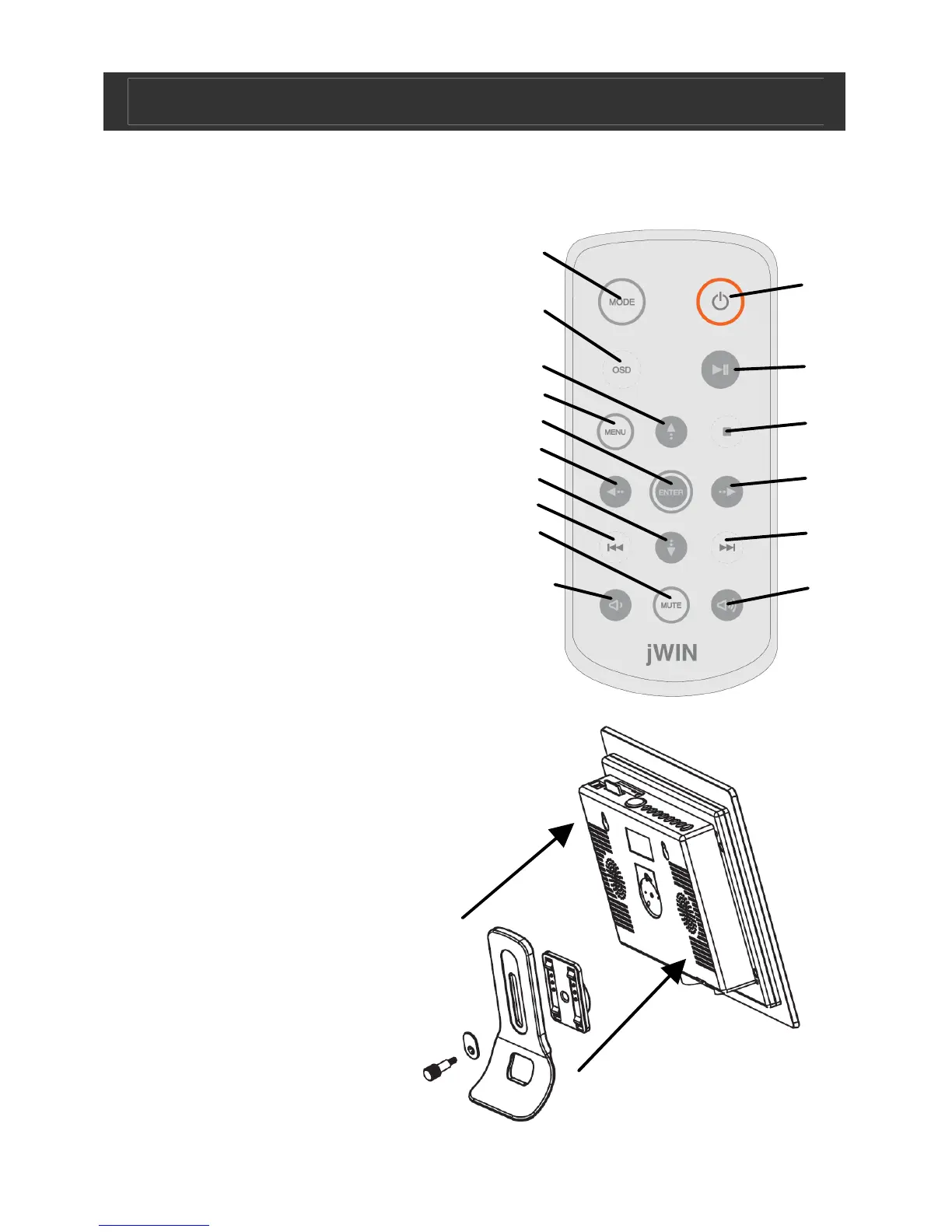
Location of Controls-Remote
1. Mode Button
2. OSD Button
3. Navigation Up Button
4. Menu Button
5. Enter Button
6. Navigation Left Button
7. Navigation Down Button
8. Fast Backward/Previous Button
9. Mute Button
10. Volume Down (-) Button
11. Power Button
12. Play/Pause Button
13. Stop Button
14. Navigation Right Button
15. Fast Forward/ Next Button
16. Volume Up (+) Button
Bracket Assembly
• Line up the pieces
of the bracket
assembly as
illustrated here.
• Hand-tighten the
screw to fasten
pieces together.
• Bracket will slide up
and down in two
positions when fully
assembled
1
2
3
4
5
6
7
8
9
10
11
12
13
14
15
16


 To Next Page