05
1-20
μ
g/m
3
21-35
μ
g/m
3
35-55
μ
g/m
3
>
55
μ
g/m
3
Excellent
Good
Moderate
Unhealthy
Excellent
Good
Moderate
Unhealthy
Excellent
Good
Moderate
Unhealthy
Air Quality Indicator
Turning On/Off
Display Instructions
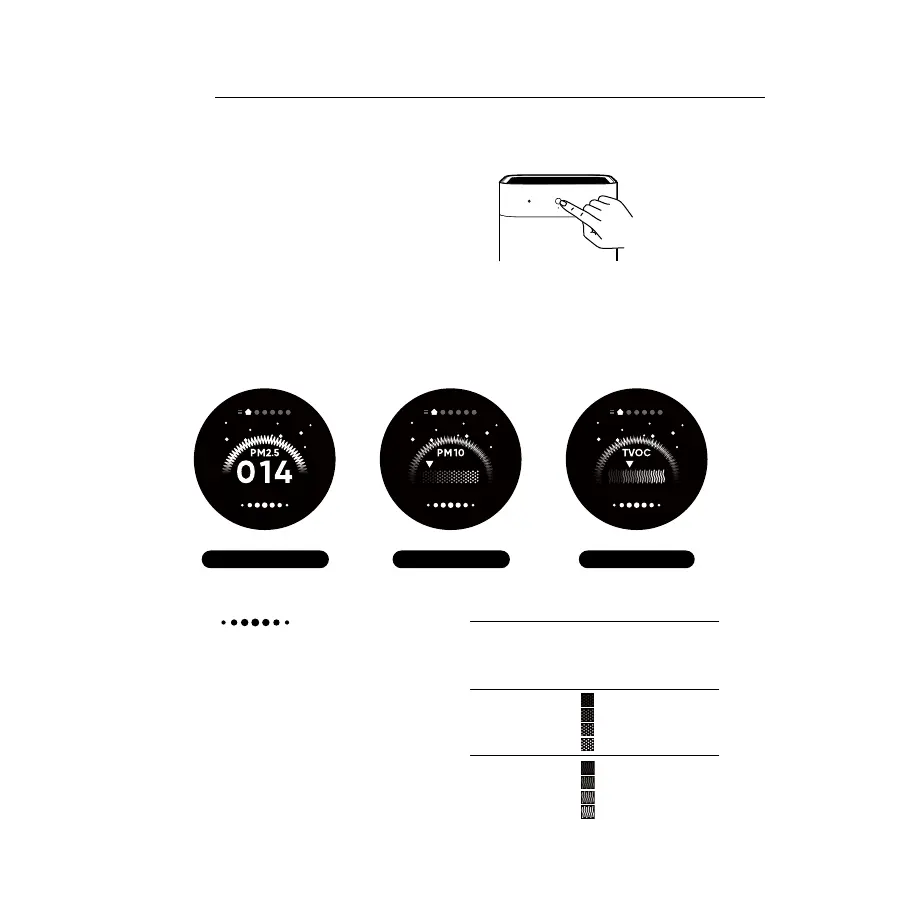
Tap the power button to turn on the purifier. While
the purifier is on, tap the power button to turn it o.
After power on, the main screen will rotate in the main interface of PM2.5, PM10, TVOC in turn.
The indicator will display green, yellow, orange or red
according the worst value of PM2.5、TVOC、 PM10.
How to Use
PM2.5 Interface TVOC InterfacePM10 Interface
Note: PM10 refers to coarse particles have an aerodynamic
diameter ranging from 2.5 to 10μm (PM10–PM2.5). Examples of
coarse particles include dust, pollen, spores, and fly ash.
Note: Upon activation, the Gas sensor inside this purifier takes
the air quality as the initial standard value. If there are changes
in the air TVOC during operation, the Gas sensor will perform
calculations based on the current indoor air quality (IAQ). The
TVOC is displayed according to 4 dierent levels, and the air
quality indicator status also changes accordingly.
PM2.5
TVOC
PM10



 To Next Page