07
Wi-Fi Settings
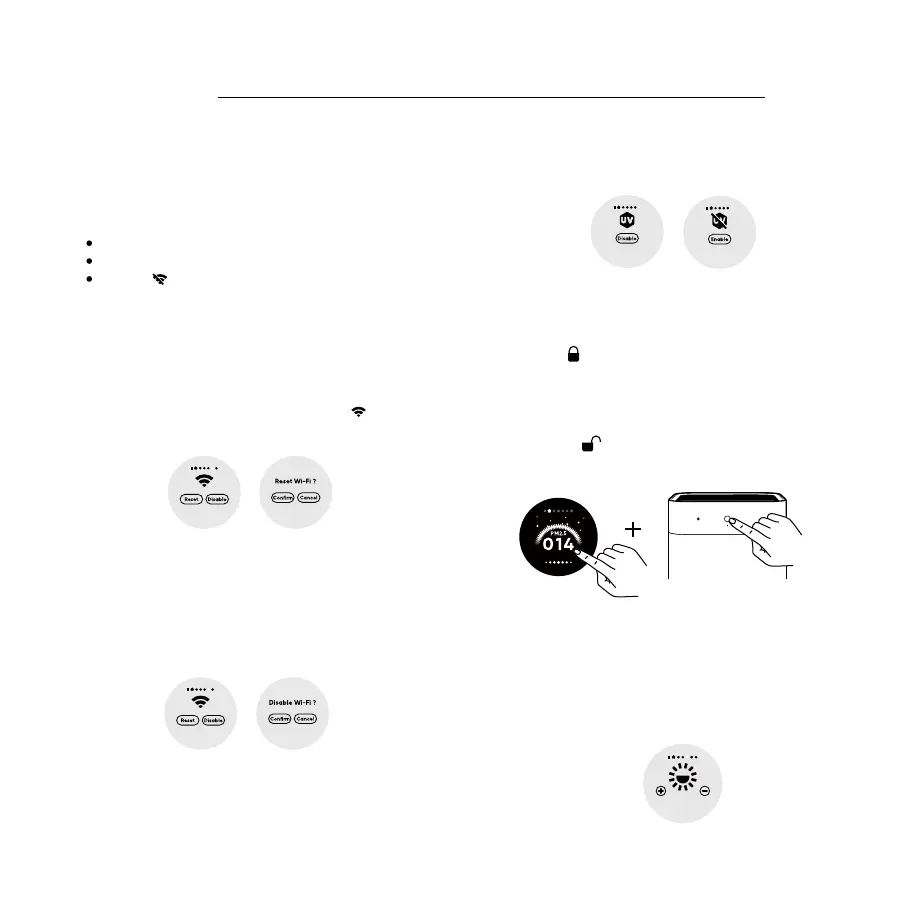
Resetting Wi-Fi
When unable to connect to the purifier to the app,
swipe left on the main screen to enter the Wi-Fi setting
interface, click "Reset" and "Confirm", then jump to the
Wi-Fi setting interface, check the Wi-Fi icon flashes,
Wi-Fi reset successfully.
Screen brightness adjustment
Swipe left on main screen, switch to the screen
brightness adjustment interface, tap "+" and "-" to
adjust 6 levels of brightness.
Tap the screen can make the screen wake up when
screen is o, it will enter screen o status again if no
operation for 5 seconds.
Enabling/Disabling Wi-Fi
Swipe left on the main screen to enter the Wi-Fi setting
interface, click “Disable” and “Confirm”, Wi-Fi disabled.
You can also enable the Wi-Fi in Wi-Fi setting interface.
On/O interface, press “Enable” or “Disabled” for UV
light On/O.
UV light On/o setting
Swipe left on the main screen, switch to UV Light
Wi-Fi Staus
Swipe left on the main screen to enter the Wi-Fi
setting interface,check current Wi-Fi status.
Connected ( Wi-Fi icon lights on)
Waiting for connecting (Wi-Fi icon flashes)
Disabled
Enabling/Disabling the child lock function
Press and hold the screen and power button
simultaneously for 3 seconds with 3 beeps, check
lock icon displaying on screen for 2 seconds,
child lock is enabled. You cannot operate the
device when the child lock is on.
Press and hold the screen and power button
simultaneously for 3 seconds with 3 beeps, check
unlock icon displaying on screen for 2 seconds,
child lock is disabled.
How to Use
Note:
: When Wi-Fi is disabled, the reset operation can turn
on Wi-Fi.



 To Next Page