EasyManua.ls Logo

JYX FF-S8-T - Karaoke Machine Controls Overview; Key Controls and Dials; Input and Output Ports; Indicators and Power Management

JYX FF-S8-T
6 pages
Print Icon
To Next Page IconTo Next Page
To Previous Page IconTo Previous Page
Loading...
PEACE LIBRARY SYSTEM
Karaoke Machine Kit Contents & Instructions
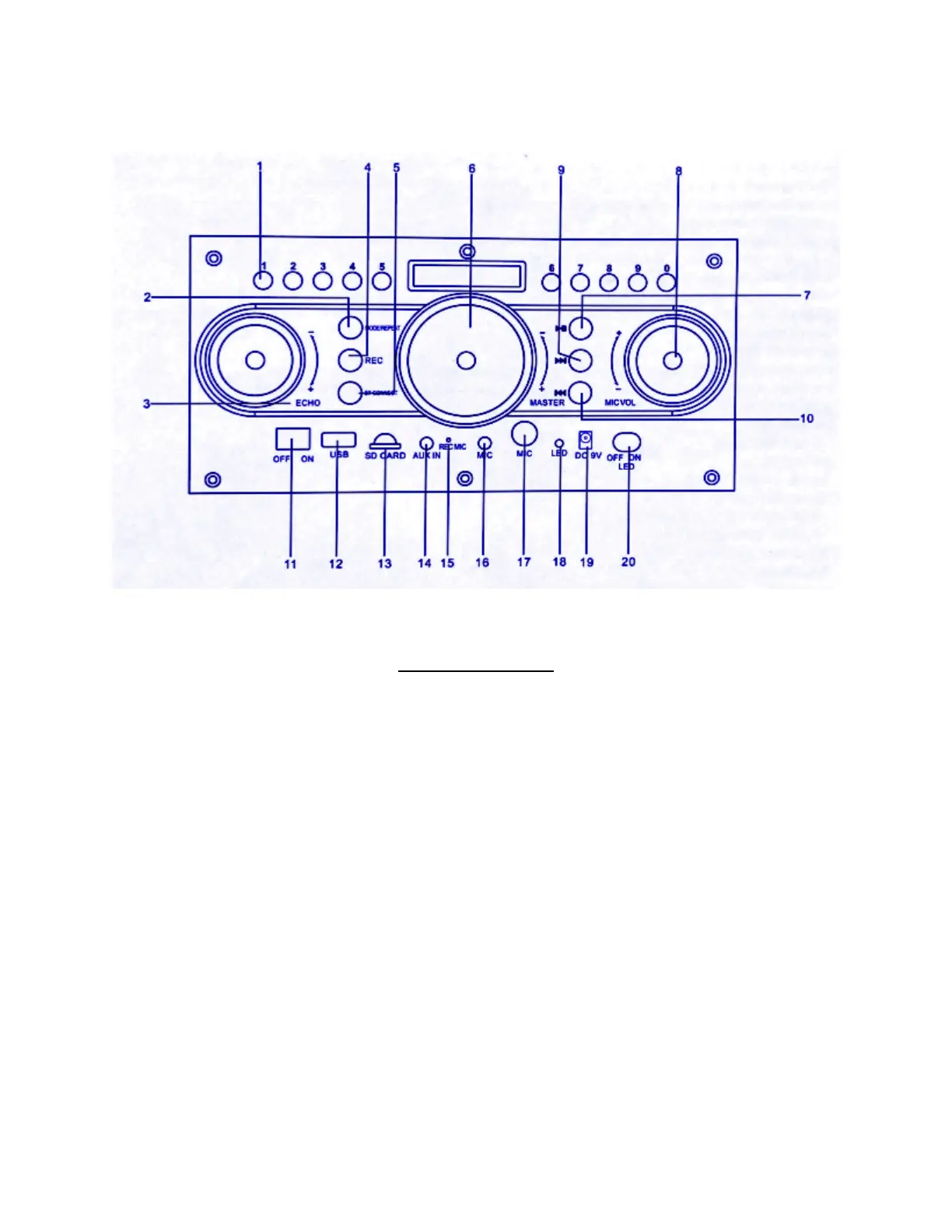
Button Functions
1. Number Keys
2. Mode/Repeat Key
3. Echo
4. REC: press this key to enter
recording state, press again to
exit and save the current
recording. Need USB or SD Card
to record.
5. Bluetooth
6. Master Volume
7. Play/Pause: use with USB or SD
Card
8. Mic Volume
9. Next: use with USB or SD Card
10.Previous: use with USB or SD
Card
11. Power On / Off
12.USB Jack
13.SD Card Jack
14.AUX-IN Jack
15.Recording Port
16.Microphone Port
17.Microphone Jack
18.Charging Indicator: Red while
charging, Blue when done
19.Charging Input
20.LED Switch On / Off

Related product manuals