19
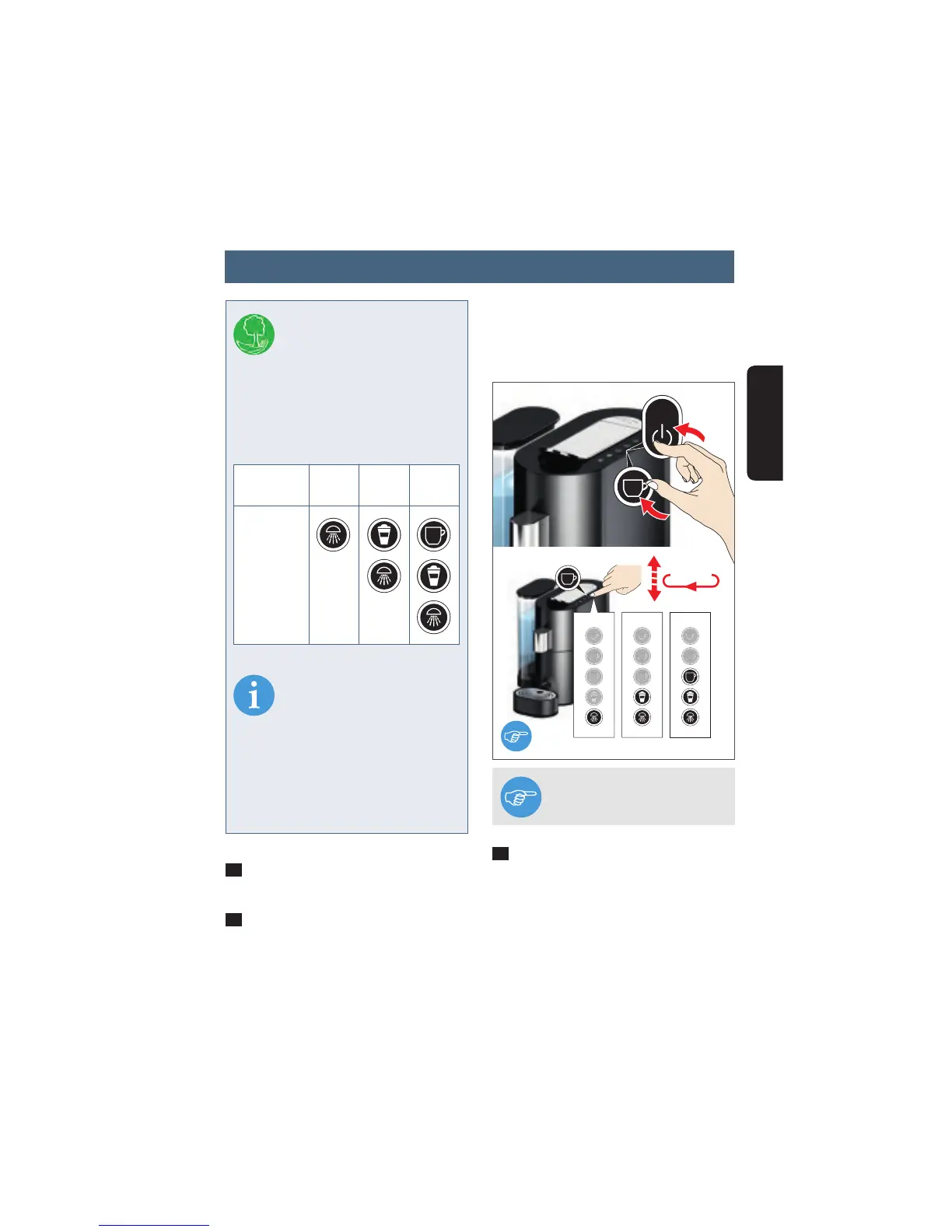
"Large cup" button as often as required
until the required switch-off time is dis-
played.
3
To save the setting, press the "Large
cup" button again for at least 3 seconds.
All buttons will blink once briefl y to con-
fi rm.
1
First switch the appliance on by pres-
sing the ON/OFF button.
2
Press the "Large cup" button and the
ON/OFF button simultaneously. The cur-
rent setting is displayed when the appro-
priate button symbol illuminates (see
table). To change the setting, press the
NOTE To cancel programming,
press the ON/OFF button.
INFO
You can specify the period af-
ter which the appliance swit-
ches off automatically when unused
individually. The factory setting is 5
minutes in order to avoid unnecessary
energy consumption and to protect the
environment
NOTE
When operating, the applian-
ce switches immediately to
the energy-saving standby mode if you
press the ON/OFF button.
During periods of absence and at the
end of the brewing day, switch the
applicance off at power supply (240v
plug).
Switch-off
time approx.
Illuminated
button(s)
5
mins
30
mins
60
mins
5 mins 30 mins 60 mins
0-1-2-3
2
English
Setting automatic switch-off




 To Next Page