K1EL WKUSB with WinKeyer3 User Manual WKUSB
WKUSB User Manual 12/20/2017 Rev 1.0 Page 5
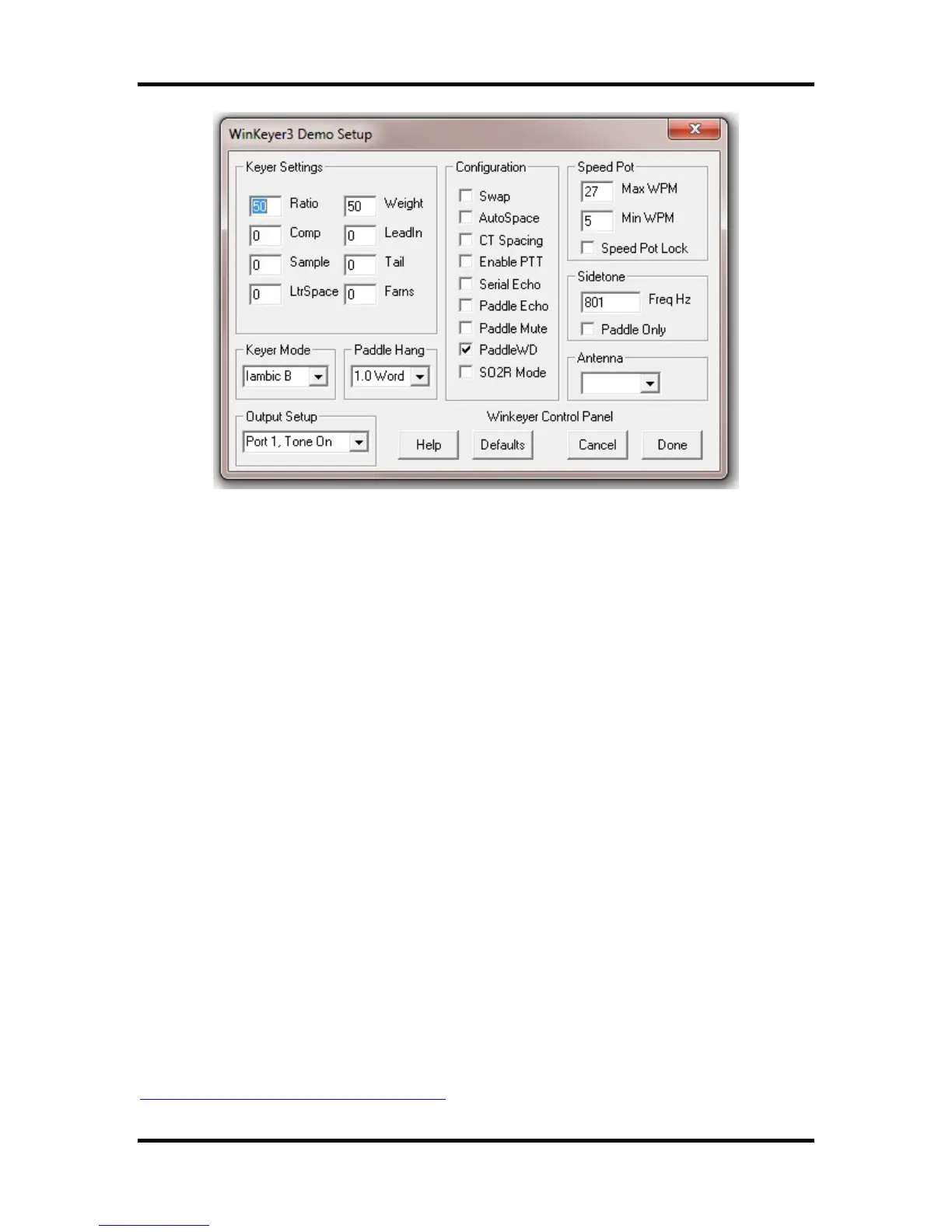
Click Cancel for now and go back to the main dialog box. Type into the lower keyboard entry
window and you will hear the text sent in Morse sidetone from the internal mini speaker. Enable
Serial Echo in Setup and what you type will be echoed in the upper text window as it is sent.
Now hook up some paddles and test paddle entry. If Paddle Echo is enabled, letters entered on
the paddles will be echoed in the upper text window. Use the Setup Dialog to try different keying
options. You probably noticed that if you change settings on the Setup dialog box, you have click
Done and return to the main application to transfer those new settings to WKUSB.
The sidetone frequency can be changed as well as specifying whether it should be used for
paddle entry only. An exact frequency selection is not always possible, it will round to the closest
one it can do. There are several speed pot options, Speed Pot Lock forces WKUSB to only use
the speed pot for speed control. When Speed Pot Lock is unchecked, the Up/Down arrows next
to the WPM readout on the main dialog box can adjust the speed or you can directly enter a
speed in the WPM edit box. In other words, speed is controlled solely by the host application.
This is how the majority of PC logging and contest applications operate. Speed is controlled by
keyboard commands, macros, or messages with embedded speed commands. The name of the
game in contesting is to have one central user focus, that being the keyboard.
Although WKtest packs a lot of power in a small app, it is meant to be a hardware test tool. It
gives you a good idea of what WKUSB is capable of and assures you that it is operating properly.
The next logical step is to move on to a ‘real’ application, such as N1MM+. Before that we will
look the WK3tools application and how standalone operation works.
WK3tools application
Normally when a WinKeyer device is not connected to a host application it will run in standalone
mode. WKUSB can be powered over the USB port or by a set of internal batteries. WKUSB in
standalone provides a complete Morse keyer with lots of capabilities. Originally, configurations
changes could only be made using commands entered on the paddles. While it still has this
capability, WK3tools allows you to make these changes from a PC application.
http://www.hamcrafters2.com/WK3tools.html


 To Next Page