9
8
English
English
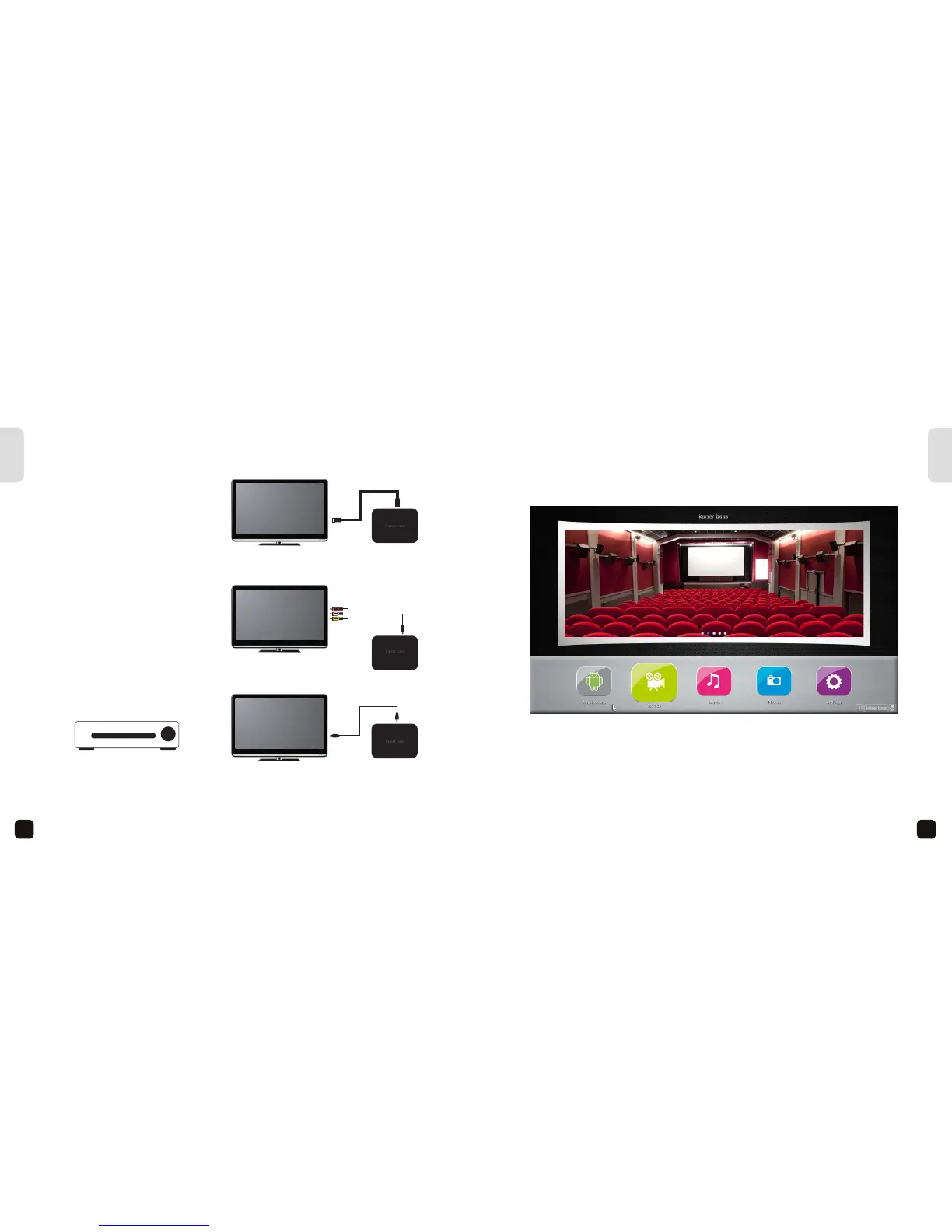
CONNECTION GUIDE
Connecting the Smart Media Player with an HDMI cable
Connecting the Smart Media Player with an AV cable
Optical Audio connection
with a S/PDIF cable
AV cable
HDMI cable (not included)
OR
AMP/ Home Theather
Optical Cable (not included)
USING YOUR SMART MEDIA PLAYER
Once you have connected the power supply, the Smart Media Player will automatically
begin to boot up. Allow a few minutes for the boot up process to complete. Once
completed, the following screen shot will appear. This is the main menu interface:
Use the directional buttons on the remote to highlight an option, press OK to select it.
You can also press the “Mouse” button to switch to Mouse Mode.
Tip: As most Smart apps are designed for a touch phone or tablet, you will need to
switch to mouse mode regularly to navigate through some apps. Some apps are purely
designed for touch screen and may not function at all.
The Smart Media Player’s operating system (OS) is Android Version: Jellybean 4.2. For
more information on how to use the Android OS, please visit www.android.com.
AMP HOME THEATER


 To Next Page