Need help?
Do you have a question about the Kaito KA550 and is the answer not in the manual?
Overview of the KA550 multi-band radio's features and ideal use cases.
Identifies and explains the controls located on the front of the KA550 radio.
Identifies and explains the controls located on the rear of the KA550 radio.
How to use the crank handle to power and charge the radio's internal batteries.
Instructions for powering the radio using AA batteries.
Utilizing the solar panel for power and battery charging.
Using an optional AC adapter for power and charging.
Connecting the radio to a computer via USB for power.
Details on USB charging for the radio and external devices.
Guide on charging cell phones or portable digital devices using the radio.
Guide to selecting AM, FM, Shortwave, and Weather bands.
How to adjust volume and tune into radio stations.
Instructions for using the NOAA Weather Band and setting up alerts.
Understanding the meaning of the LED indicators for charging and tuning.
How to operate the integrated reading lamp and flashlight.
How to use the flashing SOS light feature in emergencies.
Technical details including frequency ranges, output power, and size.
Guidelines for cleaning, handling, and maintaining the radio.
Solutions for the radio not powering on.
Advice for adapter compatibility and charging failures.
Solutions for noise or static when using the AC adapter.
Tips for improving reception of the seven weather channels.
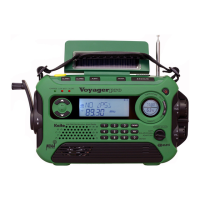
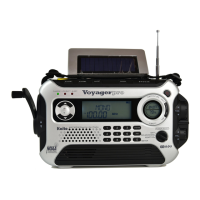
The Kaito KA550 is a multi-band world receiver designed for emergency situations and general use where a reliable AC power source might not be available. It boasts a versatile power system, including solar energy, batteries, an AC adapter (optional), and a hand-crank generator, ensuring continuous operation in various scenarios. This makes it an ideal companion for outdoor activities, travel, or as a crucial tool in disaster preparedness kits.
The primary function of the KA550 is to receive radio broadcasts across multiple bands. It covers the standard AM/FM broadcast bands, providing access to local news, music, and talk shows. For emergency preparedness, it includes 7 NOAA weather bands, which broadcast continuous weather alerts and information from the U.S. National Weather Service across all 50 states, Puerto Rico, and the U.S. Virgin Islands. This feature is particularly valuable as it can automatically turn on the radio when a severe weather emergency alert is issued, ensuring users are informed even when not actively listening. Additionally, the KA550 features two shortwave bands (SW1 and SW2), allowing users to tune into international broadcasts from stations like the BBC, Radio Moscow, Radio France, Radio Beijing, and Voice of America, expanding listening options beyond local transmissions.
Beyond radio reception, the KA550 incorporates several utility features. It includes a built-in LED flashlight for illumination in dark conditions, which is essential during power outages or nighttime emergencies. A 5-LED reading lamp, located on the bottom side of the solar panel, provides broader illumination and can be tilted 180 degrees to direct light as needed. For critical situations, an SOS light function is available, emitting a flashing red light to signal for help.
A significant feature of the KA550 is its capability to charge external devices. It includes a USB port that can be used to charge cell phones, iPods, and MP3 players. This is particularly useful when conventional power sources are unavailable, allowing users to keep their communication devices operational. The radio comes with a set of power tips to accommodate various popular cell phone models, and for USB-compatible devices like Blackberry phones or iPods/MP3 players, users can directly plug in their standard USB cables.
Operating the KA550 is designed to be straightforward. The radio can be powered in five different ways. The most self-sufficient methods involve the hand-crank generator and the solar panel. The hand-crank generator, or magneto, allows users to generate power manually by turning a handle for about one minute to get ample power for radio and flashlight functions. The rechargeable battery pack, which is pre-installed, is charged through this method. The solar panel can also run the radio under direct sunlight and slowly charge the battery pack, though cranking is recommended for faster charging. For convenience, the radio also supports AA batteries (three AA batteries are required and not included) and can be powered and charged via an optional AC adapter or a computer's USB port. When using AA batteries or the AC adapter, it's important to ensure the power selector is set correctly and, for charging, the "In-Out" switch on the back is in the "In" position.
To select a radio band, users simply rotate the band selector switch to choose between AM, FM, SW1, SW2, or Weather Band. Once a band is selected, the tuning knob is used to slowly scan for desired stations. For optimal reception on FM, SW1, SW2, and Weather Band, extending the telescopic antenna is recommended. For AM stations, positioning the radio near a window or in an open space can improve signal quality. The volume control knob allows for easy adjustment of the sound level.
The NOAA Alert function is a key safety feature. To activate it, users first tune to their local weather station on the Weather Band, then set the power selector to "NOAA Alert." In this standby mode, the KA550 will automatically turn on when an alert from the National Weather Service is broadcast. It is recommended to use the AC adapter to power the radio when the NOAA Alert function is active to ensure continuous operation.
The charging and tuning LED indicator provides visual feedback. It shows green when charging, orange when both charging and using the radio, and red when tuning or when the battery power is low. When the battery power is high, a green "HI" light is on, and a red "LOW" light indicates low battery, prompting users to recharge.
The reading lamp and flashlight are controlled by a dedicated "Lights Control" panel on the top of the unit. Users can switch between the reading lamp, flashlight, or turn them off. The SOS light is also activated via this control.
Charging external devices like cell phones is facilitated by setting the "In-Out" switch on the back to "OUT" and connecting the device using the provided power tips or a standard USB cable. Cranking the handle will then generate power to charge the device. It's noted that charging a completely dead device via cranking can be more challenging, so it's advisable to start charging while the device still has some battery power.
Maintaining the KA550 is straightforward and focuses on ensuring its longevity and optimal performance. Users are advised to clean the radio with a soft cloth and avoid aggressive polishes or cleaners, which could damage the unit's surface or internal components.
Temperature and moisture exposure are critical considerations. The radio should not be exposed to temperatures above 130°F (54°C) or left on a car dashboard, as extreme heat can permanently damage its electronic parts. Similarly, protecting the device from moisture is important to prevent internal damage.
For periods of extended non-use, it is recommended to remove the AA batteries from the radio. This prevents potential battery leakage, which can corrode battery terminals and damage the device over time. When using the AC adapter, unplugging it from the radio when not in use helps prevent overcharging of the rechargeable batteries, contributing to their lifespan.
The rechargeable Ni-MH battery pack, included with the radio, is designed for long-term use. For the first-time use, it is highly recommended to charge the battery for 6 hours using the AC adapter to ensure it is fully conditioned. Regular charging, especially when the "LOW" red light indicates low battery power, will help maintain battery health.
 General
| Tuning Modes | Analog |
|---|---|
| AM Frequency Range | 520-1710 kHz |
| FM Frequency Range | 87.5-108 MHz |
| SW Frequency Range | 2.3-22 MHz |
| Headphone Jack | 3.5mm |
| Alert | NOAA Weather Alert |
| LED Flashlight | Yes |
| Battery Indicator | Yes |
| Display | LCD |
| Weight | 1.5 lbs |
| Type | Emergency Radio |
| Bands | AM, FM, SW, Weather |
| Weather Band | 7 NOAA Channels |
| Power Source | 3 AA Batteries |
| Speaker | Built-in |

 To Next Page