Need help?
Do you have a question about the Kaito KA752 and is the answer not in the manual?
Instructions for operating the fan at low or high speeds, and turning it off.
Guidance on operating the LED lantern at different brightness levels and angles.
Steps for tuning the FM radio, extending the antenna, and adjusting volume.
Details on charging the device using an AC adapter and the charge indicator.
Technical details including power supply, battery, fan, lantern, charge time, and dimensions.
Lists the included items in the product package, such as the electric fan and manual.
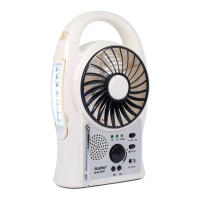
The Kaito® KA752 is a versatile, multi-function device designed for convenience and portability, combining a fan, radio, and flashlight into a single unit. It is ideal for outdoor activities such as camping, family trips, or as a useful companion in a garage. The device is powered by a built-in rechargeable battery and can also operate via an AC adapter.
The KA752 integrates three primary functions: a portable electric fan, a multi-directional LED lantern, and an FM scan radio.
Electric Fan: The device features a portable DC electric fan with two selectable speeds: "LOW" for a gentle breeze and "HI" for a stronger airflow. The fan is designed for easy operation with a simple slide switch.
LED Lantern: A multi-directional and multi-angle LED lantern is incorporated, offering two levels of brightness. The lantern can be tilted up to 150° along the radial angle, with each step angle being 30°. Additionally, it can be rotated along the axial angle for up to 270°, providing flexible illumination. To use the lantern, it needs to be pulled out from the fuselage.
FM Scan Radio: The KA752 includes a built-in FM scan radio. It features a telescopic antenna for improved reception. Users can tune into their preferred stations within the 87.5MHz to 108.8MHz frequency range using a station selector. The radio also includes a combined power and volume control knob.
Power and Charging: The unit is equipped with a built-in rechargeable battery. It can be charged using a DC 12V input via an AC adapter. A "CHARGE" indicator light illuminates during charging.
Portability: The KA752 is designed to be compact and easy to carry, making it suitable for various environments. It includes a handle for convenient transport.
Fan Operation: To operate the fan, locate the fan power switch and slide it to either "LOW" for low speed or "HI" for high speed. To turn off the fan, slide the switch to "OFF."
Lantern Operation: To activate the LED lantern, slide the tilt-able lamp control switch. One position will provide lower brightness, while another position will offer full brightness. Remember to pull the lantern from the main body to adjust its angle and direction.
Radio Operation: For radio use, first pull out and fully extend the telescopic antenna. Turn the radio power and volume control knob clockwise to switch on the radio. Use the "►►►" or "◄◄" buttons to select your desired FM station. The same knob also controls the volume.
Charging the Unit: Ensure the AC adapter is compatible with your wall output voltage (110V for this unit). Connect the DC 12V adapter to the unit's charge jack. The "CHARGE" indicator will light up, signifying that the unit is charging. It is normal for the unit to become slightly warm during the charging process.
Initial Charge: It is crucial to fully charge the unit before its first use to ensure optimal battery performance.
Regular Charging: If the unit is not in use for an extended period, turn it off. To prevent the battery from drying up and to maintain its longevity, make sure to charge the unit every month.
Environmental Care: Keep the unit away from water or excessive humidity to prevent damage. The recommended working temperature range is 32°F to 100°F.
Safety Precautions: Do not open the unit without consulting the seller or manufacturer, as this could void warranties or cause damage. To prevent the risk of fire or electric shock, do not expose the electric fan to rain or moisture. Do not place the unit in water or close to fire. Always ensure children do not have access to the electric fan.
Proper Disposal: This product should not be disposed of with general household waste. To protect the environment and human health from uncontrolled waste disposal, it should be recycled responsibly. Users are encouraged to use available return and collection systems or contact the retailer for proper disposal of the used device.
 General
| Tuning | Digital |
|---|---|
| AM | Yes |
| FM | Yes |
| SW | Yes |
| WX | Yes |
| LED Flashlight | Yes |
| Power Source | Battery, DC, Solar |
| Speaker | Built-in |
| Headphone Jack | Yes (3.5mm) |

 To Next Page