EasyManua.ls Logo

Kaiweets KC602 - Measurement Modes; Auto-ranging Functionality; Test Lead Connection Guide

Kaiweets KC602
24 pages
Print Icon
To Next Page IconTo Next Page
To Previous Page IconTo Previous Page
Loading...
Auto-ranging
1.
Press
the
(&)
button
to
turn
on
the
power
supply
of
the
meter.
After
the
self-test
is
completed,
the
meter
will
display
“Auto”
and
enter
the
smart
measurement
mode.
2.
Don't
need
to
select
the
measurement
function,
the
instrument
will
automatically
identify
and
measure
the
AC/DC
voltage,
AC/DC
current,
resistance,
continuity.
Current
is
measured
by
the
clamp,
and
the
other
measurements
will
need
to
use
the
pen
input.
3.
Read
the
measurement
results
from
the
display
screen.
The
frequency
is
displayed
when
the
AC
signal
is
measured
Note1:Minimum
identifiable
DC
current
0.8A.
Minimum
identifiable
AC
current
0.5A.
Minimum
identifiable
AC/DC
voltage
0.8V.
Note2:Automatic
identification
priority:
resistance,
DC
voltage,
AC
voltage,
DC
current,
AC
current.
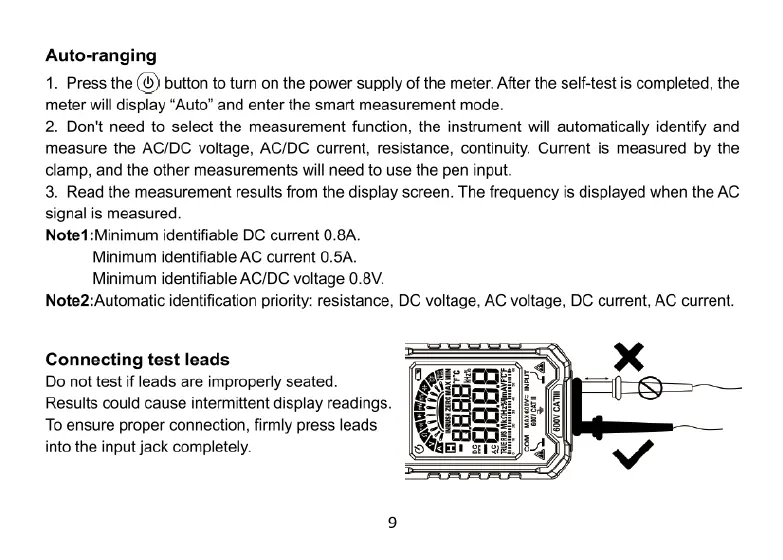
Connecting
test
leads
Do
not
test
if
leads
are
improperly
seated.
Rt
Results
could
cause
intermittent
display
readings.
gfl:
puu]
To
ensure
proper
connection,
firmly
press
leads
%ffli
%
into
the
input
jack
completely.
TINAEES