21. SOUND EFFECT
These buttons will activate Flanger, Filter, Echo, Reverse effects. Press relay to switch between Gain & Parameter (the selected
one will be flashing) in the display. Use the jog wheel to change the value.
Flanger: Gain- 0~100, Parameter: 1/32~ 16/1
Filter: Gain- 0~100, Parameter: -60~+60
Echo: Gain- 0~100, Parameter: 1/32~2/1
Scratch: Press this button to activate the scratch function. Touch and turn the top flat surface of the jog wheel to perform scratch
effect.
22. SEARCH
Press this button first and dial the jog wheel to perform the fast search forward or backward.
23. JOG WHEEL
Pitch Mode: Use the wheel to adjust the speed to get an accurate BPM with another playing unit.
Scratch Mode: The top flat surface is used for scratch effect. The ring of the wheel is used for adjusting the speed.
Adjust the gain and the parameter of the digital effect.
24. PITCH CONTROL SLIDER
To match the BPM of another track you can adjust the Pitch Control to change the speed.
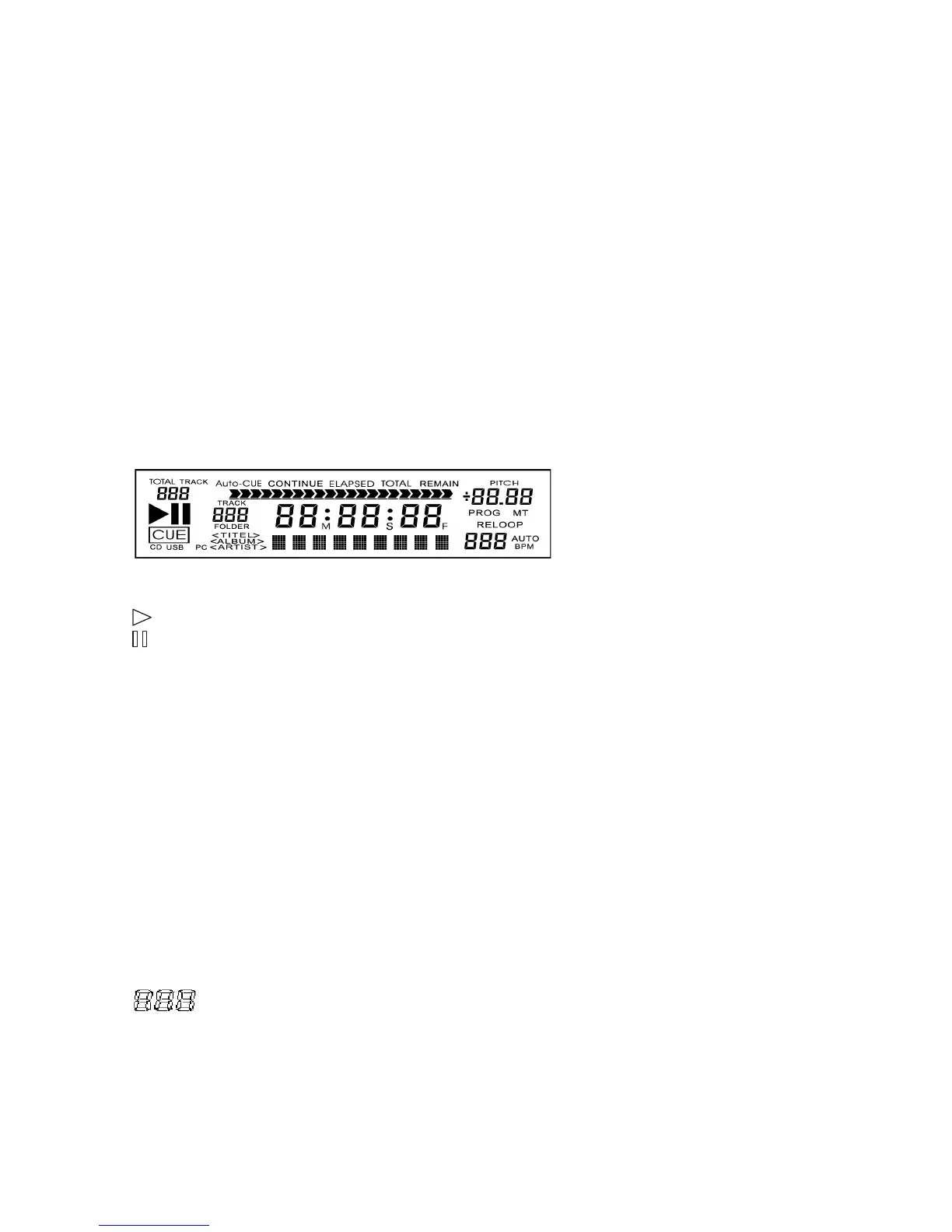
LCD Display
TOTAL TRACK – It shows the track numbers of this CD. During selecting folders, it shows the total folders of this CD.
– The unit is in play.
– The unit is paused.
CUE – It indicates a cue has been memorized.
CD – Lights when switching the play source to CD mode.
USB – Lights when switching the play source to USB mode.
PC – No Function.
CUE – Lights up when a memorized point is stored.
Continue – When the light is on, the playback is continuous without interruption.
TIME MODE (ELAPSED) – Shows the time as it is taking place.
TIME MODE (TOTAL) – Shows how much time is left on the full CD.
TIME MODE (REMAIN) – Shows how much time is left on a particular track.
TIME BAR – Show the time length depending on the setting of the “TIME” mode.
TRACK – Shows the track number that is playing.
MINUTES – Shows the minutes elapsed or remaining depending on time mode setting.
SECONDS – Shows the seconds elapsed or remaining depending on time mode setting.
FRAMES – The CD player breaks down a second into 75 frames for accurate cueing. This shows the frames elapsed or
remaining depending on mode setting.
MODE DISPLAY – Show the sound effect name, or MP3 file name/folder. Folder name cannot be displayed.
PITCH – Lights to indicate the pitch value is under it.
PROG – Lights to indicate there’s a program list existing in normal playback. Blinks when the program list is performing.
MT– Lights up when performing master tempo function.
RELOOP – Lights up when performing the loop function.
– Shows BPM value.
BPM – Illuminates when the power is on.
AUTO – Lights up when AUTO BPM function is activated.


 To Next Page
 Loading...