Need help?
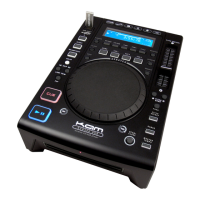
Do you have a question about the KAM KCD450 USB and is the answer not in the manual?
Prevent electrical shock and fire hazards by following safety guidelines for unit operation and power cables.
Ensure proper ventilation, avoid direct sunlight, dust, and extreme temperatures for optimal performance.
Connect USB storage and switch between CD and USB playback sources.
Navigate MP3 folders and select time display modes (elapsed, remain, total).
Manage playback modes (Continue/Single Auto Cue) and adjust touch wheel sensitivity.
Display MP3 metadata (Title, Album, Artist) and set up to three hot cue points.
Set, edit, and exit loops, including seamless and auto loop functions.
Utilize relay play, skip tracks/folders, and manually set BPM using the TAP button.
Understand display indicators and manage playback with CUE and PLAY/PAUSE functions.
Control pitch, range, and activate Master Tempo for key-locked playback.
Program track sequences and eject the CD disc safely.
Apply digital sound effects (Flanger, Filter, Echo, Scratch) and use jog wheel for search.
Use the jog wheel for pitch adjustment and scratch, and the pitch slider for speed control.
Understand the various indicators and symbols shown on the LCD display.
Identify the power on light and the disc slot on the front view of the unit.
Details on LINE OUT, DIGITAL OUT, Remote, Relay, POWER switch, and AC Power Cord.
Overview of features like CD TEXT, USB input, digital output, hot cues, and pitch control.
Details on MP3 folder search, ID3 tag support, and compatible MPEG audio formats.
 Audio Processing
| Digital output sampling frequency | 44.1 kHz |
|---|---|
| Pitch Ranges - CDDA | ±8%, ±16%, ±100% |
| Pitch Ranges - MP3 | ±8%, ±16%, ±100% |
| Master Tempo - CDDA | ±8%, ±16%, ±100% |
| Master Tempo - MP3 | ±8%, ±16%, ±100% |
| File bit rate for MPEG1 layer3 | 32~320 Kbps |
| Sampling frequency for MPEG1 layer3 | 32, 44.1, 48 KHz |
| File bit rate for MPEG2 layer3 | 40~160 Kbps |
| Sampling frequency for MPEG2 layer3 | 16, 22.05, 24 KHz |

 To Next Page