Need help?
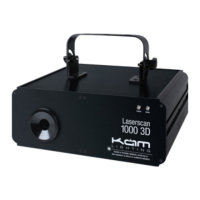
Do you have a question about the KAM LASERSCAN 1000 3D and is the answer not in the manual?
Essential warnings to prevent electrical shock, fire hazards, and ensure safe operation.
Procedure for unpacking the product, verifying contents, and checking for transit damage.
Guidance on choosing a suitable installation site, considering temperature, dust, and vibration.
Details on power input, fuse specifications, and regional cable compatibility.
Instructions for linking multiple units using DMX, including cable types and connection methods.
Specification of XLR pin assignments for DMX signal transmission.
Recommendations for secure mounting and attaching safety cables for safe operation.
Identification and function of controls and indicators on the front panel.
Identification and function of connectors and switches on the rear panel.
Guide to navigating and selecting laser's standalone operating modes via the control panel.
Description of available pre-programmed standalone effects, categorized by display type.
How to adjust sound sensitivity for music-activated programs.
Procedure for setting DMX addresses and controlling units via DMX.
Configuration steps for setting up master and slave units for synchronized output.
Using DMX to mirror or flip laser patterns.
Instructions for connecting and controlling the laser using external software via ILDA.
Channel mapping and functions when ILDA control is active.
DMX channels for selecting modes, pattern groups, and colors.
DMX channels controlling effects, zoom, clipping, and axis movements.
DMX channels for controlling axis movement direction and speed.
DMX channels dedicated to grating rotation and specific grating effects.
A visual chart correlating DMX ranges with displayed patterns.
Detailed technical data including power, laser output, classification, dimensions, and weight.
 General
| Wavelength | 532nm (Green) |
|---|---|
| Scanning Range | ±30° |
| Power Supply | AC100-240V, 50/60Hz |
| Laser Type | Diode-pumped solid-state (DPSS) |
| Output Power | 1000mW (1W) |
| Operating Temperature | 0°C to 40°C |

 To Next Page