A. Manual Mode (fixed color, w/o color changing w/o chasing)
1. Link up mor
e than 2 units or more and set Master and Slave
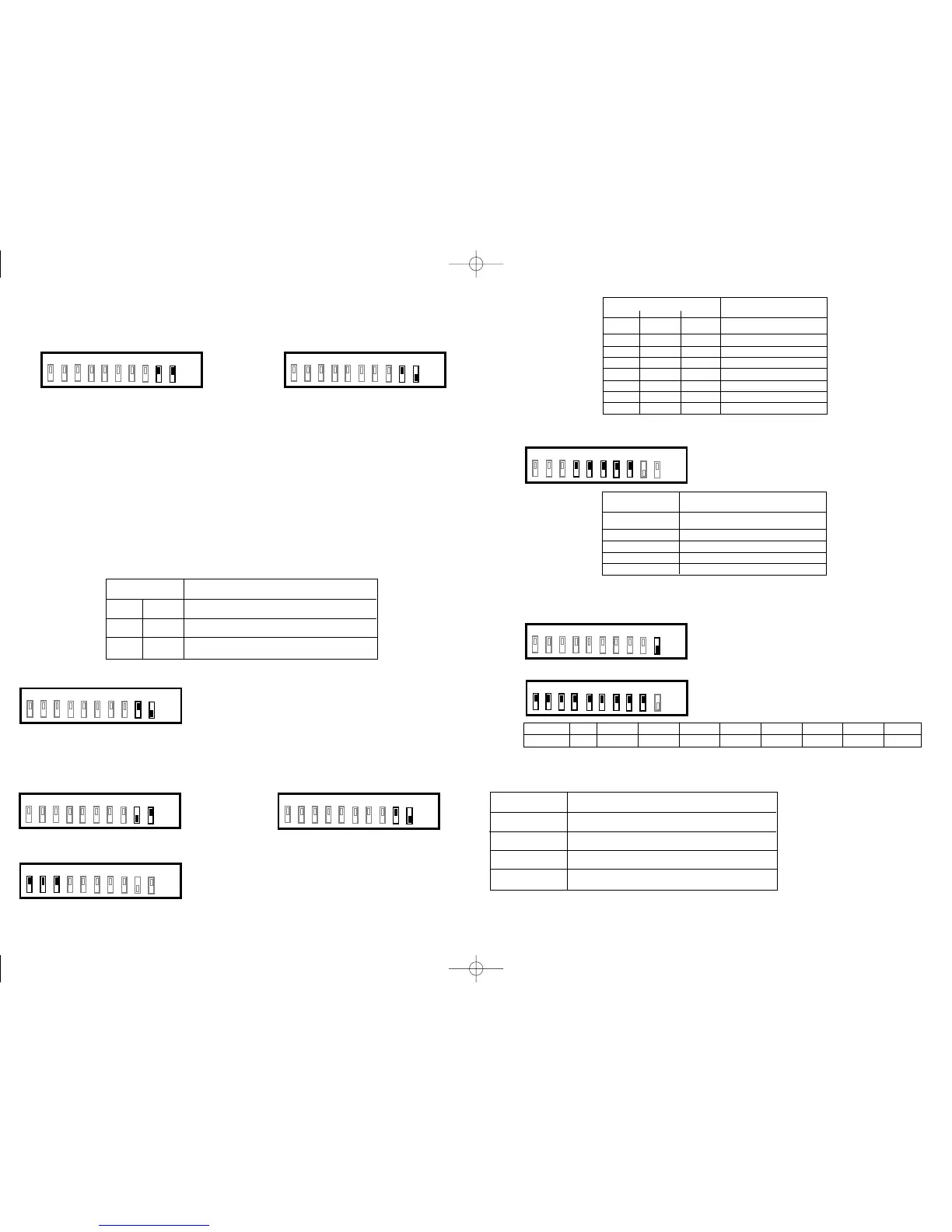
Master: DIP switch 7, 8, 9 and 10 at OFF
Slave: DIP switch 9 at OFF, 10 at ON
2.
To set color by setting dip switches of Master unit:
l DIP 1 ON: Red LED at medium brightness;
l DIP 2 ON: Red LED at high brightness;
l DIP 3 ON: Green LED at medium brightness;
l DIP 4 ON: Green LED at high brightness;
l DIP 5 ON: Blue LED at medium brightness;
l DIP 6 ON: Blue LED at high brightness;
l All linked slave units' color will be same as master unit
l The above settings cannot work with DMX controller.
l When two or more LEDs are in serial, settings applies to Master only. DO NOT make any settings on Slaves.
Otherwise, there will be unexpected color changing.
l DO NOT set DIP switch 7 and 8 at ON.
B. Sound-active Mode
Master: set DIP 10 at OFF, and other DIP of master unit:
Slave: set DIP switch 9 at OFF and 10 at ON
C. Built-in Chases Mode
1. To set Master and Slave
Master: DIP switch 9 at ON, 10 at OFF Slave: DIP switch 9 at OFF, 10 at ON
---2. To set built-in chase by setting DIP switch 1-3 of the Master.
3. To set chase speed by setting DIP switch 4-8 of the Master.
D. DMX Mode
1. To set DIP switch 10 of all units at ON.
2. To set address code by setting DIP switch 1-9 of each unit.
l The total value of the DIP switches is the address code.
3. Each unit occupies 4 DMX channels, functions as below:
DMX Channel Function
Channel 1 0 Close; 1-127 Strobe speed; 128-255 Brightness
Channel 2 0-255 (R) Brightness of red color
Channel 3 0-255 (G) Brightness of green color
Channel 4 0-255 (B) Brightness of blue color
As each units occupies 4 DMX channels, the addr
ess code of the first unit should be set as 0; and the second as 4;
third, 8; fourth, 12 …
DIP switch status Function
7.ON 8.OFF Color changing by sound
7.OFF 8.ON Strobe and color changing by sound
7.ON 8.ON Color chasing (in all linked up units) by sound
1.OFF
2.OFF 3.OFF Chase 1
1.ON 2.OFF 3.OFF Chase 2
1.OFF 2.ON 3.OFF Chase 3
1.ON 2.ON 3.OFF Chase 4
1.OFF 2.OFF 3.ON Chase 5
1.ON 2.OFF 3.ON Chase 6
1.OFF 2.ON 3.ON Chase 7
1.ON 2.ON 3.ON Chase 8
DIP switch status
Chase
DIP switch status Speed
4.ON Maximum 15 sec appro.
5.ON Fast 20 sec appro.
6.ON Medium 30 sec appro.
7.ON Slow 60 sec appro.
9.ON Minimum 120 sec appro.
1 2 3 4 5 6 7 8 9 10
OFF
ON
1 2 3 4 5 6 7 8 9 10
OFF
ON
1 2 3 4 5 6 7 8 9 10
OFF
ON
1 2 3 4 5 6 7 8 9 10
OFF
ON
1 2 3 4 5 6 7 8 9 10
OFF
ON
1 2 3 4 5 6 7 8 9 10
OFF
ON
1 2 3 4 5 6 7 8 9 10
OFF
ON
DIP switch 1.ON 2.ON 3.ON 4.ON 5.ON 6.ON 7.ON 8.ON 9.ON
Value 1 2 4 8 16 32 64 128 256
1 2 3 4 5 6 7 8 9 10
OFF
ON
1 2 3 4 5 6 7 8 9 10
OFF
ON
NEW_ledpar_manual 29/1/07 14:07 Page 3



 To Previous Page
 Loading...