5
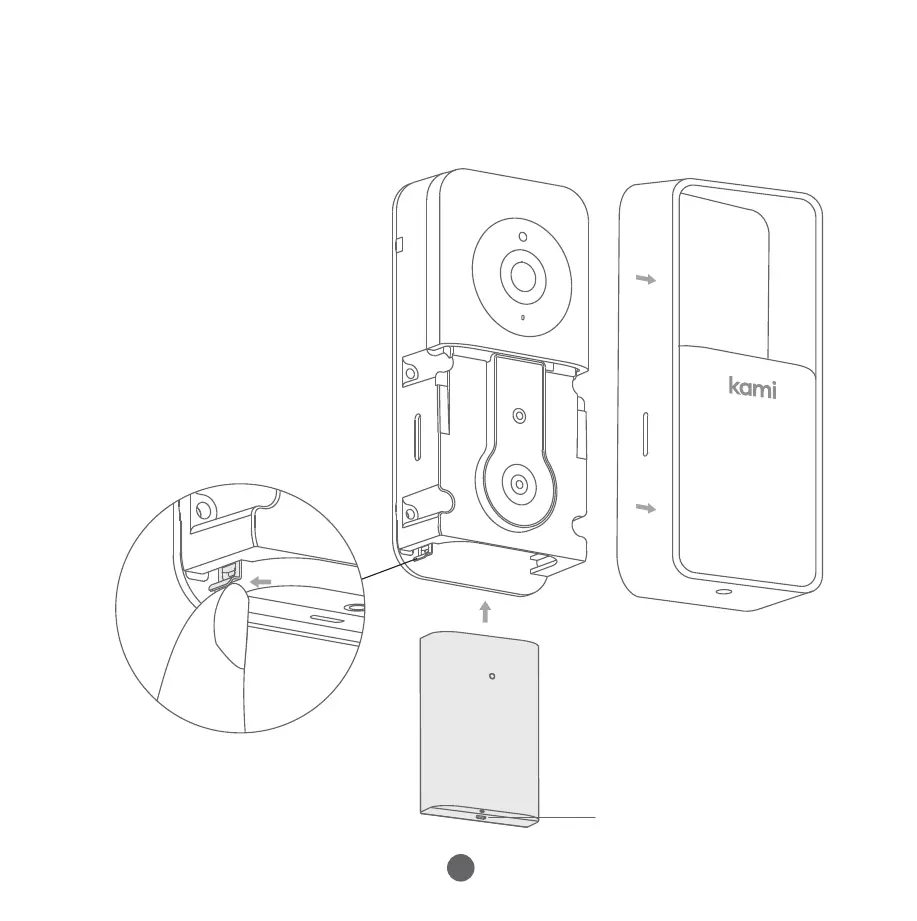
Afterremovingtheprotectivecover,pushthebatteryintothebattery
compartmentasshown.
(Ensurethatthebattery
isinsertedinthecorrect
directionwithpins
facingup)
Pushthetabshownin
thediagrambelowto
freethebattery.Pullthe
batterystraightdownto
remove.
c.InstallingtheBattery
ChargingPort
4.PairingYourDoorbellCamera
6
DownloadtheKamiHome/YIHomeAppandsignuporsignintoyour
existingaccount.
Step1
EnteryourWi-Finetworkpasswordandtapthe"PleasechooseWi-Fi"
button.
AQRcodewillappearonyourphone'sscreen.
PointtheQRcodetowardsthecameralensuntilyouhearthe
followingvoiceprompts"QRcodescanissuccessfulconnectingto
Wi-Fi"and"Wi-Fiisconnected".
Step4
AfterloggingintoyourKamiHome/YIHomeApp,tapthe"+"symbol
inthetoprightcornerandselect"KamiDoorbellCamera".
Waitforthevoicepromptandthentapthe“Iheard‘Waitingto
connect’”button.
Step3
EnsurethatyourcellphoneisconnectedtoyourlocalWi-Finetwork.
Enablethe"Location"functiononyourphone,andthenauthorizethe
"Location"functionoftheKamiHome/YIHomeApp.
Step2


 To Next Page
 Loading...