Need help?
Do you have a question about the Kamoer DIPump-KK300 V2 and is the answer not in the manual?
Defines the terms and conditions under which warranty service is valid for users.
Details what is covered by the free warranty service within one year of purchase.
Lists factors and conditions that are not covered by the free warranty.
Specifies the operating environment requirements, including temperature, voltage, and current.
Explains how the digital display shows various parameters like speed, flow rate, and time.
Describes the function of the rotary encoder for adjusting speed and time.
Details how to control the pump's rotation direction using buttons.
Identifies the connection port for the DC 24V power adapter.
Explains the 9-pin port for 485 communication, start-stop, and analog signals.
Guides on setting running and stop times for automatic speed mode operation.
How to configure speed mode for semi-automatic operation by setting stop time to zero.
Instructions for operating speed mode manually using encoder or foot switch.
Guides on setting flow addition amount and stop time for automatic flow mode operation.
How to configure flow mode for semi-automatic operation by setting stop time to zero.
Instructions for operating flow mode manually using encoder or foot switch.
Outlines the procedure to access and navigate through the device's function menu.
How to select between speed mode and flow mode via the function menu.
Configuration for pump running direction, clockwise or counterclockwise.
Setting options for how the foot switch controls pump operation.
Procedure for calibrating the pump's flow rate by setting speed, time, and actual volume.
Configuration to determine if the pump's current running state is saved upon power off.
Setting the analog input signal type, e.g., 0-5V, 4-20mA, or encoder mode.
Configuration of the back-suction feature to prevent dripping after pump stops.
Adjusting the maximum operational speed limit for the pump.
How to reset the device settings back to their original factory defaults.
Setting the communication address for protocols like 485 Modbus.
Configuring the baud rate for communication protocols.
Connecting and controlling the device via 485 communication cable.
Controlling the device using analog signals like 0-5V, 0-10V, or 4-20mA.
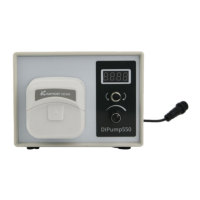
The Kamoer DIPump-KK300 V2 is an intelligent peristaltic pump designed for precise fluid handling. It offers a range of features for both basic and advanced applications, including various working modes, external control options, and calibration capabilities.
The DIPump-KK300 V2 is primarily used for pumping fluids with high accuracy. It supports both speed mode and flow mode, allowing users to control either the rotational speed of the pump head or the volumetric flow rate. The pump can operate in fully automatic cycle, semi-automatic cycle, or manual modes, providing flexibility for different operational needs.
In speed mode, the pump's rotational speed (RPM) can be set, along with running and stop times for cyclical operation. This mode is suitable for applications where a consistent pumping speed is required, and the volume dispensed is a function of time.
In flow mode, the pump's flow rate (ml/min) can be set, along with the total amount to be added (ml) and a stop time (seconds). This mode is ideal for applications requiring precise volumetric dispensing.
The pump features directional control, allowing it to rotate both clockwise and counterclockwise. The direction can be switched when the pump is stopped and started again.
A suction back function is included to prevent liquid from dripping at the outlet of the pump tube after operation. This involves the pump sucking back for a specified duration after stopping.
The device also supports external control through various interfaces, including 485 communication and analog signals (0-5V, 0-10V, or 4-20mA). A foot switch can also be connected for start/stop control.
The DIPump-KK300 V2 is designed for user-friendly operation with a combination of a digital display, rotary encoder, and directional control buttons.
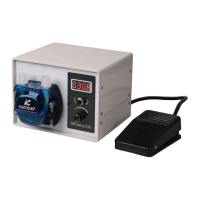
Digital Display: The 4-digit LED display shows various information such as speed, flow, flow rate, and time.
Rotary Encoder: The rotary encoder is the primary interface for adjusting speed and time settings.
Directional Control Buttons: Dedicated buttons control the rotation direction of the pump. The left button sets counterclockwise rotation, and the right button sets clockwise rotation. Direction changes only take effect when the pump is stopped and restarted.
Working Modes Configuration:
Function Menu: A comprehensive function menu allows customization of various parameters:
The manual emphasizes proper installation, use, and maintenance for warranty validity.
Warranty Conditions: The warranty is valid only if the device is correctly installed, used, and maintained according to the manual. Man-made faults or damages are not covered.
Warranty Coverage: Within one year of purchase, the company provides free warranty service for damages caused by manufacturing processes or components. This includes free repair, replacement of faulty spare parts, or replacement of the product if unrepairable. Shipping costs for repairs are not included.
Non-Warranty Coverage (Fee-Based Repairs): Several factors void the free warranty, leading to fee-based repairs:
Consumables: The pump tube is explicitly listed as a consumable part, indicating it will require periodic replacement and is not covered under free warranty.
Calibration: The "C004" flow calibration function allows users to maintain the accuracy of the pump over time by adjusting for wear or changes in tubing characteristics. This is a crucial maintenance feature for ensuring consistent performance.
Factory Reset: The "C011" factory reset function can be used to revert all settings to their original state, which can be helpful for troubleshooting or preparing the pump for a new application.
The DIPump-KK300 V2 is designed for reliable operation, but adherence to the specified operating conditions and regular checks of consumables like pump tubing are essential for long-term performance and to ensure warranty validity.
 General
| Brand | Kamoer |
|---|---|
| Model | DIPump-KK300 V2 |
| Category | Water Pump |
| Language | English |

 To Next Page