Need help?
Do you have a question about the Kamoer F4 PRO and is the answer not in the manual?
Defines terms, conditions, and scope of warranty service provided.
Lists items and conditions not covered by the free warranty.
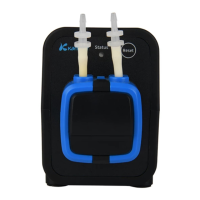
Identifies and describes the key physical components and features of the F4 PRO dosing pump.
Explains how to download the Kamoer Remote app for iOS and Android devices.
Details the process for registering a user account, emphasizing region selection.
Guides users on how to access tutorials, user manuals, and FAQs within the app.
Step-by-step instructions for connecting the F4 PRO to the cloud via Wi-Fi and the Kamoer Remote App.
Explains how to bind the dosing pump to your account and how to remove it.
Provides crucial notes for proper operation, including Wi-Fi support and device placement.
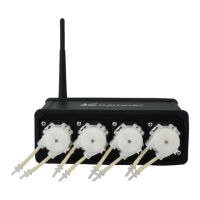
The Kamoer F4 PRO is a stand-alone, remote-controlled 4-channel dosing pump designed primarily for aquarium enthusiasts. Its main purpose is to precisely and quantitatively add various aquarium additives, such as calcium (Ca), magnesium (Mg), and KH supplements, to maintain optimal water quality. By automating this crucial task, the F4 PRO significantly reduces the manual workload for users, allowing them more time to enjoy their aquariums.
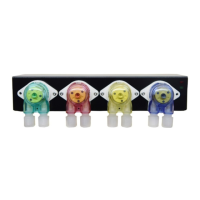
One of the key design features of the F4 PRO is its use of plastic gears to directly drive the pump heads. This mechanical choice enhances both the accuracy and precision of the dosing process, while also eliminating issues like slip and rust that can affect other pump designs. Each of the four channels is visually distinct, featuring a unique color housing that corresponds to a similarly colored connecting tube. This color-coding system makes it easy for users to identify and manage each channel, adding a touch of modern aesthetics to its functionality. The pump also incorporates highly reliable threaded joints, which are crucial for ensuring a leak-free operation, a common concern in fluid handling systems. Standard long-life pump tubing is used, contributing to the device's durability and reducing the frequency of replacements.
The F4 PRO offers modern connectivity and control, supporting both iOS and Android devices through a dedicated mobile application. This app-based control allows users to manage and monitor their dosing schedules remotely, providing convenience and flexibility. To get started, users need to download the "Kamoer Remote" app from the App Store (for Apple devices running iOS 9.1 and above) or Google Play (for Android devices running Android 4.4 and above). The app can be found by scanning a QR code provided on the packing box or within the manual, or by searching for "Kamoer Remote."
Setting up the F4 PRO involves registering an account within the app. Users can either scan a QR code on the device to automatically select the correct region or manually choose their region. It's important to select the correct region, as an incorrect choice can lead to network configuration failures. Account registration can be done via mobile phone or email, following the in-app prompts. The app also provides a "Tutorial" section, accessible from the device list page, which includes a user manual and frequently asked questions specifically for the F4 PRO, helping users troubleshoot and understand the device better.
Connecting the F4 PRO to the cloud is a straightforward process. Upon first powering on the device, the red status indicator will flash slowly. This indicates that the pump is ready to be connected to the cloud via a wireless router. Users must ensure their wireless router is connected to the internet and that their mobile phone is connected to the router's 2.4G Wi-Fi hotspot, as the device does not support 5G Wi-Fi. Within the Kamoer Remote App, users log in, click the "+" icon, select "Add Device," and then choose "F4 PRO Dosing Pump" from the list. After entering the router's Wi-Fi password, users press and hold the Reset button on the device for more than 6 seconds, release it, and then click "Next" in the app. The app will then guide the user through the network configuration based on the flashing pattern of the red status indicator. If the light flashes rapidly and continuously, it indicates configuration by router. If it flashes slowly (on for 0.2 seconds and off for 2 seconds), it indicates configuration by AP. Once successfully connected, the app will confirm the connection, and the red status indicator will remain steadily on, signifying that the dosing pump is bound to the user's account and connected to the cloud.
The F4 PRO also offers flexibility in binding. If the dosing pump is already connected to the cloud via a wireless router, and the mobile phone is connected to the same wireless network, the app will display the locally available dosing pump. Users can then directly click the "Bind" button next to the pump in the scanned list to bind it. Should a user need to unbind the device, they can long-press the corresponding device icon on the device list page in the app, and a "Remove" icon will appear, allowing them to unbind the pump.
Maintenance of the F4 PRO is designed to be user-friendly. The device is built with durable components, including the long-life pump tubing, which minimizes the need for frequent replacements. However, users should be aware that consumable and wearing parts, such as the pump tube, connectors, and connecting tubes, are not covered under the free warranty after a certain period and may require replacement over time. Regular checks of these parts are recommended to ensure optimal performance.
For proper operation and longevity, several important notes should be considered. Users should always use the product's original power adapter and ensure the device operates within the specified working environment conditions. As mentioned, the F4 PRO exclusively supports 2.4G Wi-Fi networks. The physical placement of the dosing pump is also important: it should be positioned reasonably to ensure that the height difference between the inlet and the outlet is within 0.5 meters. To maximize efficiency and prevent issues, the connection pipe for the liquid inlet should be kept as short as possible, while the outlet connection pipe should be suspended above the target container. Finally, it is crucial for users to carefully check that the inlet and outlet connections are oriented in the correct direction to avoid operational problems. Adhering to these guidelines will help ensure the F4 PRO operates effectively and reliably for an extended period.
 General
| Channels | 4 |
|---|---|
| Adjustable Speed | Yes |
| Calibration | Yes |
| Accuracy | ±1% |
| Accuracy (Volume) | ±1% |
| Power Supply (Current) | 1.5A |
| Operating Temperature | 5-40°C |
| Power Supply (Voltage) | 24V |
| Communication Interface | RS485 |
| Weight (Alternative) | 1200 g |
| Connectivity | WiFi |
| Control | Manual |

 To Next Page