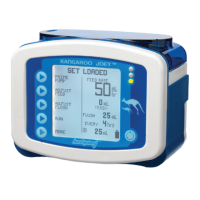
KANGAROO E-PUMP INSTRUCTIONS FOR FEED/FLUSH ONLY
(adapted from Kangaroo ePump Instructions for Use Manual)
CC.12.10A BC Children’s Hospital Child & Youth Health Policy and Procedure Manual Page 2 of 2
May 1
st
, 2012 Refer to online version – Print copy may not be current – Discard after use
o Press RUN to restart pump at anytime
8. To clear feed totals (“mL FED,” “BOLUSES FED,” “mL FLUSH”) without clearing the pump settings, do the
following:
i. while pump RUNNING
ii. Press HOLD
iii. Press CLEAR VOLUME
iv. the pump will then show LOAD A SET or, if the Pump Set is already loaded, it will show SET
LOADED
9. KTO: Keep tube open, this feature can be programmed to keep tube from occluding. Settings 5 – 240 minutes in
5 minute intervals. Approximately 1 mL fluid in 1 hour.
10. Lock Feature: While pump is running hold 3
rd
button until the lock icon appears
o Unlock: Hold 3
rd
button until lock icon disappears
11. More: Options
o Buzzer/Alarm Buzzer increase or decrease volume
o History/maximum of 72 hour past history
o Languages/do not adjust
o Continuous/Intermittent. Most feeds in hospital will be Continuous
12. Rinse out Bag, use pump to rinse the bag. Use the AUTO PRIME or HOLD TO PRIME options.
Error/Warning/Information Screens and Troubleshooting
o HOLD ERROR: appears if the pump has been in HOLD mode, without input, for more than 10 minutes.
o ROTOR ERROR: appears during RUNNING or PRIMING, when the pump has detected an unusual
operating condition for the rotor. Generally results from a problem with the Pump Set tubing around the
rotor. Check that the Pump Set is not damaged, and re-load the tubing. Press CONTINUE.
o FLOW ERROR: Downstream occlusion: occlusion in pump-patient line below pump
o FEED OR FLUSH ERROR: Upstream occlusion: Empty Bag or occlusion in bag-pump line above pump
o PUMP SET DISLODGED: Pump Set not properly loaded in pump
o BATTERY LOW: Indicates that the battery must be recharged immediately.
o SYSTEM ERROR: General Error caused by many factors: return pump to Biomedical Engineering
o FEEDING COMPLETE information screen appears after completion of the programmed feeding. Turn
pump off.
o The Pump Set usage warning indicator (SET USE >24 HRS) will blink on the RUNNING screen if a Pump
Set has been used for 24 or more hours. It is recommended to replace Pump Sets after this length of
usage. This icon is only an informational message and does not require immediate action.
o If troubleshooting reveals a problem with pump supplies (i.e. bag, tubing), complete product complaint
form and retain affected supplies to ensure follow-up by manufacturer



 To Previous Page
 Loading...