EasyManua.ls Logo

Kangaroo Joey - User Manual

Kangaroo Joey
2 pages
Print Icon
To Next Page IconTo Next Page
Loading...
© 2018 Cardinal Health. All Rights Reserved. CARDINAL HEALTH, the Cardinal
Health LOGO are trademarks of Cardinal Health and may be registered in the
US and/or in other countries. 01/2018 - H9818 - WF#2098506
15 Hampshire Street 800.962.9888
Mansfield, MA 02048 508.261.8000
Kangaroo
TM
Joey
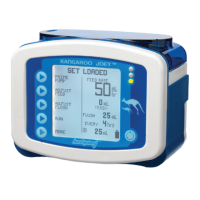
Enteral Feeding Pump
QUICK
REFERENCE
GUIDE
FLUSHING MODE
OPERATION
Programming and Menu
Selection Buttons
Power Button
SYMPTOM PROBABLE CAUSE CORRECTIONS
Hold Error
Pump in Holding mode
for more than 10 minutes.
Press Continue to return to Holding screen, or press and hold the
Power button to turn off. Several options are available from the
Holding screen, such as Run and Adjust Settings.
Flow Error
Occlusion in pump-patient
line (downstream occlusion).
Check for and correct the occlusion in the line between pump and
patient. Replace Pump Set if error can’t be resolved. Check the valve
pocket in the pump set loading area for dampness or dirt.
Feed Error
Empty bag or occlusion
in bag-pump line
(upstream occlusion).
Check for empty bag and refill, or check for and correct the occlusion
in the line between the pump and feed bag. Replace Pump Set if error
can’t be resolved.
Pump Set
Use >24 Hrs
Empty bag or occlusion
in flush line.
Check for empty bag and refill, or check for and correct the occlusion
in the line between the pump and flush bag. Replace Pump Set if error
can’t be resolved.
Flow Error
Use > 24 Hrs
Pump Set in use beyond
recommended length of time.
Informational warning message blinks on upper left of screen. Its
recommended that the Pump Set be replaced.
Pump Set
Dislodged
Pump Set not properly
loaded to pump.
Check black ring retainer (MISTIC) and valve; reload Pump Set and
restart pump to continue. Replace Pump Set if error can’t be resolved.
Battery Low
Battery charge too low.
Immediately plug pump into A/C outlet to recharge battery and to
provide power for pump.
Rotor Error
Pump Set tubing not
properly loaded on rotor,
or other unusual rotor
operating condition.
Check that the tubing is loaded on the rotor and that it’s not
damaged, torn, etc. Reload tubing or replace Pump Set.
System Error
General error caused by
many factors. See Manual
for error list.
Power down pump and attempt restart to clear error. Call customer
service, 800.962.9888, with screen code if error
can’t be resolved.
For additional operating instructions and information, see the operating manual
for the Kangaroo™ Joey Enteral Feeding Pump "Flushing Mode Operation."
Status LEDs
Red: Error
Yellow: Hold/Pause
Green: Normal Operation
Below are some of the probable causes of alarm conditions and how to correct them.
Question and Answer IconNeed help?

Do you have a question about the Kangaroo Joey and is the answer not in the manual?

Summary

Troubleshooting Alarm Conditions

Hold Error

Pump in Holding mode for more than 10 minutes. Press Continue or Power Off.

Flow Error (Downstream Occlusion)

Occlusion in the pump-patient line. Check/correct occlusion, check valve pocket.

Feed Error (Upstream Occlusion)

Empty bag or occlusion in the bag-pump line. Refill bag, check/correct occlusion.

Pump Set Use > 24 Hrs

Pump Set in use beyond recommended time. Informational warning, recommended replacement.

Pump Set Dislodged

Pump Set not properly loaded to pump. Check retainer, reload set.

Battery Low

Battery charge too low. Plug into AC outlet to recharge.

Rotor Error

Tubing not loaded on rotor or other unusual condition. Reload tubing or replace Pump Set.

System Error

General error, consult manual. Power cycle, call service with code.

Battery Operation

General Instructions

Priming the Pump

Setting the Feed Rate

Setting the Flush Rate

Repriming the Pump After Feed Bag Empties

Changing Rate or Clearing Volume

Overview

The Kangaroo™ Joey Enteral Feeding Pump is a medical device designed for administering enteral nutrition and hydration. It features a user-friendly interface with a clear display and intuitive controls, making it suitable for both clinical and home care settings. The pump is equipped with status LEDs (Red for Error, Yellow for Hold/Pause, Green for Normal Operation) to provide immediate visual feedback on its operational status. Programming and menu selection buttons, along with a power button, allow for easy navigation and control.

Function Description:

The primary function of the Kangaroo™ Joey pump is to deliver enteral formula and flush solutions at precise rates and volumes. It supports both continuous feeding and intermittent flushing, ensuring patients receive adequate nutrition and hydration while maintaining tube patency. The pump is capable of operating on both AC power and a rechargeable battery, providing flexibility for patient mobility and ensuring uninterrupted feeding during power outages.

Usage Features:

  • Battery Operation: The pump automatically switches to battery power when unplugged from an AC outlet. The battery recharges when plugged into an AC wall outlet, ensuring continuous operation.
  • General Instructions:
    • Setup: Users should fill or spike the feeding container and water bag before setting up the pump.
    • Power On: The pump is turned on by pressing the Power button.
    • Accuracy: For optimal accuracy, the fluid line in the feeding set bag must be positioned 6 inches above the top of the feeding pump when initiating a feeding cycle.
    • Settings Retention: The pump offers options to "Keep Settings" or "Clear Settings." "Keep Settings" is useful for day-to-day use with the same feeding regimen, streamlining setup for recurring treatments.
    • Set Loading: The pump set should be loaded according to the provided diagram, taking care not to overstretch the tubing to prevent flow issues.
  • Priming the Pump:
    • Access Priming Options: Press "Prime Pump" to access the priming menu.
    • Auto Prime: The "Auto Prime" function automatically primes both the feed and flush lines. The pump initiates priming with the flush line, and the formula stops before reaching the end of the feeding line.
    • Manual Feed Line Prime: Users can press and hold "Hold to Prime Feed" to prime the feed line down to the connector at the end of the pump set.
    • Completion: After priming, press "Done."
  • Setting the Feed Rate:
    • Access Feed Rate: Select "Adjust Feed," then "Feed Rate."
    • Rate Adjustment: Use the left-side buttons to program the feed rate from 1 to 400 mL in increments of 1 mL.
    • Confirmation: Select "Enter" once the desired rate is set.
    • Volume to Be Delivered (VTBD): This is an optional feature for stopping the pump and alarming after a specific amount of formula is delivered. Users can select "Feed VTBD" and program the volume from 1 to 3000 mL in increments of 1 mL.
    • Initiate Feeding: Select "Done," then "Run" to start the feeding. A small drop icon will scroll on the screen, indicating active operation.
  • Setting the Flush Rate:
    • Access Flush Volume: Select "Adjust Flush," then "Flush Volume."
    • Volume Adjustment: Set the volume of water per flush cycle from 10 to 500 mL in increments of 1 mL.
    • Confirmation: Select "Enter."
    • Flush Interval: Define the time interval between the start of each flushing cycle from 1 to 24 hours in increments of 1 hour.
    • Confirmation: Select "Enter," then "Done."
    • Initiate Flushing: Select "Run" to start the flushing. A small drop icon will scroll on the screen.
  • Repriming After Bag Empties:
    • Error Trigger: An empty pump set bag will trigger a "Feed Error" screen.
    • Refilling: The pump set bag can be refilled to continue feeding.
    • Patient Disconnection: Disconnect the feeding line from the patient.
    • Refill Bag: Refill the bag with formula.
    • Continue Operation: Press "Continue" to resume pump running.
    • Repriming Steps: Press "Hold," then "Adjust Settings," then "Prime Pump." Press "Hold to Prime Feed" to prime the feed line down to the connector at the end of the pump set until formula reaches the stepped connector.
    • Completion: Press "Done," then select "Run."
  • Changing Rate or Clearing Volume:
    • Hold: Select "Hold" to pause operation.
    • Clear Volume: Select "Clear Vol" to reset the delivered volume.
    • Adjust Settings: Select "Adjust Settings" to modify any parameters.
    • Resume Operation: Select "Run" to return to normal operations.

Maintenance Features:

The device manual provides a comprehensive troubleshooting guide for common alarm conditions, enabling users to address issues promptly and ensure continuous operation.

  • Hold Error: If the pump remains in "Holding" mode for more than 10 minutes, users can press "Continue" to return to the "Holding" screen or press and hold the "Power" button to turn off the pump. Options like "Run" and "Adjust Settings" are available from the "Holding" screen.
  • Flow Error (Downstream Occlusion): This indicates an occlusion in the line between the pump and the patient. Users should check and correct the occlusion. If the error persists, replacing the Pump Set is recommended. The valve pocket in the pump set loading area should also be checked for dampness or dirt.
  • Feed Error (Upstream Occlusion/Empty Bag): This alarm signifies an empty bag or an occlusion in the line between the bag and the pump. Users should check for an empty bag and refill it, or locate and correct the occlusion. If the issue cannot be resolved, the Pump Set should be replaced.
  • Pump Set Use > 24 Hrs (Flow Error): An informational warning message will blink on the upper left of the screen, indicating that the Pump Set has been in use beyond the recommended 24-hour period. It is recommended to replace the Pump Set.
  • Pump Set Dislodged: If the Pump Set is not properly loaded, users should check the black ring retainer (MISTIC) and valve, then reload the Pump Set and restart the pump. If the error persists, the Pump Set should be replaced.
  • Battery Low: This indicates that the battery charge is too low. Users should immediately plug the pump into an A/C outlet to recharge the battery and provide power.
  • Rotor Error: This suggests that the Pump Set tubing is not properly loaded on the rotor, or there's another unusual rotor operating condition. Users should check that the tubing is loaded correctly and is not damaged. Reloading the tubing or replacing the Pump Set is recommended.
  • System Error: This is a general error that can be caused by various factors. Users should power down the pump and attempt to restart it to clear the error. If the error persists, customer service should be contacted, providing the screen code for diagnosis.

Important Note: Pump sets should not be reused after 24 hours of initial usage to ensure patient safety and optimal pump performance.

For comprehensive operating instructions and additional information, users are directed to consult the operating manual for the Kangaroo™ Joey Enteral Feeding Pump, specifically the "Flushing Mode Operation" section.

Kangaroo Joey Specifications

General IconGeneral
TypeEnteral Feeding Pump
Battery Life18 hours at 125 mL/hr
Power SourceRechargeable battery or AC adapter
Battery TypeLithium-ion
Battery Life at Specific Rate18 hours at 125 mL/hr
Flow Rate Range1-400 mL/hr
Accuracy+/- 5%
ModesContinuous, Bolus
Occlusion Pressure SettingsHigh, Medium, Low
Dimensions Alternative4.1 x 5.1 x 2.1 inches
AlarmsOcclusion, Low battery
Weight Alternative0.95 lbs

Related product manuals