EasyManua.ls Logo

Kantronics KPC-2 - Page 43

Default Icon
86 pages
Print Icon
To Next Page IconTo Next Page
To Previous Page IconTo Previous Page
Loading...
Performing
a
Loop-Back
Test
۳
KPC-4
Only
This
test
is
to
verify
that
your
KPC-4
is
functional,
and
that
the
wiring
to
your
computer
is
correct.
1.
Remove
the
KPC-4
from
its
case.
(See
the
Assembly
and
Disassembly
section.)
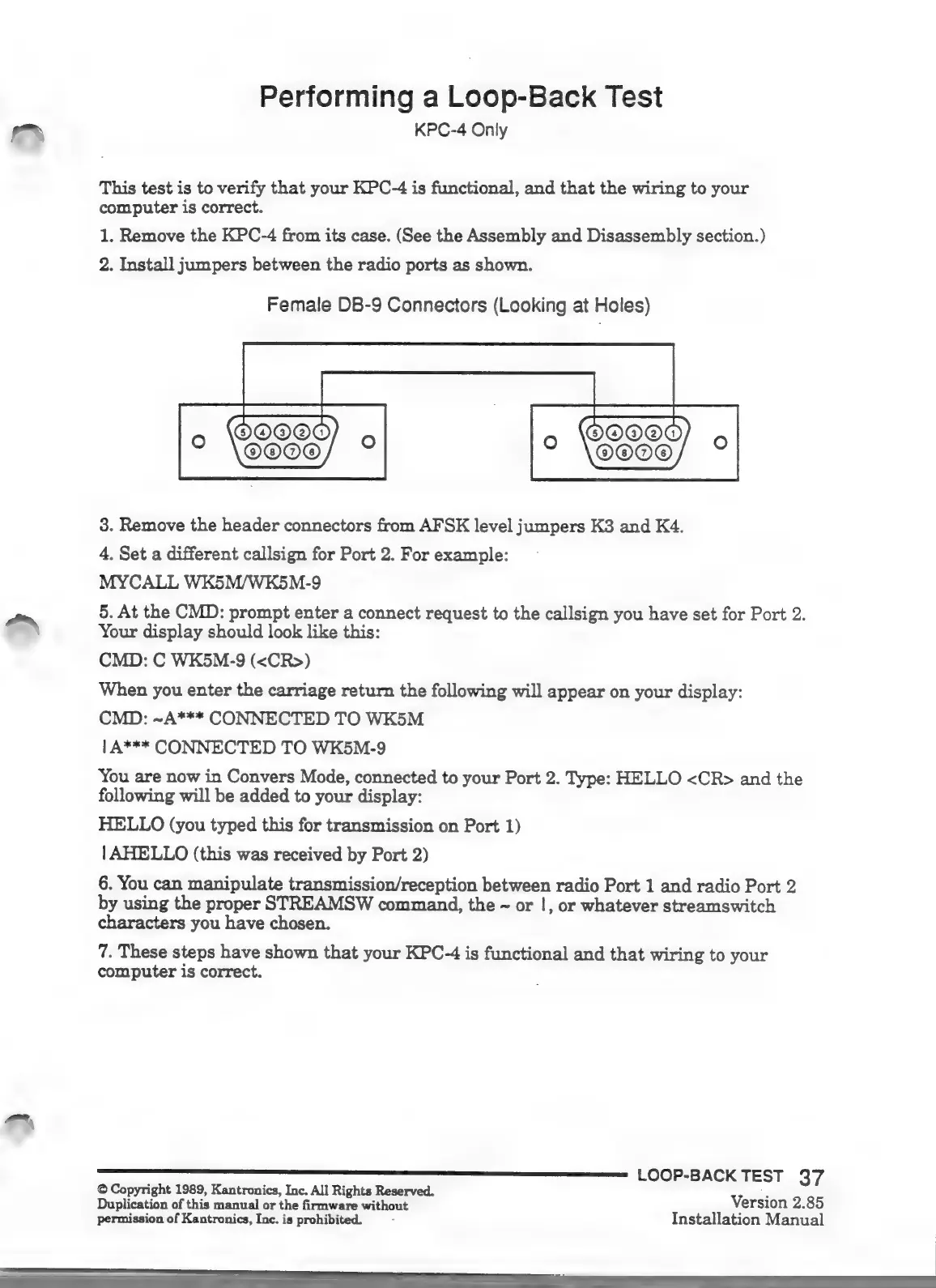
2.
Install
jumpers
between
the
radio
ports
as
shown.
Female
DB-9
Connectors
(Looking
at
Holes)
3.
Remove
the
header
connectors
from
AFSK
level
jumpers
K3
and
K4.
4.
Set
a
different
callsign
for
Port
2.
For
example:
MYCALL WK5M/WK5M-9
5.
At
the
CMD:
prompt
enter
a
connect
request
to
the
callsign
you
have
set
for
Port
2.
دم󰾯
Your
display
should
look
like
this:
CMD:
C
WK5M-9
(«CR»)
When
you
enter
the
carriage
return
the
following
will
appear
on
your
display:
CMD:
-A***
CONNECTED
TO
WK5M
|
A***
CONNECTED
TO
WK5M-9
You
are
now
in
Convers
Mode,
connected
to
your
Port
2.
Type:
HELLO
<CR>
and
the
following
will
be
added
to
your
display:
HELLO
(you
typed
this
for
transmission
on
Port
1)
|
AHELLO
(this
was
received
by
Port
2)
6.
You
can
manipulate
transmission/reception
between
radio
Port
1
and
radio
Port
2
by
using
the
proper
STREAMSW
command,
the
-
or
|,
or
whatever
streamswitch
characters
you
have
chosen.
7.
These
steps
have
shown
that
your
KPC-4
is
functional
and
that
wiring
to
your
computer
is
correct.
O
Copyright
1989,
Kantronics,
Inc.
All
Rights
Reserved.
8
Duplication
of
this
manual
or
the
firmware
without
Version
2.85
permission
of
Kantronics,
Inc.
is
prohibited.
Installation
Manual

Other manuals for Kantronics KPC-2

Related product manuals