3
Network Configu
ration
Network Configuration
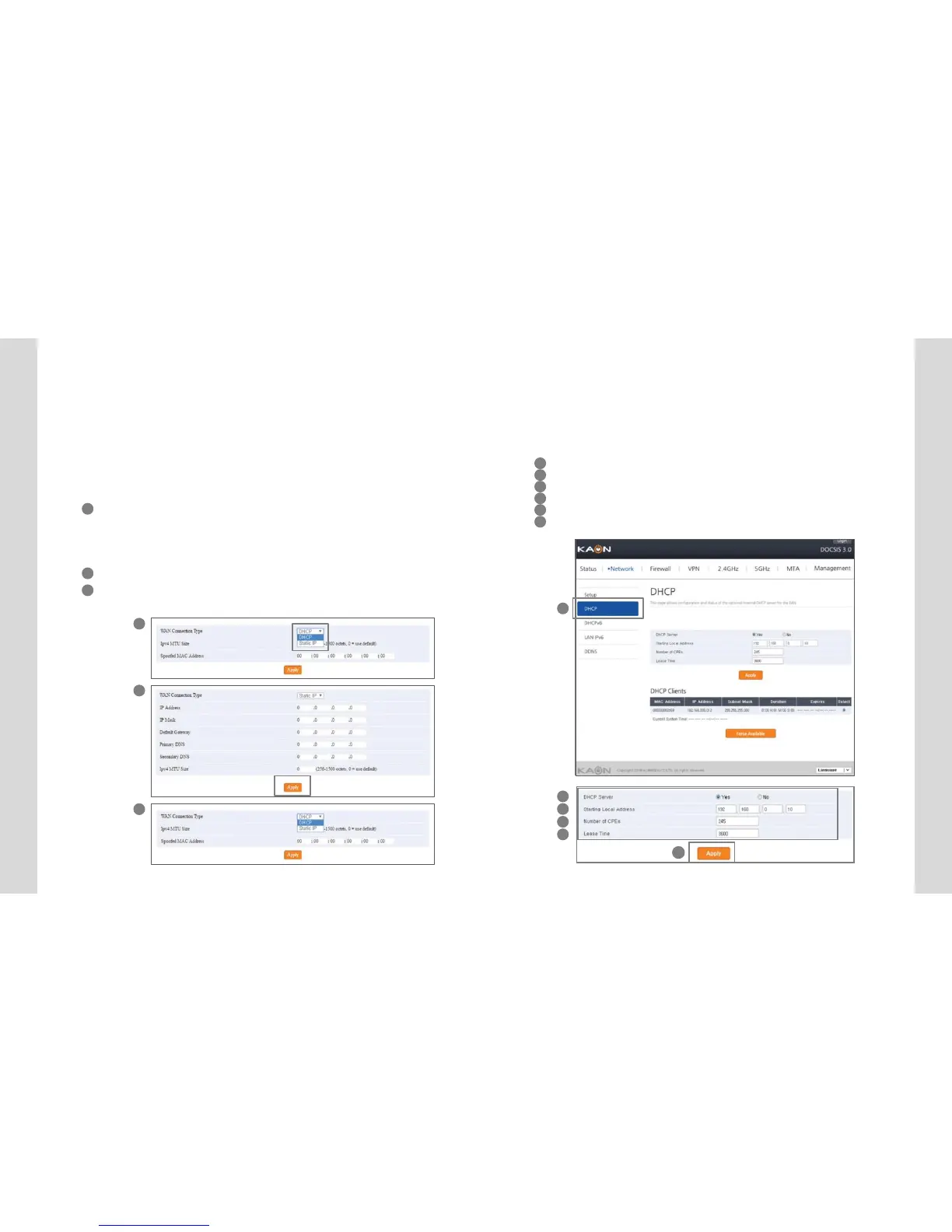
If ISP uses DHCP, select “DHCP” for WAN Connection Type.
If ISP uses static IP addressing, select “Static IP” for WAN Con-
nection Type, and enter the information(GW, Subnet Mask, DNS)
provided by ISP.
>>WANsetting
1 WAN connectionType.
Select DHCP or Static IP to be applied.
If DHCP is selected, IP assigned automatically from DHCP server can be used
(recommended).
If Static IP is selected, IP generated by user setting can be used.
2 When Static IP is selected, enter exactly the IP into the input text fields.
3 Click “Apply” button on the bottom of the page after inserting all data into the
each inputentry.
1
1
2
3
4
5
2
3
4
DHCP
Server Configu
ration
DHCP Server Configuration
If the DHCP server is activated, the devices connected to the equip-
ment can get assigned automatically a private IP address.
1 Select DHCP on theNetwork menu.
2 If you select “Yes”radio button, the DHCP Serveris activated.
3 Enter the starting IP address available in the DHCP Server.
4 Enter the quantity of IP address to be assigned.
5 Enter the lease time. (Default recommended)
6 Click ”Apply” button to setthe information to be applied.
7 8
6


 To Next Page