9 10
Wireless Configu
ration
(Radio)
Wireless Configu
ration
(Primary
Network)
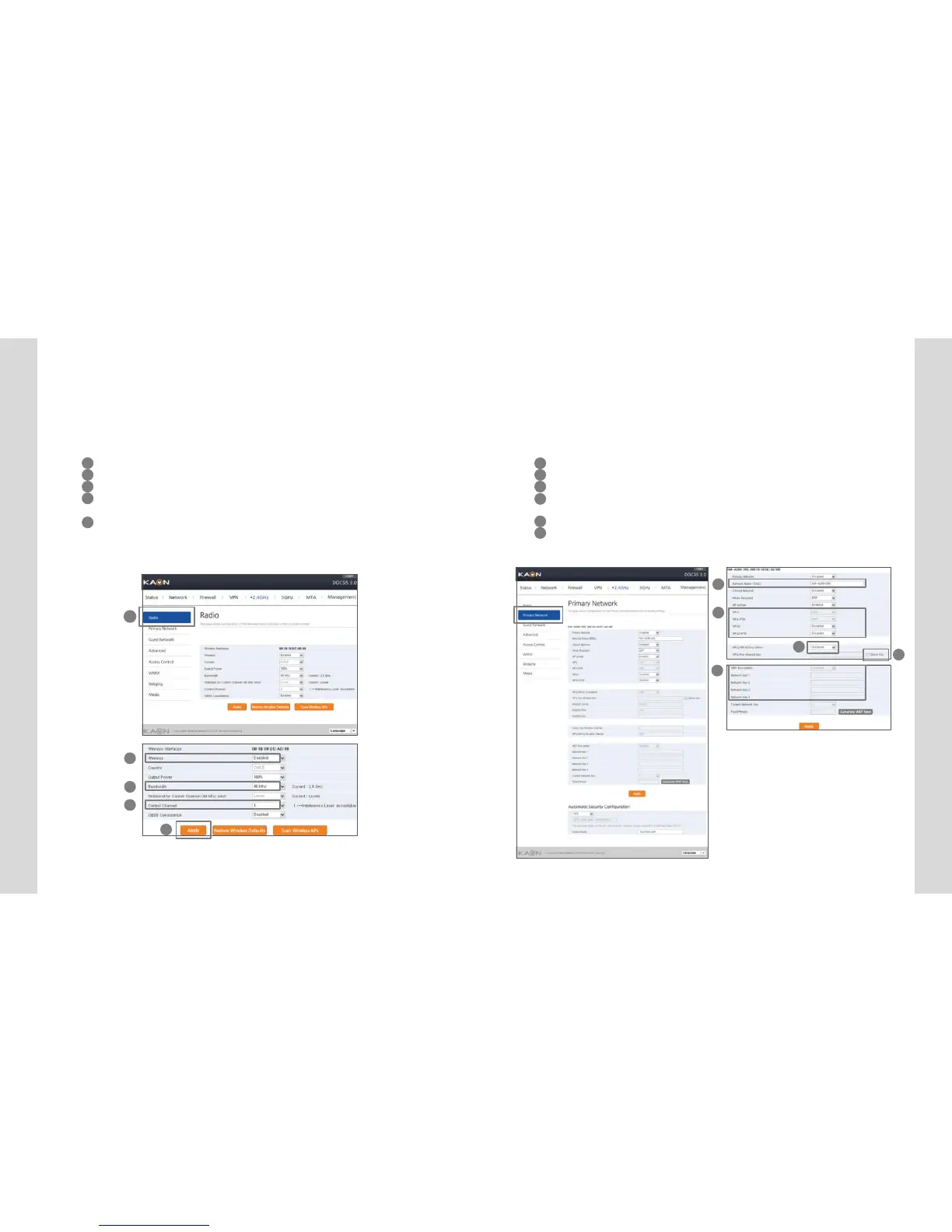
Wireless Configuration
(Radio)
5 6
Set whether wireless, and the default information. The default set-
tingsrecommended.
1 Select “Radio” on wirelessinterface.
2 If you select “Enabled” on wireless, Wireless isactivated.
3 Set the usable channel bandwidth (Defaultrecommended).
4 Usable to set whether automatic or certain channel.Performance may be affected
by the degree of wireless congestion on a certain channel.
5 Click ”Apply” button to setthe information to be applied.
1
2
3
4
5
Wireless Configuration(Primary Network)
Youset SSID and authentication method for connection to WiFi
network.
1 Set SSID on connecting WiFinetwork.
2 Select the applicable encryption method for the access authentication.
3 Select the applicable type of AES or TKIP+AES upon the access authentication.
4 “Show Key” Check-box is checked, the inserted password is available to be read
on the textbox.
5 4 WEP keys are supported, and at least 1 key is usable.
6 Click ”Apply” button to setthe information to be applied.
1
2
3
4
5


 To Next Page