11
Status
(Security)
7
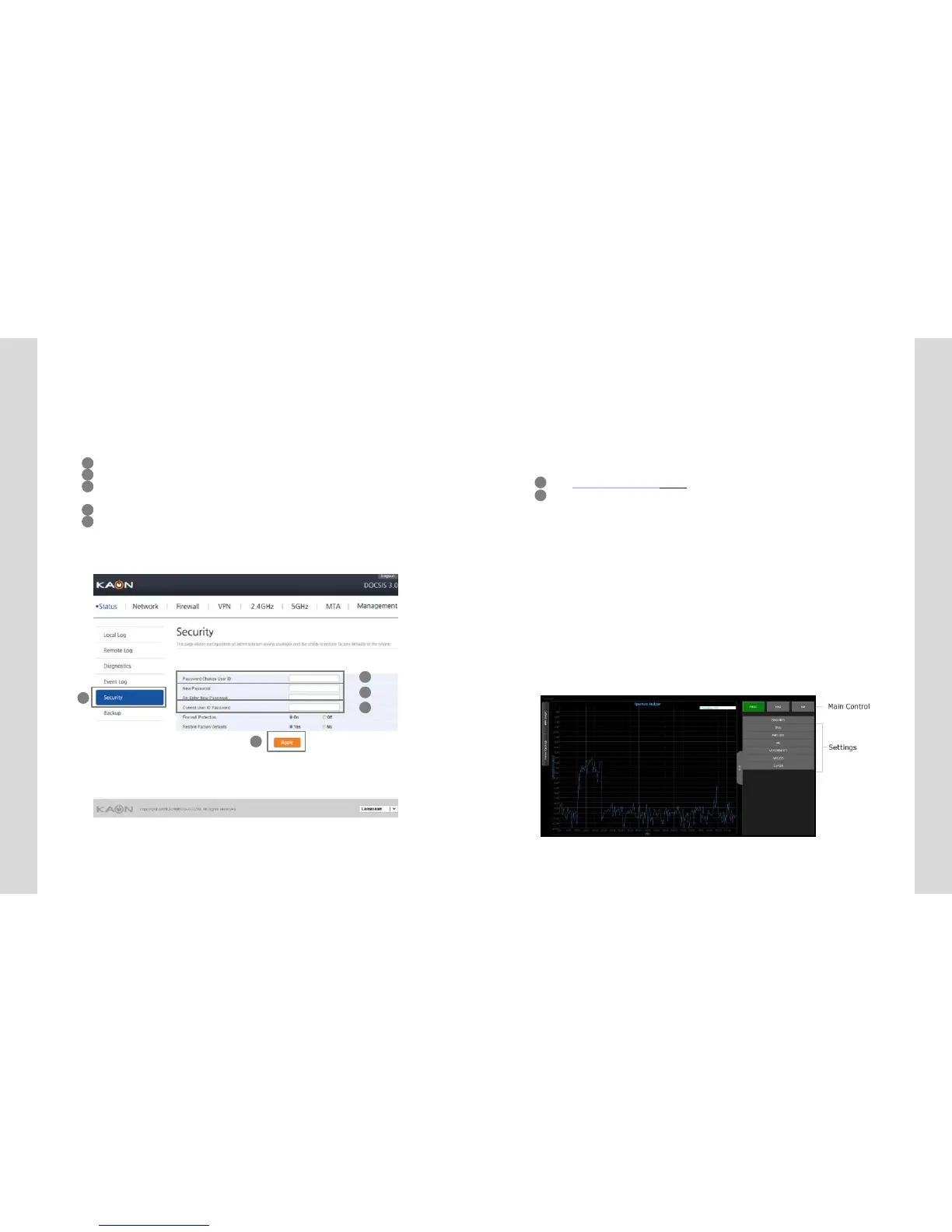
Status (Security)
You set the account information to enable to access to the
equipment.
1
5
2
3
4
12
Spec
trum Analyzer (DS/US)
8
Spectrum Analyzer (DS/US)
Spectrum Analyzer enables the technicians to configure
an interactive GUI to understand about characteristics on
the CM, it works normally as they utilize a regular
spectrum analyzer.
1 ● Main Control
2 - PRESET button : Resets all the settings back to its default values.
3 - HOLD button : Stops the spectrum analyzer from running.
4 - RUN button : Starts the spectrum analyzer.
5 ● Settings
- FREQUENCY : Specifies the frequency (center, start, or stop) to monitor
in terms of Hz.
- SPAN : Specifies how wide of a span to view in terms of Hz.
- AMPLITUDE : Sets the reference level (offset) of the input signal.
- BW : Bandwidth
- MEASUREMENTS
1 Type http://192.168.100.1:8080 on your web browser address bar.
2 Click ‘RUN” button to run spectrum analyzer.
1 Click “Status”menu on “Status” page.
2 Input userID.
3 Input new password on New Password text box and input theequal one to
Re-Enter New Password text box.
4 Input the password of current user ID to get the user authentication.
5 Click ”Apply” button to setthe information to be applied.


 To Next Page