EasyManua.ls Logo

KAR-TECH MINI REMOTE - User Manual

KAR-TECH MINI REMOTE
8 pages
Print Icon
To Next Page IconTo Next Page
Loading...
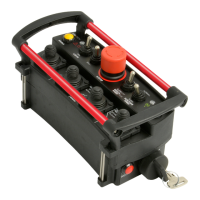
MINI REMOTE
TM
MINI REMOTE CONTROL SYSTEM
PRELIMINARY
USER MANUAL
July 20, 2005

Questions and Answers

  • N
    Nichole GrossAug 2, 2025
    What to do if all functions stop working on my KAR-TECH MINI REMOTE Remote Control?
    • M
      Maria VasquezAug 2, 2025
      If all functions are not working when a function switch is activated, there are several things to check: * Ensure the selector switch is in the correct position. * Verify that the unit power is on. * Confirm that the receiver power is on. * Inspect the vehicle wiring for power to the receiver. * Check the LED status display for the system status. * Ensure the vehicle's electrical circuit is properly grounded. * Examine the vehicle's hydraulic system.
  • S
    Sarah MooreAug 16, 2025
    How to fix intermittent function operation on KAR-TECH MINI REMOTE Remote Control?
    • J
      Jose ThompsonAug 16, 2025
      To address intermittent function operation: * Check for loose connections. * Check the LED status display for system status. * Inspect the receiver antenna for any damage and ensure it is properly connected. * Check the vehicle's hydraulic system.

Summary

Description of Mini Remote System

Installation Guide

Before Applying Power

Checks for power and ground polarity before connecting the remote control.

Routine Maintenance

Maintenance Precautions

General precautions to prevent injury during maintenance work on the system.

Troubleshooting

Troubleshooting Chart

Problem and solution guide for common issues with the system.

System Specifications

User Instructions and Compliance

KAR-TECH MINI REMOTE Specifications

General IconGeneral
BrandKAR-TECH
ModelMINI REMOTE
CategoryRemote Control
LanguageEnglish