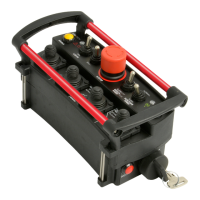
MINI REMOTE
4
TROUBLE SHOOTING CHART
PROBLEM
SOLUTION
1. No operation of all functions when a
function switch is activated.
1. Check to see if the selector switch is in
the proper position.
2. Check that unit power is on.
3. Check that receiver power is on.
4. Check vehicle wiring for power into the
receiver.
5. Check LED status display for system
status.
6. Check for proper grounding of vehicle's
electrical circuit.
7. Check vehicle's hydraulic system
2. Certain functions do not work
1. Check the wiring connection from the
receiver to the valve coil or the output
function that does not work.
2. Check LED status display for system
status.
3. Check vehicle's hydraulic system
4. Check vehicle's electrical system
3. Function operates intermittently.
1. Check for loose connections.
2. Check LED status display for system
status.
3. Check receiver antenna for any damage
and proper connection.
4. Check vehicle's hydraulic system


 To Next Page