457462_b 41GB
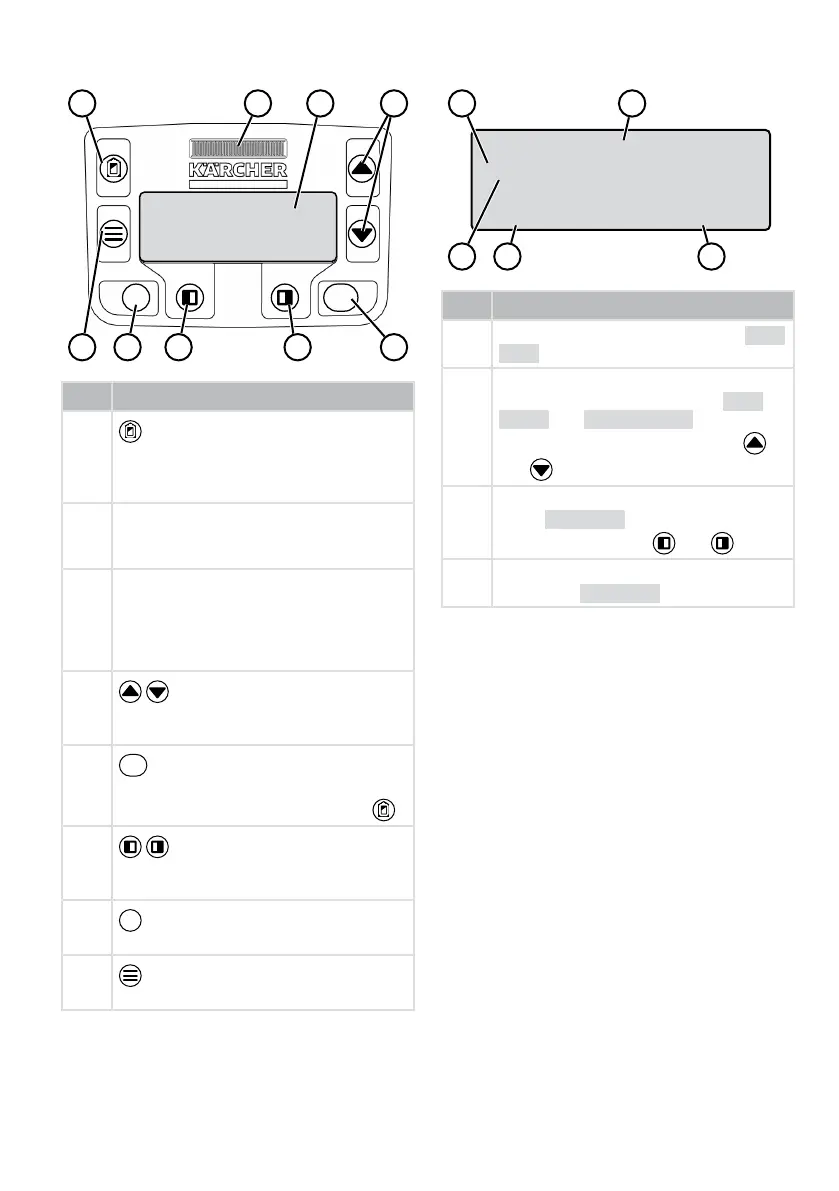
2.4 Control panel
No. Component
1
(home button): Cancel mowing, the
appliance returns to the charging sta-
tion. It starts on the next day automati-
cally again at the set mowing time.
2 Rain sensor: Registers if it rains (see
chapter 7.4 "Setting the rain sensor",
page54).
3 Display: Shows the current operating
status of the appliance, the name of the
selected menu, its menu items and the
functions to be selected. (see chapter
2.5 "Display", page41).
4
(arrow keys): Select the menu
items, increase and decrease numerical
values, select between settings.
5
(Start/Stop button): Start mowing
manually and stop mowing or immedi-
ately resume it again after pressing .
6
(function keys): Call up the func-
tion that is displayed directly above the
button on the display.
7
(On/Off button): Switch the appli-
ance on and off.
8
(menu button): Call up the main
menu.
2.5 Display
No. Display
1 Name of the selected menu (here: Main
Menu)
2 Menu items in the menu: Only two menu
items are ever displayed (here: Set-
tings and Information). Further
menu items can be displayed with
and .
3 Functions for the selected menu item
(here: Settings). Further functions
can be called up with and .
4 Asterisk for marking the displayed menu
item (here: Settings)


 To Next Page