Inspired by life
5. Automatically calibration for EvO Altus V01.02
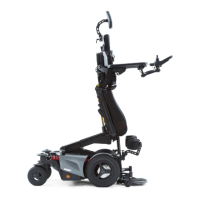
This version has an upgrade where the support wheels have two positions:
1. anti tipper functionality (the wheels are closer to the ground so they work as anti tipper as well)
2. support wheels up for driving up a ramp. (wheels are max. up to make driving on a ramp possible)
5.1
Key to enter automatic calibration mode (ACM)
To enter the automatic calibration mode you need to use the Calibration key tool. This tool is only available from
Karma Directly and is only to be used by trained and authorized persons.
this special key need to connected to the CxSM module, using Inhibit 7 port.
inhibit port 7 to connect Key to.
5.2
Prepare the chair for automatic calibration mode. (ACM)
Before we put the wheelchair in to automatic calibration mode (ACM), the seat needs to be positioned into the right
starting position. To do so, we use the single powered functions of each powered seat actuator.
step 1: negative tilt in flat (horizontal) position
step 2: tilt in flat (horizontal) position
step 3: backrest in vertical position (90°)
step 4: legrest in vertical position (90°)
if the wheels are in “maximum up” position to drive on a ramp, the driving speed will be automatically reduced
by 50%. for normal driving the user is forced to lower the support wheels into “anti tipper“ position. In this
position it is possible to drive at maximum speed.
5.3
Enter automatic calibration mode (ACM).
To get into the auto calibration mode, the switch of the key needs to be pushed when switching on the electronics of
the wheelchair. Keep it pushed until you see the normal screen in the joystick module display. Then let go of the key
switch. The wheelchair is now is auto calibration mode.
Make sure you have an elastic rubber band with you. You need this for the automatic calibration of the Wheelchair.
Now push the mode button to go to the seat function mode. If in the seat function mode, select “sit > stand ‘.
Now push the joystick forward and secure it with the rubber band.
The system will now automatically run through a certain sequence,
calibrating each seat actuator at a time.
When the automatic calibration is successfully finished a
long beep tone will sound.
If there is a failure during calibration, two short beeps will sound
make sure you push the switch until the normal driving screen has been shown. letting go too early or holding
too long after the normal screen is shown , will get you out of automatic calibration mode again. This time
windows is there to avoid unintended entering in to the automatic calibration mode.
make sure you push the switch until the normal driving screen has been shown. letting go too early or holding
too long after the normal screen is shown , will get you out of automatic calibration mode again. This time
windows is there to avoid unintended entering in to the automatic calibration mode.


 To Next Page