2HP-5HP VFX AERATOR MANUAL
10
3-PHASE STARTUP PROCEDURE
If a Kasco Control Panel is not provided, please refer to the following warnings:
When inherent overheating protection is not provided: use with approved motor control that matches
motor input in full load amperes with overload element(s) selected or adjusted in accordance with control
instructions. Utiliser un démarreur approuvé convenant au courant à pleine charge du moteur et dont les éléments
thermiques sont réglés ou choisis conformément aux instructions qui l’accompagnent.
When inherent overheating protection is provided: use with approved motor control that matches motor
input in full load amperes. See table below. Utiliser un démarreur approuvé convenant au courant à pleine charge
du moteur.
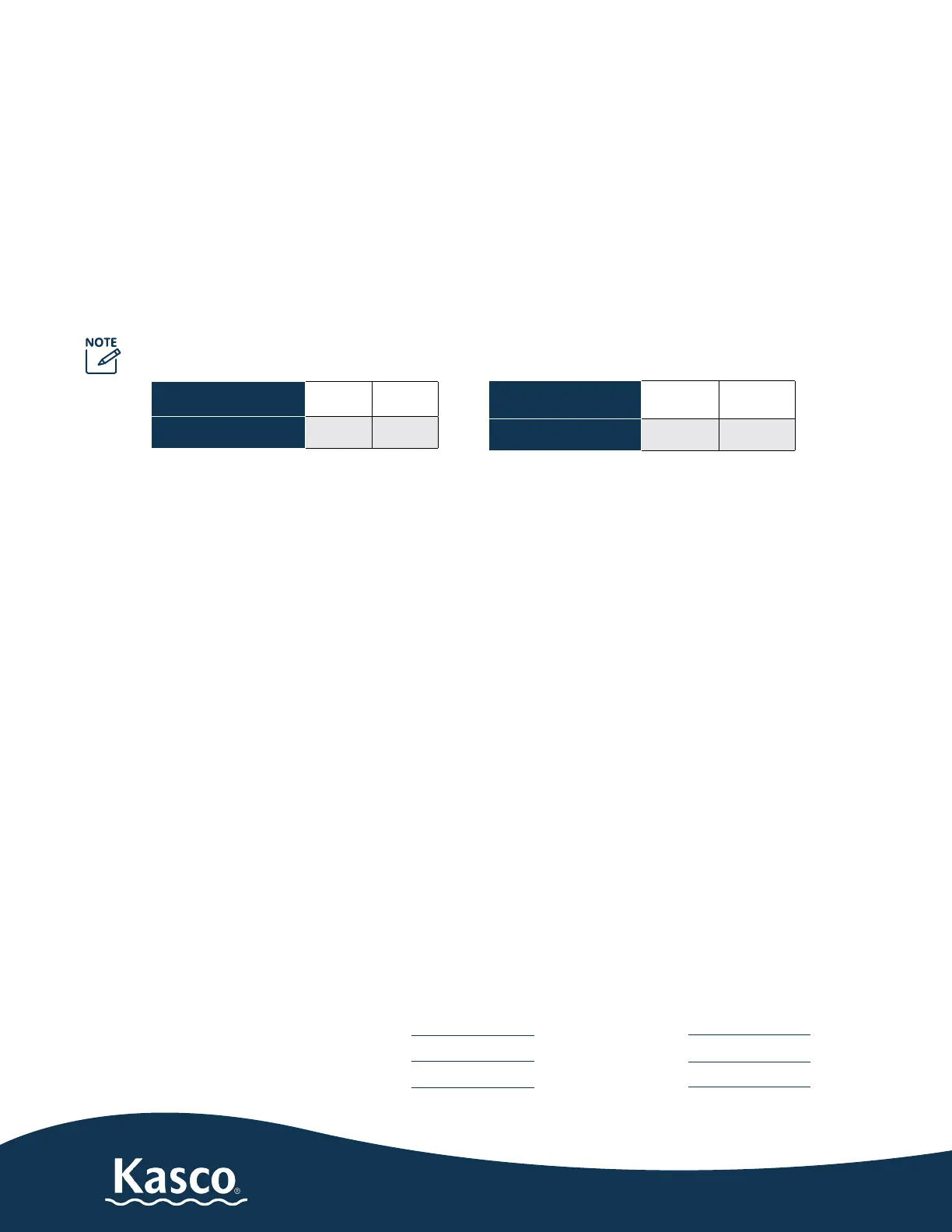
The motor input in full load amperes is the marked value or the service factor amperes shown on the
nameplate.
3-phase 208-230V 2.3VFX 5.3VFX
Full load amps
7.5 16
3-phase 460V 2.3HVFX 5.3HVFX
Full load amps 3.6 7.8
Control panels must be installed by a qualied electrician.
If unit is connected to a circuit protected by a fuse, use a time-delay fuse with this pump.
You must verify motor rotation before installing the unit in the water. 3-phase Kasco units will run in a
clockwise rotation when looking down at the propeller. Keep clear of the propeller while verifying rotation.
Air will be blowing out (up) of the pump chamber when rotating in the correct direction. If a Kasco 3-phase
panel is supplied, follow the instructions included with the panel in addition to the steps below.
Electrician:
1. Verify all screw terminal connections are tightened to specied torque setting prior to energizing the
panel.
2. Verify the electrical service (voltage and phase) matches the control panel and aerator nameplate rat-
ings. Refer to the control panel instructions and schematics for installation details.
3. Verify all switches, circuit breakers, and motor starters are in the OFF position
4. Connect electrical service to the control panel as shown in the electrical schematic that came with the
panel.
5. Connect the aerator power cord to the panel as shown in the electrical schematic.
6. Set the motor starter overload to the FLA rating on the aerator nameplate.
7. Pump rotation: The pump rotation is clockwise when looking down at the propeller. Apply power to the
control panel. Turn on the 15amp control circuit breaker, and motor starter.
8. Momentarily turn the Hand-O-Auto switch to Hand. This will run the aerator. Do not run the aerator for
more than a few seconds on shore. If the rotation is not correct, disconnect and lock out power from the
control panel. Swap any two of the aerator power cord wires in the panel. This will cause the motor to
reverse direction. Reapply power to the panel and verify the rotation is clockwise.
9. Once rotation is veried, with the power disconnected and locked out again, continue with installation of
the aerator on page 9.
L1-L2 Volts L1 Amps
L1-L3 Volts L2 Amps
L2-L3 Volts L3 Amps
Current unbalance should not exceed 5% at full load.
Record the following data while the
unit is operating in the water under
load:


 To Next Page
 Loading...