WHE E L B LANC E R
Increase by the value []; Decrease by [-]
3.
Then enter the size (D)
Find the nominal diameter (D) marked on the tire. Increase increase the value
by pressing [+]; Decrease the value by pressing [↓]
Until the set "D" value is displayed
Note: If the radar width measuring device is available, the machine will
automatically measure the width B value of the tire at the same time as the protective
cover is lowered, without the need to manually input the size "B".
ALU-S balance mode dimension input method:
Do not clamp lead on the outside of the aluminum rim balance (S balance).
1) Manual input of rim data
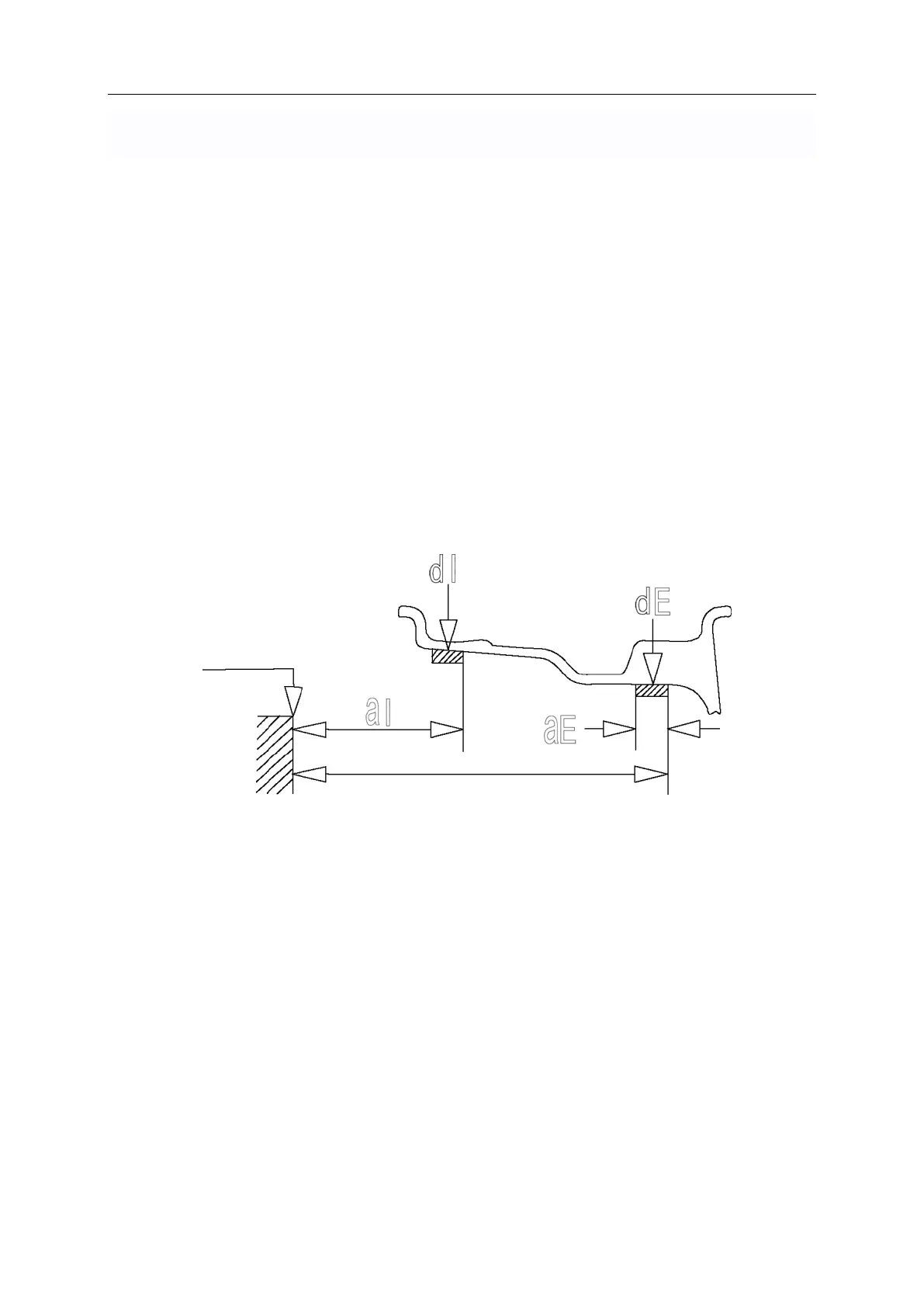
Press key to select "S" balance mode (corresponding indicator light is on), please refer to (figure)
A) To change AL value, press A ↑
, A ↓ to change.
B) Change AE value by pressing B ↑, B ↓.
C) To change the DL value, press D↑, D↓ to change.
0 gauge
14mm
D) To change the DE value, press < FINE > and hold it all the time, and press D
↑, D ↓ to change.
Note: The default value DE = 0.8dL. When the dL is changed, DE returns to
the default value. When the system calculates the center of gravity of the
balance block and the distance of the balancing machine, it will
automatically consider the balance block according to 14mm.


 To Next Page
 Loading...