EasyManua.ls Logo

Kawai K4 - Page 4

Kawai K4
104 pages
Print Icon
To Next Page IconTo Next Page
To Previous Page IconTo Previous Page
Loading...
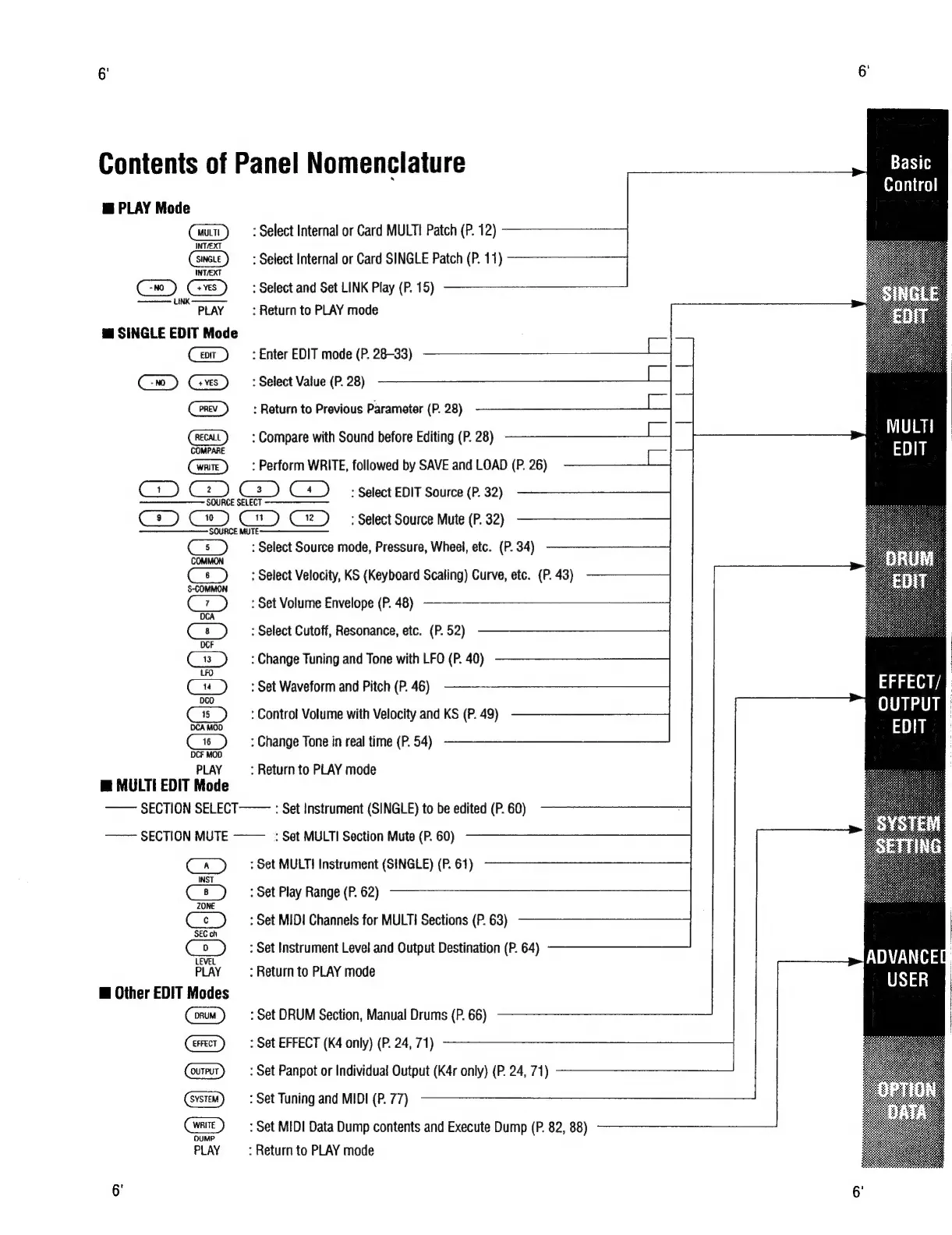
Contents
of
Panel
Nomenclature
i
PLAY
Mode
:
Select
Internal
or
Card
MULT!
Patch
(P.
12)
:
Select
Internal
or
Card
SINGLE
Patch
(P.
11)
GD
Gs
:
Select
and
Set
LINK
Play
(P.
15)
PLAY
:
Return
to
PLAY
mode
™
SINGLE
EDIT
Mode
:
Enter
EDIT
mode
(P.
28-33)
:
Select
Value
(P.
28)
PREV
:
Return
to
Previous
Parameter
(P.
28)
RECALL
:
Compare
with
Sound
before
Editing
(P.
28)
:
Perform
WRITE,
followed
by
SAVE
and
LOAD
(P.
26)
Ce)
Cz).
Cs
C4)
=
Select
EDIT
Source
(P.
32)
Co)
Ce)
C)
‘Select
Source
Mute
(P.
32)
Cs)
:
Select
Source
mode,
Pressure,
Wheel,
etc.
(P.
34)
ee
:
Select
Velocity,
KS
(Keyboard
Scaling)
Curve,
etc.
(P.
43)
:
Set
Volume
Envelope
(P.
48)
:
Select
Cutoff,
Resonance,
etc.
(P.
52)
E>
:
Change
Tuning
and
Tone
with
LFO
(P.
40)
ae
:
Set
Waveform
and
Pitch
(P.
46)
Cr)
:
Control
Volume
with
Velocity
and
KS
(P.
49)
:
Change
Tone
in
real
time
(P.
54)
DCF
MOD
PLAY
:
Return
to
PLAY
mode
m@
MULTI
EDIT
Mode
——
SECTION
SELECT———
:
Set
Instrument
(SINGLE)
to
be
edited
(P.
60)
——
SECTION
MUTE
~——
:
Set
MULTI
Section
Mute
(P.
60)
Ca)
—:
Set
MULTI
Instrument
(SINGLE)
(P.
61)
:
Set
Play
Range
(P.
62)
:
Set
MIDI
Channels
for
MULT!
Sections
(P.
63)
Co)
:
Set
Instrument
Level
and
Output
Destination
(P.
64)
PLAY
:
Return
to
PLAY
mode
@
Other
EDIT
Modes
:
Set
DRUM
Section,
Manual
Drums
(P.
66)
:
Set
EFFECT
(K4
only)
(P.
24,
71)
:
Set
Panpot
or
Individual
Output
(K4r
only)
(P.
24,
71)
:
Set
Tuning
and
MIDI
(P.
77)
:
Set
MIDI
Data
Dump
contents
and
Execute
Dump
(P.
82,
88)
PLAY
—:
Return
to
PLAY
mode
Basic
Control
EFFECT/
|
OUTPUT
I
EDIT
ADVANCEM
USER