EasyManua.ls Logo

Kawai K4 - Page 9

Kawai K4
104 pages
Print Icon
To Next Page IconTo Next Page
To Previous Page IconTo Previous Page
Loading...
10
10
1-1.
Instrument
Setup
1.
Making
Connections:
How
to
set
the
unit
up
quickly
and
easily
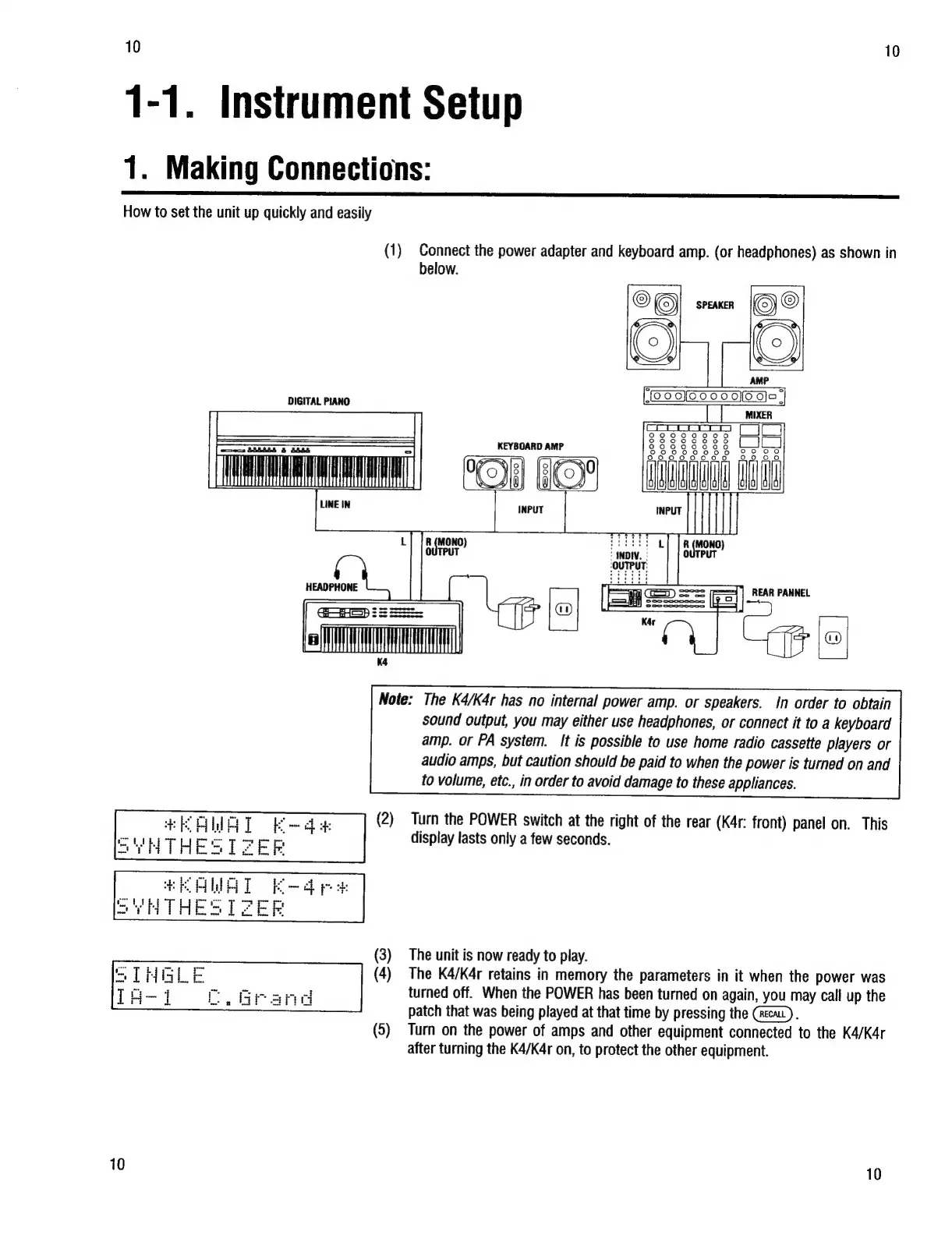
(1)
Connect
the
power
adapter
and
keyboard
amp.
(or
headphones)
as
shown
in
below.
DIGITAL
PIANO
S38SE4
&
SSL
WALL
Nl
LINE
IN
KEYBOARD
AMP
TO
HEADPHONE
REAR
PANNEL
+
saa
Note:
The
K4/K4r
has
no
internal
power
amp.
or
speakers.
In
order
to
obtain
sound
output,
you
may
either
use
headphones,
or
connect
it
to
a
keyboard
amp.
or
PA
system.
It
is
possible
to
use
home
radio
cassette
players
or
audio
amps,
but
caution
should
be
paid
to
when
the
power
is
turned
on
and
to
volume,
etc.,
in
order
to
avoid
damage
to
these
appliances.
Turn
the
POWER
switch
at
the
right
of
the
rear
(K4r:
front)
panel
on.
This
display
lasts
only
a
few
seconds.
The
unit
is
now
ready
to
play.
The
K4/K4r
retains
in
memory
the
parameters
in
it
when
the
power
was
ee
turned
off.
When
the
POWER
has
been
turned
on
again,
you
may
call
up
the
patch
that
was
being
played
at
that
time
by
pressing
the
(reca).
(5)
Turn
on
the
power
of
amps
and
other
equipment
connected
to
the
K4/K4r
after
turning
the
K4/K4r
on,
to
protect
the
other
equipment.
CC.
Grand
10
10