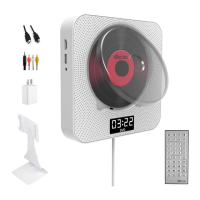
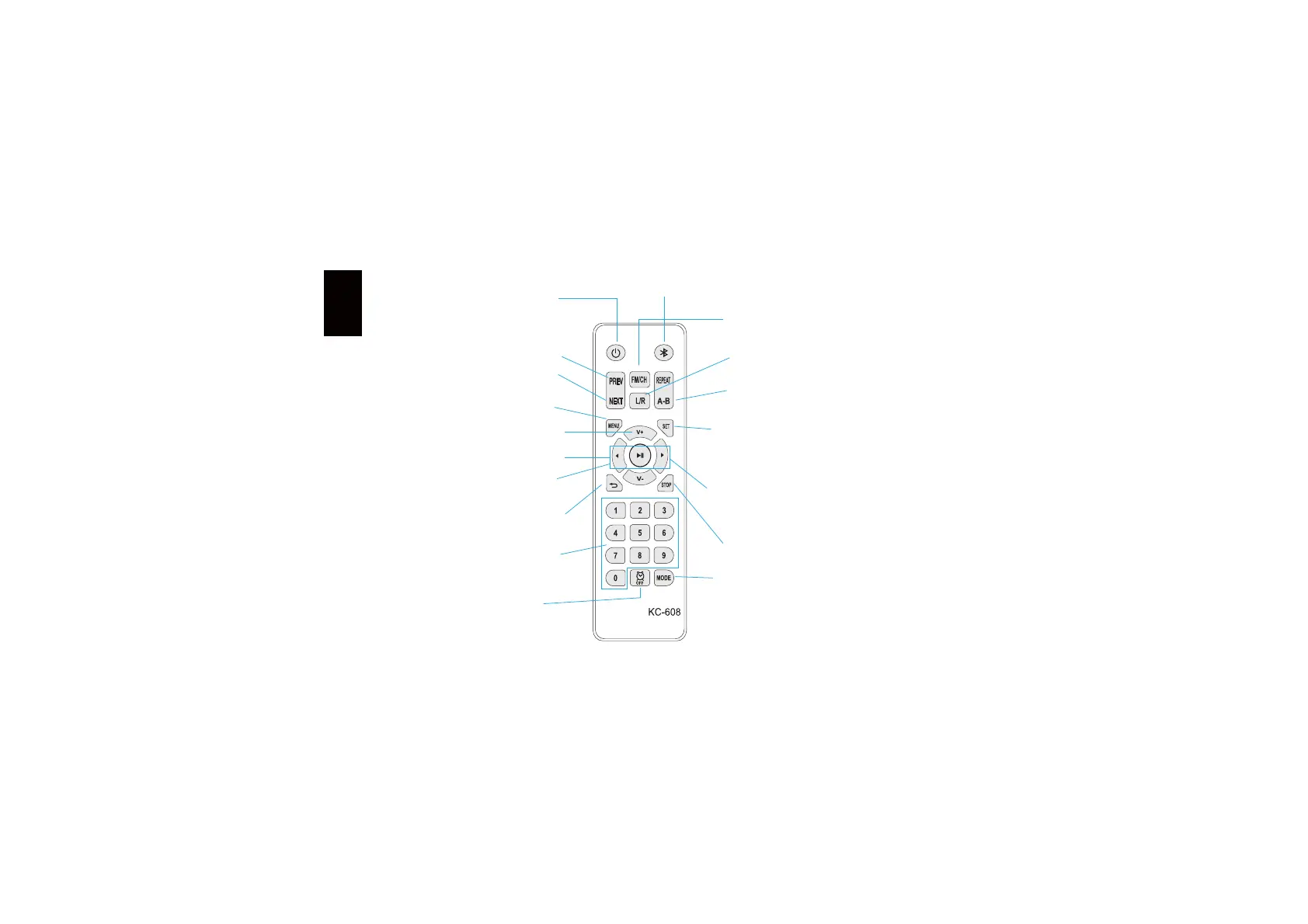
Introduction of keys on
the remote controller
Mode switching
Menu key
Standby key
Number keys
Return key
Volume +/-
Cursor movement
direction key
AB repeater
L/R
Stop key
NEXT
FM radio
Timed shutdown
PREV
Previous/Next
track
Play/Pause key
Press the Stop key and the DVD pause reading the disk, the play
interface will return to the initial picture of the system. To read the
disk and play the needed content anew, just press the Play/Pause
key on the remote controller.
In the started state, press the function switching key to switch to
the Bluetooth mode, and you will hear a cue tone from the host
speaker, now just turn on the Bluetooth of your mobile device to
search and connect "kecag".
In the started state, press the Switch key of the remote controller or host
to switch to the radio mode, which includes full automatic search/semi-
automatic search.
Ɣ)XOODXWRPDWLFVHDUFK,QWKH)0ZRUNLQJPRGHSUHVVWKH)0NHy to
begin full automatic search, wait a moment until the automatic search
is finished, the searched out channel will be saved in the number button,
then press the number key on the remote controller to make the device
play related channel.
Ɣ6HPLDXWRPDWLFVHDUFK,QWKH)0ZRUNLQJPRGHORQJSUHVVWKHNEXT/
PREV key and release it, until the player becomes mute, it will automatically
switch to the next/previous FM channel. Each time the device only search
out one channel, and you can save the current channel. Long-press the
number keys on the remote controller to save it.
In the started state of the device, press the time setting button
DQGWKHILUVWRIEHJLQVWRIODVK)RUH[DPSOHWRVHW
VHWDFFRUGLQJWRWKHIROORZLQJPRGH&RQILUP&RQILUP
&RQILUP&RQILUP
6ZLWFKLQJVHTXHQFHRIPRGH'9'PRGHĺ86%PRGHĺ%OXHWRRWKPRGHĺ)0
UHFHSWLRQPRGHĺ/,1(PRGH,QWKHVWDUWHGVWDWHRI'9'WKHGHIault mode is
'9'PRGHUHDGGLVN The corresponding mode symbol will be lightened when
this mode is switched to. Switch to the mode according to your need.
Applicable to DVD disk
Ɣ3UHVVPHQXNH\ The TV set will display the picture of DVD disk
FRQWHQWPDVWHUPHQXQRZSUHVVWKHGLUHFWLRQNH\WRPRYHWhe
cursor and select the needed content for playing.
Ɣ3UHVVWKH&RQILUPNH\WRSOD\DQGSUHVVWKH3DXVHNH\WRSOD\
from the position where the cursor is at.
This key is not the startup/shutdown key (OFF is
GLVSOD\HGDIWHUWKHGHYLFHHQWHUVWKHVWDQGE\PRGH
Startup/shutdown must be via the pull switch.
Number key for track selection
Return to the previous operation
Press the direction key to select the content of disk to be played. In magnifying
part of the image or reading the Picture-CD, press the direction key can rotate
the image.
,QWKH'9'86%PRGHSUHVVWKH A-B key twice to repeat playing the content.
The player will repeat playing the content between the points A and B point,
press the A-B key again to stop repeating.
ƔYRXFDQSUHVVWKH92/80(NH\RQWKH TV set or power amplifier to
adjust the volume.
Ɣ3UHVVWKHVolume+" key on the remote controller of device to increase
the volume, and press the "Volume-" key to decrease the volume.
Ɣ:KHQWKH'9'GLVNLVSOD\HGLQDVRXUFHFRGHRXWSXWZDy, this item
need not be adjusted
BTSC/PAL60/P$/$8T2
:KHQWKHGHYLFHLVFRQQHFWHGZLWKWKHFRPPRQ TV set, the widescreen
image is displayed on the whole screen, yet part is automatically cut off
(Recommend selecting $XWR
Press the Pause key to enter the pause state; press the Play/Pause
key to restore to the normal state.
Ɣ3UHVVWKH%DFNNH\WRSOD\WKHSUHYLRXVWLWOHFKDSWHUWUDFN
Ɣ3UHVVWKH)RUZDUGNH\WRSOD\WKHQH[WWLWOHFKDSWHUWUDFN
1RWHIn the case of the super VCD or VCD that is switched to the
*PBC OFF" state, pressing the Forward key will make the device in
dead state if the current track is already the last one, and pressing
the Backward key will make the device in dead state if the current
track is already the first one; if the device is in stop state currently,
pressing is invalid. In the case of DVD disk, there will be different
actions according to the structure of the disk itself.
Ɣ6HWWLQJUDQJHRIWLPHPLQ
Ɣ3UHVVWKHFORFNNH\RQFHWRDFWLYDWHWKHWLPHGVKXWGRZQDQGEHgin to
set from 30min
Ɣ(DFKSUHVVLQJZLOOGLVSOD\PLQVOHHSRQWKHGLVSODy, and the figure
increase in turn. 7KHWLPHUFDQVHWPLQDWPRVWWKHQSUHVVLWRQFH
to close the timed shutdown.
Ɣ6HWDSHULRGDQGWKHSOD\HUZLOOEHJLQWRFRXQWGRZQXQWLOLt
automatically enters the standby state.
6HOHFWLQJ/5VRXQGWUDFN,LVDSSOLFDEOHWR'9'VXSHU9&'VCD,
9&'&'&'*+'&':0$ AVI, MP3/JPEG disks.
1RWH
Ɣ3UHVVLQJNH\FDQVZLWFKWKHVRXQGWUDFNPRGH
Ɣ)RUWKHELOLQJXDO9&'GLVNSUHVVWKHVRXQGWUDFNNH\WRVHOHFt the
needed language.
Ɣ6ZLWFKLQJVHTXHQFHRIVRXQGWUDFNL channel R channel Hybrid
FKDQQHO6WHUHRVWHUHRE\GHIDXOW
Mouvement du curseur
Bouton Direction
Bluetooth
Set key
V\VWHPVHWWLQJ
Ɣ5RXWLQHVHWWLQJ3UHVVWKH6HWNH\WRHQWHUWKHV\VWHPVHWWLQJ
3UHVV8P'2:1/()T and RIGHT keys to select, press the Confirm key
to confirm. Press the Set key again to exit system setting.
Ɣ79VHWIRUPDW1RUPDO3DQRUDPD
:KHQWKHGHYLFHLVFRQQHFWHGZLWKWKHFRPPRQ TV set, the widescreen image
is displayed on the whole screen, yet part is automatically cut off (Recommend
selecting $XWR
ƔVLGHRLQSXWVideo component/TV-RGB/P-SCAN YPBPR/S-VIDEO
Ɣ+'RXWSXW You can select HDMI HD data output.
Ɣ)UDPHVFDOH6HOHFWWKHDVSHFWUDWLRDFFRUGLQJWRWKHVL]HRI TV set screen
Ɣ7KHIXQFWLRQRIEUHDNSRLQWPHPRU\ This function is opened by default.
:KHQWKHSOD\HULVLQQRUPDOZRUNLQJVWDWHLQFDVHRISRZHUbreakdown,
it will be restored to the play position of power breakdown in next normal
starting to resume playing. This function can also be closed.
+TMROYN


 To Next Page
 Loading...