Quick Installation Guide - KEEBOX IPC1000W
English 8
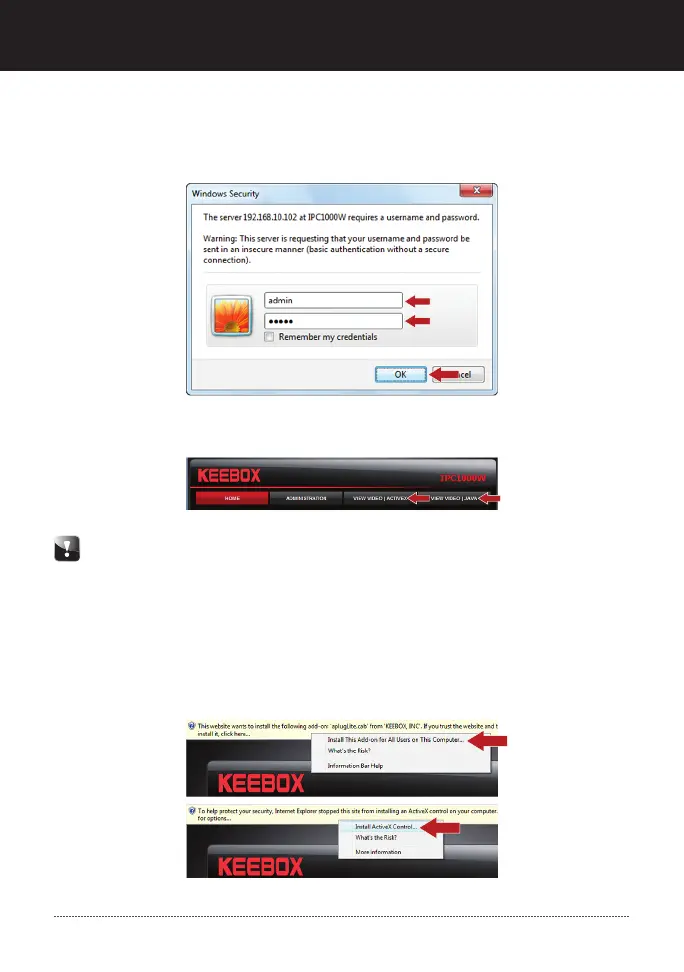
17. Click View Video | Active X or View Video | Java.
18. Right click on the information bar and select Install This Add-on for All Users
on This Computer… (Internet Explorer 8) or Install ActiveX Control (Internet
Explorer 6/7)
Follow steps 18-19 if you click “View Video|Active X”. If you want to View
Video using Java, make sure to download and install Java. Then skip to step
20. Go to www.java.com to download Java.
16. Enter the User name and Password, and then click OK. By default:
User Name: admin
Password: admin


 To Next Page
 Loading...