Hardware Installation and Configuration
Quick Installation Guide - KEEBOX IPC1000W
English 2
Wi-Fi Protected Setup (WPS) allows you to quickly connect to your wireless
router or access point. If you would like to use WPS push button setup, please
go directly to section 4. Wi-Fi Protected Setup (WPS) Push Button Setup. If your
wireless router or access point does not support WPS, continue on to step 1.
It is recommended that you configure the IP Camera while directly connected
using a Network cable.
If you would like to use KView software, please install the software by clicking
Install KView in the Autorun window and refer to the User's Guide on the CD
for more information.
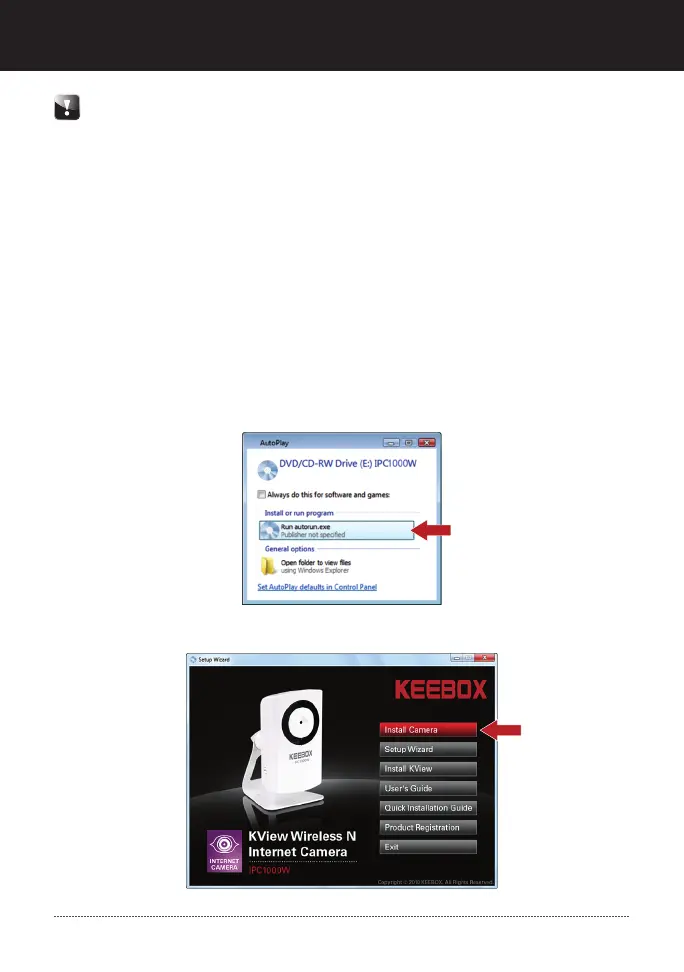
2. Click Run autorun.exe (Windows 7/Vista only)
3. Click Install Camera.
1. Insert the Utility CD-ROM into your CD-ROM drive.


 To Next Page
 Loading...