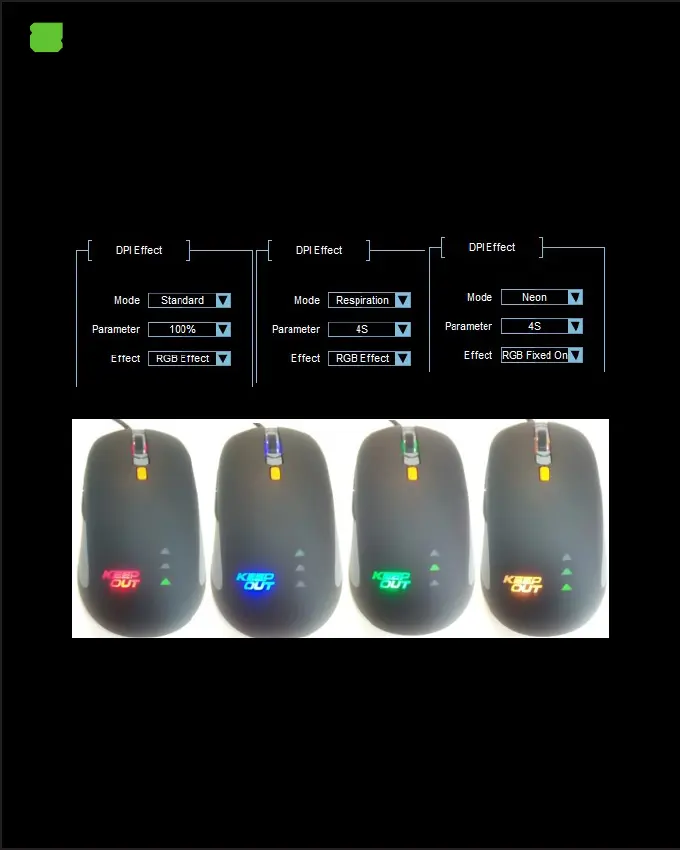
5. DPI Eect
Allows you to set the lighting eect based on the selected DPI.
It has several conguration combinations.
In Mode you can select Standard, Respiration, and Neon.
In Parameter you can select dierent parameters based on the selected mode.
In Eect you can select dierent RGB Eects.
Finally click on the APPLY button and then on OK
6. Mode B button (Mode 10 Buttons)
The Mode B button allows you to have 10 buttons at a time with only 5 buttons,
you rst have to congure the Shift function on a button, now congure the other
buttons as desired in Mode B, if you do not press the congured button With the
Shift function, all the buttons work as congured in Mode A, pressing the button
set to Shift + any of the buttons set in Mode B will perform the function set in
Mode B.
EN


 To Next Page